


Convert Your Old VHS Tapes to DVD or Digital
Unfortunately, those old VHS video tapes with treasured family memories won't last forever. Even if the VCR doesn't eventually jam and eat the tape, a VHS recording uses fragile magnetic tape that degrades over time, whether you watch it or not. Don't count on those VHS tapes (or your VCR player) lasting forever -- convert your VHS tapes to DVD or digital format today, and save those memories for posterity. Here are some tips on how to get it done… |
How to Convert VHS to DVD
You have several options to when converting VHS to DVD. Let's look at them one by one and then you'll be ready to choose the one that's best for you.
Combo Units
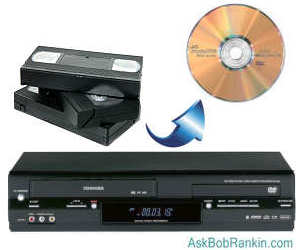
If you own a combination DVD and VCR player/recorder, it's almost painless to pop in the VHS tape and a blank DVD, press a few buttons and directly record the old tape to a shiny new DVD disc. A slight variation on this method is to connect your VCR to a separate DVD recorder unit.
If you don't need to modify the video (editing, adding chapters and custom menus), this method is the easiest and most direct. If you don't own a machine that can play VHS tapes, don't despair -- they can still be found! You can find the Samsung DVD-VR375 DVD Recorder VHS Combo and the LG RC897T Multi-Format DVD Recorder and VCR Combo with Digital Tuner at Amazon, and I'm sure you can find used VHS/DVD recorders on Ebay for even less. Your local Goodwill or Salvation Army store probably has a few gathering dust as well.
Using a Video Camera
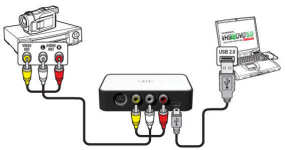
Just about any digital video camera (camcorder) can serve as the tool to help you copy directly from your old VCR into a digital format. Usually it just requires hooking up a cable (may need to be purchased separately) from the VCR's Video Out port (the red, white, yellow connectors) to the Video In port on the camera and pressing a few buttons. Each camera works a bit differently, so follow the instructions in your video camera's manual for recording from an auxiliary input. This is a slow process because it is a re-recording of what is on the tape to the DVD or digital format such MP4, but it is fairly simple and requires no additional hardware if you already own a video camera.
Using a Black Box
Special devices like the DVD Xpress Video Converter from ADS Tech make it easy to transfer directly from VHS tape to a DVD disc. Basically, this is an external device that takes the place of the video camera in the previous scenario. You connect the VCR to the device with a standard red/white/yellow cable and then connect the device to your computer with a USB cable. These devices may be more cost effective than a video camera and a little easier to use. This unit is no longer manufactured, but you can still find them for sale online.
Another option is the VIDBOX Video Conversion for PC or Mac. This hardware/software combo can capture VHS, Beta, 8mm or camcorder tapes and convert them to DVD, MP4 or other digital formats. It can also record audio from your cassettes and LP records to create WMA files or audio CDs. It comes with a USB video capture device, USB Cable, RCA AV Cable, Quick Start Guide, Installation Software CD and step-by-step instructions.
What Hardware and Software Do I Need?
Most computers sold in the last few years will have the basic system requirements needed for dealing with the digital version of your VHS recording. You should have 4GB or more of RAM and at least 15GB of hard drive space available.
Oh, and a DVD burner, and a stack of blank DVD discs, if that’s your target media. Some computers have combination CD/DVD drives, which may or may not be able to burn a DVD. Don't assume that because you can burn a CD, you can also burn a DVD. Look for the "DVD-RW" logo on the drive door, or consult the documentation if you're not sure. If you need a DVD burner, external USB-connected models are easier to install than internal CD/DVD drives.
Once you capture the video on your computer, you can use movie editing programs such as Windows Movie Maker or iMovie (Mac OS) to manipulate the video as desired, add subtitles, chapters, etc. Make sure the DVD software and/or recorder is set to "finalize" the disc. A disc that's not finalized can be played on most computers, but not on standard DVD players.
If you run into trouble transferring a copyrighted movie, try using a "stabilizer" such as the Sima CT-200 (also sold as the Clarifier SX by Facet Video.) Check out VideoHelp.com for more video editing software and tutorials with wonderful step-by-step instructions.
Here's one thing to consider: you might not need the physical DVD at all. You can convert VHS to digital format (MP4 is a popular digital video option) and save the video to a hard drive, mobile device or cloud storage. You can view the video on your computer, smartphone or tablet, store the digital version as a backup of the video tape, or share them on social media sites.
The Low-Tech Solution
A final option for those who don't care to dirty their hands with wires, bits and bytes is a service bureau. Many services offer to receive your VHS tapes by mail and return them with a DVD or Blu-ray equivalent. One example is iMemories. Their price is $14.99 per videotape. You can download your digital files, or store then with an iMemories Cloud subscription, which costs $6/month or $50/year. The cloud option lets you store, organize, edit and share your videos with others if desired. You can have them burn a DVD ($10 extra) or a USB thumb drive ($20 extra).
WalMart has a similar service which charges $12.96 for a 30-minute VHS videotape, and $7.46 for each additional 30 minutes. You get a digital copy of your items, accessible in your MemoryCloud account for 60 days. From your account you can view and download your files to a computer, smartphone, or tablet. You can order additional copies on DVD ($3.96 each) or USB ($12.96 each). There’s also an option to transfer your items to Google Photos.
How Long Do DVDs Last?
All that I've read indicates the expected longevity of CD/DVD discs is anywhere from 2 to 250 years. That's a pretty wide spread, and the most likely reason is that optical discs have only been in common use as archival media for a decade or two. DVD discs were invented in 1995, so there simply are no 50, 100 or 200 year-old DVDs to support the notion that they will last for decades or centuries. They might, under the right conditions, but we don't know for sure. Here's what some experts are telling us:
The U.S. National Institute of Standards and Technology's 2005 report on CD/DVD Care and Handling offers information on the subject of CD/DVD life expectancy. In that report, they say: "...there is consensus that, under recommended storage conditions, CD-R and DVD-R discs should have a life expectancy of 100 to 200 years or more. CD-RW, DVD-RW (writable) discs should have a life expectancy of 25 years or more."
However, the U.S. National Archives and Records Administration has a report called Frequently Asked Questions (FAQs) about Optical Storage Media which says "CD/DVD experiential life expectancy is 2 to 5 years even though published life expectancies are often cited as 10 years, 25 years, or longer." They discuss various factors which can impact life expectancy and recommend that you test your media every two years to make sure it's still readable.
The useful life span of CD and DVD discs is affected by temperature, humidity, exposure to light and day-to-day use. My advice is to buy quality name-brand discs, keep your DVDs in a cool, dry place, avoid direct exposure to sunlight, and hopefully they will last for a decade or more.
Storing your videos and photos in digital form, with regular backups, is an even better strategy, especially if your goal is to pass those digital memories on to future generations.
Should You Keep Your VHS Tapes?
There's one interesting wrinkle here. Transferring your VHS tapes to DVD is a good idea for several reasons. Aside from the fact that the tapes are fragile, you may not always have a VCR on which to play those tapes. But it's quite possible that your old VHS tapes will outlive the DVD discs to which you are transferring your family memories. Bob Greene, a contributor to this website, gave me the following information, which I think is excellent advice:
There is another, huge advantage to tape. If a portion of the recording becomes damaged or otherwise inaccessible, the rest of the tape is still readable, in most cases. Not so for digital discs -- if a byte fails in the most critical area, the entire thing can be lost.
Keep your family memories longer on VCR / audio tape, and store the tape under best archival conditions, away from heat, humidity, strong magnetic fields and sunlight UV. Maintain a tape player (for the format used) in operating condition, and protect the player with storage under best conditions possible. If you plan for the long term, look into the condition of rubber pressure wheels and belts-- these must not "dry out" and crack.
The ideal strategy is to copy the tape to optical disc, archive the tape, and use the disc as source material. Check the disc yearly for problems, and re-record a disc from the tape source, if necessary."
So YES... keep those VHS tapes around for as long as is practical. You may need them again. Have you converted your VHS tapes to DVD or digital format? Share your experience and tips you've learned here, by posting a comment or question below…
|
|
|


This article was posted by Bob Rankin on 7 Nov 2022
| For Fun: Buy Bob a Snickers. |
 |
Prev Article: Will a VPN Boost Your Online Privacy? |

The Top Twenty |
Next Article: Time to Break Up With Your Phone Company? |
 |
Post your Comments, Questions or Suggestions
|
Free Tech Support -- Ask Bob Rankin Subscribe to AskBobRankin Updates: Free Newsletter Copyright © 2005 - Bob Rankin - All Rights Reserved About Us Privacy Policy RSS/XML |
Article information: AskBobRankin -- Convert Your Old VHS Tapes to DVD or Digital (Posted: 7 Nov 2022)
Source: https://askbobrankin.com/convert_your_old_vhs_tapes_to_dvd_or_digital.html
Copyright © 2005 - Bob Rankin - All Rights Reserved

Most recent comments on "Convert Your Old VHS Tapes to DVD or Digital"
Posted by:

Leo
07 Nov 2022
One thing you didn't mention were these "patch cords" consisting of usb at one end the RCA plugs at the other. Do they work?
Like this
https://www.amazon.ca/Coverter-Capture-Digital-Converter-support/dp/B06X42H9VZ/ref=asc_df_B06X42H9VZ/?tag=googleshopc0c-20&linkCode=df0&hvadid=292968375828&hvpos=&hvnetw=g&hvrand=7902019082751307417&hvpone=&hvptwo=&hvqmt=&hvdev=t&hvdvcmdl=&hvlocint=&hvlocphy=9000921&hvtargid=pla-349203857454&psc=1
Posted by:

Lucy
07 Nov 2022
Yes, we have started to make digital copies of our old home movies, slowly, as you wrote because they record in real time. However, our family have had fun actually watching them as we transfer them over. (Were we really that youthful?)
I am glad you added Bob Greene's advice, because we had planned to trash all the old VHS tapes, to get rid of some "clutter", but now we will be keeping them.
Used VHS recorders are best sourced locally if you can, they weigh so much that shipping costs make it prohibitive. We have seen them at Thrift Stores, Yard Sales, and Rummage Sales at local churches and schools for a very reasonable cost.
Posted by:

Dave
07 Nov 2022
I'm not disagreeing with anything you said and I don't know about VCR tape but I still have, and occasionally play 1/4" tapes that my dad made back in the '40s on my Teac reel-to-reel. In fact one is on paper tape! Of course they are mono and I have to mute one channel but they still sound good. I have a DVD/VCR machine and a box of tapes so, yes, I need to get off my butt and get busy. Thanks.
Dave
Posted by:

Brian B
07 Nov 2022
Bob, you didn't mention Millennium Disks (M Disks) as being an alternative. The recording strata is metal rather than vegetable coating, and as such, the manufacturers claim a 1,000 years life. I have white a lot of my "precious" memories and data stored on these disks, but obviously, I can't confirm that sort of longevity, and never will be able to. I did read that the US navy had started to use these disks, which I felt was a fairly good endorsement. Of course you need a dedicated DVD burner which is not too expensive, and the disks come in 25Gb or 100Gb which again aren't cheap, but considering that you get lifetime storage on virtually indestructible Disks, is well worth looking at.
Posted by:

Brian B
07 Nov 2022
Edit.
I have quite a lot of my ........
Posted by:

Jack Edward Underwood
08 Nov 2022
I have a GoVideo machine that with the press of 1 button transferred all of my VHS to DVD. Then I put them on my computer, transferred them. Now they are digital. Guessing as long as there are computer video players, like windows media player, they will be archived forever. Oh and I put them on a SSD drive. It occurs to me in the rest of my life I will never watch them all. LOL
Posted by:

Wolf
08 Nov 2022
About 10 years ago, I installed a circuit board on my computer, which allowed the digitization of VHS tapes to a digital format. There was software, which allowed me to create '.mp4' files, which are now safely stored and archived on my computers. Plus, using Carbonite Cloud backup, I will retain those files for a long time. As I do with all my data, I have several backups. Thank you, BOB, for another informative article!
Posted by:

Kathleen A Dombrowski
10 Nov 2022
EasyCap Video Capture Device works graet, can be found on Ebay for under 10 dollars.
Posted by:

Pat Johnson
11 Nov 2022
Which brand do you feel are the best (or better) blank DVD's to use to record my VHS tapes? DVD+ or DVD-? Thank you.