


Convert WMA to MP3
I have lots of music in WMA (Windows Media Audio) format but I want to convert it to MP3 for my iPod. How can I convert WMA to MP3? |
How to Convert WMA to MP3, or Vice-Versa
With the abundance of digital audio formats available for the mass consumption of music, a clear victor has yet to emerge. But two of the top contenders -- the ubiquitous MP3 format, and Microsoft's Windows Media Audio (WMA) -- both offer good sound quality and portability.
Although both formats can be ideal for casual, and even critical listening, not all digital media players are universal in their support for both MP3 and WMA files. For example, Apple's celebrated iTunes application and its corresponding iPod portable media player offer support for an array of consumer and professional audio formats. But when it comes to virtually any Microsoft-invented media format, the unfortunate user is out of luck, and the proper course of action may not be apparent.
So, what's a budding audiophile to do? Well, there's always the tedious method of gathering your incompatible songs and burning a standard audio CD, which will convert the files to PCM audio in the process, and then ripping the music from the CD to MP3 or WMA files. But this can burn a lot of time, in addition to CDROM disks. So is there a cost-effective software solution, that can save time and eliminate the expense of all those throw-away CD's?
(NOTE: If you're looking for help converting iTunes music into MP3 format, look here.)
Audio Conversion Software
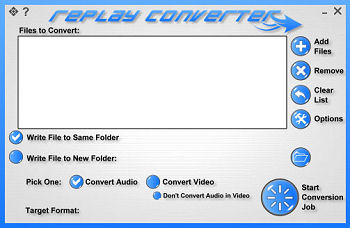 Most software and hardware media players incorporate MP3 support, but the problem lies in preparing your WMA files for those applications and devices that simply refuse to cooperate. For Windows, there are many applications that will convert WMA files to MP3 (and back). One of the more popular programs available is Applian Technologies Replay Converter (US $29.95) which converts files to and from a variety of audio and video formats. The interface is relatively clear-cut, providing buttons to select songs, as well as drag and drop file selection. The conversion process itself is a little sluggish, and the maximum bit-rate of 128 kps for both MP3 and WMA file conversion leaves a bit to be desired. For what it does offer, this little program functions very well.
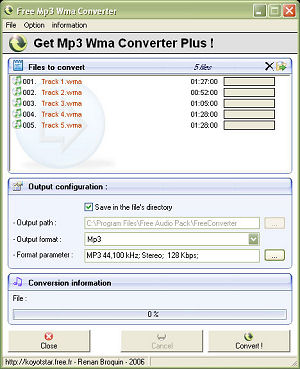 Looking for a less expensive solution? Check out Koyote Software's Free MP3 WMA Converter, which provides lots of flexibility. With Koyote's converter, MP3 and WMA formats, as well as a host of others, can be translated using an astounding variety of options. Users have full control over bit rate up to 320 kps, sample frequency, channel selection, high and low pass filters, quality presets, and even a command line interface.
Similar to most, Koyote's converter employs either a dialog box or the drag and drop method for file selection. Though it is not required to achieve excellent results, opening the dialog box or drop down menu to make any necessary adjustments to the format parameters can certainly enhance the output of the file conversion, whether it is WMA to MP3, or vice versa. Koyote Software's Free MP3 WMA Converter is an excellent choice for the Windows platform, and if you need further convincing, it comes bundled with a CD ripper, audio editor, and peer-to-peer file sharing software, all free as well.
For Apple's Macintosh Operating System, the options are considerably more limited by comparison. Patrice Bensoussan's EasyWMA is designed specifically for users who need to convert Microsoft's proprietary media files to more Mac-friendly formats. EasyWMA's interface is incredibly straightforward (Figure 5). With its output format and bit rate (up to 320 kps) menus, the process includes the simple task of either selecting a file to open through the program's File menu, or dragging a single, batch, or entire folder of Windows Media files into the main window, and file conversion begins immediately (and finishes quickly) to your chosen destination (Figure 6 and Figure 7).
The program even includes an option to automatically import your converted songs into iTunes, thereby rendering them iPod-ready. As a Macintosh-based solution, requiring OS 10.2 or later, EasyWMA is unmatched in terms of ease of use, functionality, and affordability (US $10). 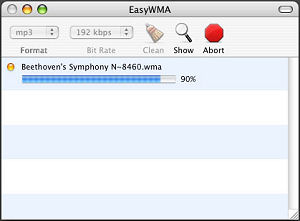
The DRM Roadblock
Keep in mind that these format conversion tools are not intended, and in the majority of cases are simply unable, to bypass the Digital Rights Management (DRM) schemes employed by Microsoft, Apple and the recording industry to protect copyright and restrict the use of purchased audio files.

But there are some software solutions that claim to get around this problem. WMAConvert Platinum promises to legally convert DRM-protected WMA files to unprotected MP3 format at high speed, with CD sound quality. And Tunebite Premium offers to record your copy-protected WMA files as they are being played, then saves the recordings as unprotected MP3 audio files you can use anywhere.
Got comments about audio conversion or DRM? Post your thoughts below...
|
|
|


This article was posted by Bob Rankin on 8 Feb 2007
| For Fun: Buy Bob a Snickers. |
 |
Prev Article: Free Office Software |

The Top Twenty |
Next Article: What is RFID? |
 |
There's more reader feedback... See all 35 comments for this article.
Post your Comments, Questions or Suggestions
|
Free Tech Support -- Ask Bob Rankin Subscribe to AskBobRankin Updates: Free Newsletter Copyright © 2005 - Bob Rankin - All Rights Reserved About Us Privacy Policy RSS/XML |
Article information: AskBobRankin -- Convert WMA to MP3 (Posted: 8 Feb 2007)
Source: https://askbobrankin.com/convert_wma_to_mp3.html
Copyright © 2005 - Bob Rankin - All Rights Reserved

Most recent comments on "Convert WMA to MP3"
(See all 35 comments for this article.)Posted by:

R. D. Foster
01 Jan 2008
How about we ask Bob how much money he makes recommending spyware/crapware loaded software. The "Koyote Software's Free MP3 WMA Converter" is a disaster of a program that appears to give you a choice of installing a toolbar or not, but installs even when you say no. It also installs "Search Settings" which I am still working to get off of my PC.
EDITOR'S NOTE: You can ask... but you'd be disappointed in the answer. I just installed the software (being careful to UNCHECK the options for Yahoo Search Settings and Dealio Toolbar) and it installed cleanly, without any baggage. I did a few conversions, then uninstalled via Control Panel. No problems, no toolbars, no spyware. For the record, I don't care which converter you use, nor do I have any financial interest in any of them.
Posted by:

barry
29 Feb 2008
Many protected WMA files which could not be used. And after I tried some converter, I found this WMA MP3 converter could convert any WMA files to MP3 and other music as I want.
Posted by:

music fan
11 Mar 2008
useful for mp3 player, added to favorites. I also use Eufony from http://www.softe.net to convert wma to mp3.
Posted by:

tracyjump
03 Jul 2008
I found Daniusoft WMA MP3 Converter is a better choice.Like it can convert DRM WMA to MP3 or other audio formats including m4a, ac3, aac, wma, wav, ogg, ape. And extract audio track from DRM WMV and play the original video music on different players such as iPod, PSP, Zune, Creative Zen, Archos etc. And high conversion speed is another highlight.
Recommend
http://www.wmatomp3-converter.com/wma-mp3-converter.html
Posted by:

CandaceID
30 Dec 2008
okay, I NEVER sign up for stuff, but this is the 2nd time I've ended up here and actually found a solution both times. So... here's hoping I don't get spammed to death.
Posted by:

music fan
04 Jan 2009
Very useful tips! I also use eufony from http://www.softe.net, which is so nice for wma to mp3 conversion.
Posted by:

musicholix
04 May 2009
useful tips for wma to mp3 conversion. http://www.softe.net
Posted by:

Old fashioned
06 Oct 2009
Never seen this in print, just play it back and record it. If you really want the recording time is not an issue.
Posted by:

FourEyedLady
15 Oct 2009
Hi, How do I convert RealMedia Audio files to MP3 files?
EDITOR'S NOTE: See http://labnol.blogspot.com/2007/01/convert-real-audio-rmra-to-mp3wav.html
Posted by:

Uttam
04 Dec 2009
Hi
I have some mp3 songs which was protected by author. How can i listen this song in mobile, ipod?? Pls give me free DRM protected converter software link..........!!!!
I m hoping 2 all freinds who are interested in my problem
Many thanks
Uttam
Kathmandu, Nepal
Posted by:

Alice
13 Apr 2010
Hello! I use TuneCab converter for DRM WMA to MP3 and other conversions. It's useful, here is the link to try http://www.tunecab.com
Posted by:

Nattaly
15 Jul 2010
Hi, I convert video and audio files with the help of Convert-tune converter. It is easy-to-use and converts to various popular formats (for ipod, ipad, zune).
Posted by:

medianoche
31 Aug 2010
Very useful sharing, thanks a lot!
Posted by:

Download de Filmes
04 Jun 2011
Hi, How do I convert RealMedia Audio files to MP3 files?
Download de Filmes
Posted by:

Ted Cooper
30 Jun 2011
Hi Bob,
you have published some great articles on converting MP3 and WMA files to all sorts of other formats BUT my car's stereo only understands REAL music CDs (ie CDs as purchased). So, two questions :
1. what format are "REAL" music CDs ?
and
2. is there any converter around that will convert MP3 and WMA formats back to "real" CD format so that I can happily and fearlessly play my music in my car ?
best regards
Posted by:

daveclark966
16 Mar 2019
Avdshare Audio Converter can convert DRM protected or unprotected WMA directly to iPod supported MP3, WAV, etc no matter what version of iTunes you have installed or whether you have installed iTunes or not.
Posted by:

daveclark966
07 Jun 2019
Among all WMA to AAC converters, Avdshare Audio Converter wins more positive feedback.
Posted by:

lyla_can_wait
18 Jan 2020
Thank you so much for sharing such an useful guide. I usually use TunesKit Audio Converter to do the job. It can convert WMA to MP3, and it also has some drm removal features.
Posted by:

Bella Gorden
07 Aug 2020
I do recommend Tunelf Audio Converter to you. With it, you can convert common audio files including WMA to MP3 and other popular formats.Really great and charming! Via that, I also convert Apple Music to mp3 and then I could listen to them on any device. It is a full-featured audio converting tool. Just have a try!
Posted by:

darry
16 Sep 2020
Thanks for the nice sharing! But here I'd like to recommend DRmare iTunes Audio Converter for you. By using this tool, you can easily get audios from iTunes, Apple Music, etc. with high quality. And then you can move them to any other devices for playing offline with ease.