


Ubuntu Jaunty Jackalope
Ubuntu, the Linux-based operating system, is slick freeware with a web browser, office tools, games and a ton of other software. If you are hesitant to adopt Windows Vista or the new Win7, some of the recent Ubuntu updates may help you make the switch to a Linux desktop... |
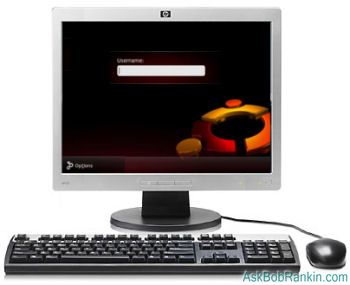
Ubuntu 9.04 - Jump Up to Jaunty Jackalope
Canonical's Ubuntu 9.04 is the newest version of their Linux-based operating system, released in April 2009. The Desktop Edition, suited for home users, promises shorter bootup time, and enhanced suspend/resume features for faster access after hibernation. There's also more support for 3G cards and wireless devices. Also noteworthy is the inclusion of the latest GNOME desktop environment with improved support for multiple monitors, and Brasero, a slick CD burning application.
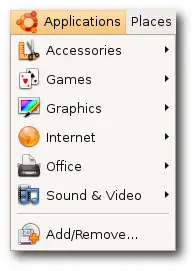 Ubuntu Version 9.04 comes packed with OpenOffice 3.0, a free office suite that's compatible with Microsoft Office, which would set you back a large chunk of change. I've used OpenOffice and not only have I found it equal to the MS software in preparing documents, creating spreadsheets and making presentations, it has a much simpler learning curve.
Ubuntu 9.04 also comes in a Netbook Remix version. With a faster boot speed and a built-for-purpose interface, Canonical recommends it for those with an Acer Aspire One, Asus eee PC 1000 and Dell Mini 9 since they have done extensive testing on those models. The entire Remix can be downloaded to a USB flash drive to be installed at a later time. It too has new icons, better application notification and a slicker appearance.
Enterprise Features in Ubuntu 9.04
New to the Server Edition are many advantages for businesses. Configuring printers, mail servers and other tasks are now more efficient. Look for improved virtualization with KVM features, and clustering support in Samba file server. Canonical labs has tested on IBM, Dell, Sun and HP hardware to assure better service.
One of the most unique aspects of the Server Edition is UEC (Ubuntu Enterprise Cloud.) Companies can build clouds within their firewalls without fear of security issues with the use of Apparmor. This is another factor that makes it easier for businesses to run larger systems without breaking their budgets. Also new is extended hardware compatibility, improved infrastructure and Samba 3.3, which allows extended cluster support to integrate with Microsoft systems. And like the Desktop Edition, it has a superior suspend-and-resume feature.
Is Ubuntu Right For You?
 Ubuntu is no longer a toy for geeks. In terms of usability as an everyman's everday operating system, I rank it even with Windows and OS X. If you're tired of your current OS, or building a system from scratch, installing Ubuntu Linux instead of the expensive alternatives from Microsoft of Apple is a no-brainer.
It offers everything most people need -- a web browser, email, office apps, and games -- for free, in a user-friendly package. Unless you have some special software that only runs on Windows or a Mac, there's little incentive to stick with the commercial OS choices.
And because Linux is made by and for those who want an alternative to existing commercial Microsoft or Apple solutions, there is always a support system if you run into problems. A new version is released every six months and all updates are free. The Ubuntu community is there if you need help, want to help others, or even get involved in the Ubuntu development effort.
Got something to say about Ubuntu Linux? Post your comment or question below...
|
|
|


This article was posted by Bob Rankin on 8 Jul 2009
| For Fun: Buy Bob a Snickers. |
 |
Prev Article: Windows 7 Desktop Customization |

The Top Twenty |
Next Article: How to Hide Your IP Address |
 |
Post your Comments, Questions or Suggestions
|
Free Tech Support -- Ask Bob Rankin Subscribe to AskBobRankin Updates: Free Newsletter Copyright © 2005 - Bob Rankin - All Rights Reserved About Us Privacy Policy RSS/XML |
Article information: AskBobRankin -- Ubuntu Jaunty Jackalope (Posted: 8 Jul 2009)
Source: https://askbobrankin.com/ubuntu_jaunty_jackalope.html
Copyright © 2005 - Bob Rankin - All Rights Reserved

Most recent comments on "Ubuntu Jaunty Jackalope"
Posted by:

ibbill
08 Jul 2009
I am using the 9.04 it is the most stable system I have ever used.For help the forum they have for help is the best that is around.No spyware virus defrag none of the aggravating problems I once had with the other system. You all know which one that was.
Google is slowly making all their products linux friendly. Which is a huge huge plus.
Strongly recommend this system over anything I have ever used.
Bill
Posted by:

Tom Bullock
08 Jul 2009
Hi Bob,
I agree with your Jaunty 9.04 comments to the extent I have explored it as a brand new linux user. The only thing I am having problems with is finding a wireless driver that it will recognize. I have Jaunty installed on a Dell Inspiron 2200 laptop. Using a terminal and this command: lspci | grep Network, I discovered that my dell wireless card is a Broadcom Corporation BCM4318 [AirForce One 54g] 802.11g Wireless LAN Controller (rev 02). So far I have not found any install instructions (or whatever) to activate my wireless in Jaunty.
Any suggestions? TIA Tom
Posted by:

S. Marciano
08 Jul 2009
Gutsy was my first experience with Ubuntu and I must say it has come a long way. I downloaded Jaunty in April and found it pretty good.
However, everything is all good until to run into a problem. Wireless support, in my opinion, is just awful. It didn't have a problem detecting my WLAN adapter....the problem was connecting to a secure network. Another issue I had was getting CUPS configured to be able to use my printer. It was a headache.
Yes....it is an alternative....however I always find myself coming back to the comfort of XP Pro.
Posted by:

Gary Wigle
08 Jul 2009
I have yet to find a reason to switch over to Linux. I have used Linux since the days of Red Hat 5. So far it just doesn't get the job done since Windows changed over to NTFS. I still have my DOS 5 discs and my Window 95 and 98. Linux just plain doesn't get the job done like Windows 2000 or XP, Vista? Can't wait until Windows 7 DVD are sent out. Linux? No thanks. NTFS is steady as a rock.
Posted by:

Tom Chapman
08 Jul 2009
My son was quite impressed with Linux Mint 7. So after reading this article on Ubuntu Jaunty Jackalope, I'd really like to see a comparison between the two platforms.
Thanks.
Tom Chapman
Posted by:

Anthony
09 Jul 2009
I have used Ubuntu for years and they keep getting better every year. Ubuntu is just as good as Windows OS. Also the only down fall will be most all software that only runs on Windows or a Mac will not work on linux.
Posted by:

Glenn Plaid
09 Jul 2009
Could I run Ubuntu from a thumb drive to see if I like it and if it will run some old Win95 software?
EDITOR'S NOTE: Yes, you can do that. A google search for "ubuntu thumb drive" will get you there.
Posted by:

Toby
09 Jul 2009
Hey Bob.
I agree that Linux (and in particular Ubuntu) have reached the point that they are truly competative with windows and OSX, there can still be quite a large learning curve in setting up your system. Inevitably one still has to use command line and bash scripts etc to get ino the guts of Ubuntu, so it's all a bit daunting at first.
Once you get around that though Ubuntu is amazing, and programs like cedaga ofwind can get around wingows software restrictions. Anc there's always virtual macines if all else fails.
Toby
Posted by:

-dkap
09 Jul 2009
Gary Wigle: I'm glad your user experience is wonderful. You should always use the tool that works for the job you are doing. Since I couldn't get Vista to stay up, for more than 3 days straight, and the computations I am doing take about 7-10 days, I run them under Linux, for that is the tool that works for me. And while I occasionally need to run IE6 to talk to the Oracle Server, to file my expense reports, there is a way to install it, under wine, that works, so I can use the locked-system-type tool on an open system. The only other program I miss is visio.
Posted by:

Jim
12 Jul 2009
I downloaded Ubuntu a while back, but the first roadblock I hit was "Gnome or KDE?" I have no knowledge of either and therefore have no way of making an intelligent choice. So I just scrapped the whole idea right then.
Posted by:

Hector
12 Jul 2009
I installed Ubuntu jaunty jackalope on my Compaq Presario C700 wich came with Vista Home Basic and everything goes fine. I installed ubuntu using Wubi with a 8 GB partition. Does it mean that I have only 8 GB to save my files (aka. music, videos and documents)?
In order to not end with no space in my linux filesystem I saved all my files in the windows vista partition, selecting the "host" directory in the linux filesystem. Am I right?
EDITOR'S NOTE: Yes, that sounds reasonable.
Posted by:

Bill
13 Jul 2009
Not only is ubuntu free but it comes with tons of free software and it takes up less room on your hard drive than windows anyways.
Posted by:

udey
13 Jul 2009
i ordered the free cd of ubuntu....it was amazing..i eman the appearance and the user friendly beahviour....but i removed it in a month just for 1 problem....the main purpose that i use a pc is for entertainment....but the music player it comes with don't even play mp3 files!!
okok...it does so...but by updating it.....it has to be updates soooo much!
but i have a downlaoding limit of only 1gb!
they should atleast make it compatible with coomon formats such as wma, mp3 etc...
the second problem was that even when i increase the volume to the fullest, it is very less!
this doesn't happen in any version of windows that i ever installed...i never understood why that happened....if anyone has solution to my problems...i would love to remove this heavy windows and go to ubuntu again!
Posted by:

John Moir
13 Jul 2009
I've been using Jaunty for about two months, now, and I'm really impressed with it. One of the advantages of Jaunty, that I haven't seen mentioned, above, is the fact that it can be run from a "Live CD" (or "Desktop" DVDROM),whicyh allows it to be run directly from Ram without affecting your present system at all) to discover how it works with your hardware, *before* you install it on the hard drive.
I was especially pleased to discover that it works just like other commercial operating systems do, by clicking on icons. It also notifies the user of updates, when they become available, and, thanks to a free utility called Compiz, can make the desktop a very contemporary and easy to use place to work from. At least get a Live CD/DVD .iso image and run it, before assuming it's not for you.
Posted by:

Dez
17 Jul 2009
After reading some of the concerns posted here, I'd like to offer the following options.
1. If you want to run .mp3, .avi, and .mpg files out of the box, there's always PC Linux (PCLOS) Live CD.
It runs multimedia files (music and video) without having to upgrade anything. If you need more then there are additional codecs in the repo for Win files.
2. If you'd like to have the best of both worlds, there is Puppy Linux that runs entirely from CD, no install needed.
It's only 80MB so it will boot in 30 seconds, plus it runs entirely from the RAM, so it's very fast.
When you're done, remove the CD and go back to Win.
Posted by:

Homer Boone
17 Jul 2009
I have been using Linux since 2006. Have used a version of Ubuntu most of that time though I do have Debian and Win XP on one computer.
Most of the problems mentioned above are easily solved by using Google to ask questions. To install the Medibuntu repository, which will provide w32codecs to run mp3 files, is easy if one follows the instructions.
Anyone who has access to the Internet can obtain all the information required to have a rewarding experience with Ubuntu. None of us were born with a knowledge of computer operating systems, windows or any other. The learning curve is not steep, GO FOR IT.
Posted by:

Dan
18 Jul 2009
If you need to save bandwidth after reinstalling ubuntu you can prepare before you reinstall by first downloading and installing the 'aptoncd' package. Go to System in bar at the top of the screen. Then hover over administration in the drop down box and Click on APTonCD. You can use this to create a CD or DVD with all of the packages and updates that you previously installed. Then you can backup your computer and reinstall ubuntu. After installing ubuntu just open up synaptic package manager again and install aptoncd. Then just restore the packages from the CD or DVD in the aptoncd application. Lastly install the updates and packages you downloaded before by selecting them and choosing mark all upgrades. It should install the packages really fast and without using much bandwidth due to the packages being stored on your hard drive locally instead of having to install them off of the internet. Try that in winders.