


Wireless All-In-One Printers
A reader asks: 'Is a wireless inkjet printer as good as a regular wired printer? I'm concerned about speed and print quality. If there's no significant difference, can you recommend a few wireless inkjets for me?' |
Should I Buy a Wireless Inkjet?
A wireless printer is convenient and flexible; it can be set up just about anywhere and moved easily. Inkjet printing is the workhorse standard these days, providing a broad range of print quality at affordable prices. Put the two together and you have a state-of-the-art combination.
As the name implies, a wireless inkjet printer doesn't require a wired (USB or Ethernet cable) connection to your desktop or laptop. Instead, it connects via wifi to your network router, so it can be easily shared with all the computers in your home or office. And instead of being forced to place the printer within a few feet of your computer, you can place it anywhere within range of the wireless router.
This makes it possible to put the printer in a central location, instead of on one person's desk - especially nice in a small office setting. You won't lose anything in the way of speed or print quality by going wireless. But of course, you'll still have to plug it into the wall for A/C power, so it's not truly wireless in the sense of a mobile phone.
Some Recommended Wireless Inkjet Printers
Here are some popular wireless inkjet printers for your consideration.
The Canon PIXMA MG7120 Wireless Inkjet Photo All-In-One features a 3.5 inch LCD display and lots of connectivity options. Its maximum color resolution is a high 9600 x 2400 dpi for borderless 8.5x11 photo or document printing in up to six separate ink colors including gray. (Bear in mind that means six ink cartridges to replace on uneven schedules.) Connectivity includes WiFi and Apple’s AirPrint technology. Additional features include Auto Duplex Printing, Full HD Movie Print, wireless Auto Power On, Auto Scan Mode, Quick Start, a Quiet Mode and My Image Garden software. MSRP $199.99, widely available for $150.
Canon's PIXMA MG5520 is very similar to the MG7120, but has only 5 ink cartridges and is a bit slower. It's “Cloud Enabled,” allowing you to print from many popular cloud services (e. g., Picasa Web Albums, Flickr, Facebook, Twitter, Dropbox, etc.) either at the printer or from a remote mobile device. You can even email a document to the MG5520. Canon provides a free Android app called Pixma Printing Solutions (PPS) and iPhone users can use AirPrint. Built-in WiFi enables full use of the MG5520 from anywhere on your home or office network. MSRP $149.99, street price $99.99.
The Epson WorkForce WF-3540 Wireless All-in-One Color Inkjet Printer is an office-class workhorse with a 500-sheet paper bin; however, the automatic document feeder that feeds originals for copying or faxing handles 30 sheets. It claims the world’s fastest two-sided printing for quick and economical production of lengthy documents and cost-per-page 40% less than laser printers. A rear-panel feeder handles specialty papers including envelopes so you needn’t unload and reload standard 8.x11 sheets. MSRP $199, street price around $128.
The Epson WorkForce WF-2540 Wireless All-in-One is a budget-minded (MSRP $129.99, street price $89.99) AIO that gets the job done just a bit slower than the 3540 and other higher-priced printers. Its LCD display is 2.5 inches vs. 3.5 inches, and it prints 9 ISO ppm (black) and 4.7 ISO ppm (color). Touted as a business printer, the WF-2540 is a good choice for frequent home users too.
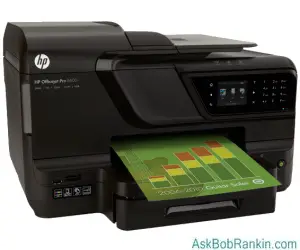
If you're shopping for an all-in-one for your office, check out the HP Officejet Pro 8600 Plus e-All-in-One (MSRP $299). This workhorse is an updated version of HP's popular Officejet 8500A model, with a sleeker design, faster print speeds, and cloud printing capability. The 8600 can copy and scan in both standard and legal-size, and produces professional quality documents and photos. The 8600 Plus model has a 250-sheet paper tray, but it you need more, the 8600 Premium model can crank out up to 500 sheets without reloading. I've had a similar HP model, the OfficeJet Pro L7780, for six years and it's been a great tool. Shop around online, and you can find the 8500A for as low as $199!
Don’t neglect the used and refurbished markets when shopping for an AIO printer with wireless capability. A friend of mine recently scored an immaculate Lexmarket XL4850 AIO, refurbished and working perfectly, for less than twenty bucks; the shipping brought the total to just under $40!
Do you have a wireless inkjet printer? Post your comment or question below...


This article was posted by Bob Rankin on 3 Jan 2014
| For Fun: Buy Bob a Snickers. |
 |
Prev Article: Geekly Update - 02 January 2014 |

The Top Twenty |
Next Article: Should You Bing In The New Year? |
 |
There's more reader feedback... See all 33 comments for this article.
Post your Comments, Questions or Suggestions
|
Free Tech Support -- Ask Bob Rankin Subscribe to AskBobRankin Updates: Free Newsletter Copyright © 2005 - Bob Rankin - All Rights Reserved About Us Privacy Policy RSS/XML |
Article information: AskBobRankin -- Wireless All-In-One Printers (Posted: 3 Jan 2014)
Source: https://askbobrankin.com/wireless_allinone_printers.html
Copyright © 2005 - Bob Rankin - All Rights Reserved

Most recent comments on "Wireless All-In-One Printers"
(See all 33 comments for this article.)Posted by:

Allan Brunner
03 Jan 2014
Have installed an HP Photosmart 5524 for two people. It wireless and eprints from desktop, Laptop and Ipad. Brilliant. Only downside is the cost of the ink
Posted by:

Gaynor
03 Jan 2014
I have an HP office jet 4620 and it goes very well unless I change ink cartridges etc and it will sometimes need to be re installed. It does say it's not connected at times but then the second try it goes good.
Posted by:

tom
03 Jan 2014
I agree with Len's comments (above). Unlike older models, new HPs will stop printing when only one cartridge goes dry and there are 5 or 6 cartridges. The printer won't work until the dry cartridge is replaced. Also, The term "dry" is inaccurate. There is still some ink left, it just won't work, so you're buying more cartridges. For some personal printing I don't care if the print is gray instead of black, or b&w instead of color. I just don't like HP forcing me to buy cartridges when I don't need to.
Posted by:

Jim H
03 Jan 2014
Have a Epson WF7520 all-in-one for nearly a year.
Scans upto 11 X 17 and prints up to 13 X 19.
Duplex auto prints both sides, two trays.
No problems, low ink use, easy to operate,
wireless. Love it.
And have a Epson flat bed scanner, several years, still works great.
Have had HPs & Brothers will buy Epson next time.
Posted by:

John
03 Jan 2014
I have 3 wireless printers Canon MG6220, Brother HL2170, and Brother HL2280. When they work they work great but as an earlier post by Steve, sometimes the Brothers are WiFi fickle.
Posted by:

MmeMoxie
03 Jan 2014
Bob, great info, on AIO Printers. :)
I have been using multi-cartridged Printers, what seems like forever, now. My first was a Canon BJC6000 and it was a workhorse. It finally died and then I got another Canon. I had fallen in love with multiple cartridges printers. The convenience of only having to replace one color was awesome, in my book.
Must admit, there was a learning curve, to having multiple colored cartridges. When my first Multi-Cartridge printer went out of ink, on one of the colors, I did NOT have a "back up" supply, so, I had to go to the store, to get one. First lesson learned, always keep all colored cartridges extras, so when it happens at 3am, you only have to reach into your own supply, to replace. :)
Second lesson learned ... You can get your black and colored cartridges cheaper, on the Internet. I now, get mine from Meritline.com, for my printer, they are the cheapest.
My current printer is a wireless one, finally, a Brother MFC-J4510DW and I am one happy camper, with it. Again, must note ... Brother's are not the "best made" printers on the planet. What I mean by that is, the printer's printing quality is not the greatest, but, far from the worst. The workings of the machine are far above, what I expected, when I got my first Brother machine. But, I have learned that the "outsides" of the Brother machines, leave much to be desired. They are flimsy, at best. I am talking about all of the plastic surroundings, to the machine. I have learned to be very careful, when lifting the top of the machine, to scan a paper and also, to be very careful and patience, when putting down the lid.
My Brothers have not made good photo prints. They aren't bad, just not good. But, that isn't what I got my Brother Printers for ... I got them, because their prices were right and their black and colored cartridges prices were excellent. In other words, I got my printer for printing, period.
My latest Brother model the MFC-J4510DW is considered a Business model. The real beauty of this printer is that it can print out 11x17 pages, plus it prints, scans, copies and faxes, and I mean a stand alone fax. Another great feature is the 3.7" Swipe Touchscreen Display! I can see what I am doing, finally. :)
Setting up, was easy, but, I have set-up 4 Brother Printers to date and so, in all honesty, I am extremely comfortable with setting up, Brother Printers. However, I remember my first Brother Printer ... I happen to be one, who reads the instructions, okay? So, I read what I was suppose to do and the set-up went every easy, with each Brother Printer, I do the same ... I read the instructions and all goes well, for me. :)
Posted by:

Bill
03 Jan 2014
I have a wireless Kodak printer, and I am totally satisfied with the wireless operation,and the print quality. Much better than several other wired name brand printers I had in the past. It advises you if there is any printing problem, easy connection to wireless network,and it warns you well in advance when the ink is getting low.
I recently purchased a Cannon, and am still trying to get it to connect to the network.
Posted by:

KRS
03 Jan 2014
Inkjet printers are inexpensive to buy, but they rape you on the ink. Get a WiFi-connected b/w laser printer plus an inexpensive color inkjet for photos.
The HP LaserJet Pro P1102w at $199.99 from HP has built-in WiFi. The only PITA is the small 150 sheet paper tray.
The HP LaserJet Pro M1217nfw all-in-one is $159.99. It also does wireless.
I've used an HP LJ P2055dn for several years with a WiFi home network and couldn't be happier. For color, I'm fine with an HP OfficeJet 4500 with built-in WiFi.
Posted by:

Joseph Fischer
03 Jan 2014
An All-In-One printer is very useful. Wireless printing is now standard on mid-range printers, so you might as well get that feature. Wireless printer set up and use has gotten easier over the years. However, it is still not as simple and reliable as printing through a printer cable.
With my particular setup, wireless printing works fine as long as the wireless router and the printer are always powered on. If I have to power my router or printer off and on, the printer usually is assigned a different IP address. Then I have to re-establish the wireless connection between my computer and the printer.
The printer is one more wireless device, so it might impact the performance of your other wireless connections.
My printer (HP 8600) acts as a Wi-Fi router/hotspot. If I am closer to my printer than to my actual Internet Wi-Fi router, my laptop tries to connect to my printer rather than my router.
Also the scanner function only works with a wired connection, as was previously mentioned.
Since I don't print very often, I end up leaving the printer turned off most of the time. When I need to just print a quick page or two I use a wired connection. When I'm working on a big project, I use the wireless connection.
Posted by:

Chuckj5710
04 Jan 2014
I've had an HP 6700 for the past couple of years, and it performs flawlessly. As an AIO it does the occasional copies and faxes fine, and as a network connected printer (wireless) it works just great. The real bonus is that I can set it to print on both sides of a page (duplex). Plus, the cost was under $150. After 2 years, I'm still pleased.
Posted by:

Greg
04 Jan 2014
Last Christmas I purchased an HP 3520 for an amazing $39. I was nervous as it was so inexpensive.
It is fantastic. It works so well I'm shocked. Our Win7 notebook connects wirelessly as the printer is NOT connected thru any cables. My XP desktop is wired to the router that then connects wirelessly to the printer, all seamlessly and automatically.
It only prints, scans & copies and has 4 cartridges, but it continues to print if one runs dry.
The quick start sheet stated to install inks first, etc and then install the CD. Ignore this poor advice and install CD first. Then you can watch the installation video and easily set up the printer. Video is NOT available until CD is installed and makes printer set up a no brainer.
Posted by:

MJS
04 Jan 2014
I have an HP 8000 series printer. Functionality is good. But it won't print with a dry cartridge. EVEN WORSE is the fact that HP has DATE CHiPs in the cartridges. A brand new unopened one will not work past its "expiration date". And HP will do nothing for you in the way of swapping out an unopened package that is "expired". Also these cartridges can not be bought aftermarket because the chip renders them useless. They can't be refilled, and even if still full of ink, they won't work if not "fresh". A little guaranteed profitablity built into each cartridge by HP. Will make me think twice before buying another HP.
Posted by:

Gray
04 Jan 2014
I have a Canon MP610 and an MG5420 (~$50 before Christmas) I'm one of the geeks who ALWAYS refills my own ink. Never had any problems - just make sure you refill them BEFORE they run dry. My one minor complaint with the MG5420 is it does not have a top rear paper feeder like most printers. It has two paper drawers in front. They both spend a lot of time doing all sorts of "maintenance", in other words, wasting ink but I guess most printers do this!
Posted by:

BrianR
04 Jan 2014
Hey Bob, another great article, and important topic.
I have a Brother MFC-7860-DW printer, and I love it! Best printer I've ever had. And you are correct, the flexibility of location that wireless offers is great. I've got mine tucked under a table in another room, where it stays out of sight, and out of mind. I turn it on only when I need to print. It quietly fires up in less than a minute. And as it is a laser printer, the pages are printed and ready before I even get to the printer. And the software is easy to use, making scanning a piece of cake, as well as updating the firmware and software when updates become available. Now, I do not use the fax option, so I can see where having a phone jack nearby may be a challenge when finding a location for any multifunctional printer. But not having to worry about a network connection is still a great plus.
I also want to chime in and support some of the earlier comments regarding the HP 8600 printer. Based on my experience, I cannot recommend this printer. The warm up time is too long and noisy, it gulps up ink too fast, the cartridges are too expensive for the number of prints you get, and it is as bulky as they get. And if the comment by MJS is true about the chips that regulate a cartridge expiration date, then this could possibly be the worst printer on the market. I have slowly seen HP move in this direction for years (their quality has dropped and greed has set in), and I have stopped recommending HP to my clients. I was also tired of troubleshooting issues caused by conflicts their software and drivers had with Windows and other applications.
Brother and Canon seem to be the way to go these days. And like another comment pointed out already, going with a multifunctional laser printer is the best option for most people who don't need to print in color very often. And if you do occasionally need color, you can have a small inkjet printer as a second printer (non-HP and single function of course). You will quickly recover any extra up-front costs of buying two printers, with the ink/toner savings, plus the value of your time messing with the issues. In my opinion, the less-frustration factor alone, is enough of a reason to go this route.
Happy New Year Bob! Looking forward to more great articles in 2014.
Posted by:

mike
05 Jan 2014
I like Bob's articles even if not always agree with them completely. This case again, printer discussion on the negledge able side of the price, what a printer costs. Almost irrelevant. Ask, please, what the printing costs! The printing industry is robbing the public through irrational ink or toner costs. Is everybody blind not to see the complot?
Posted by:

Sharon H
06 Jan 2014
Wireless or not, inkjet printers are a rip off because of the cost of ink.
At our Computer and Technology Club, we finally got rid of our inkjet(s)-we went through more than one and had all kinds of headaches with the ink cartridges-and now have an inexpensive laser printer. It's like heaven compared to the inkjet. I am hoping to one day buy one for home use.
Whether you buy inkjet cartridges, go for refurbished or fill them yourself, they are still a massive ripoff. Laser is the way to go, wireless or not.
Posted by:

christopher n
07 Jan 2014
Original inkjet was a Canon BJC - free with ISP subscription. lasted forever and i refilled those cartridges at home. family wanted color so switched to HP printers. Subsequent software updates became burden-some. Seemed to eat more and more CPU cycles. Uninstall/new install did not help. Last HP died and switched to an Epson, which was the brand of my first dot matrix printer. And the Workforce is my first wireless. No problems, except that I haven't figured out refills, and have succumbed to buying them off the internet till that day presents itself.
I am using carrot ink for my replacement cartridges - http://www.carrotink.com/
Posted by:

frank
08 Jan 2014
Avoid the HP all-in one 4500 Wireless.
It goes to sleep and doesn't wake up automatically.
This is a known defect and there is no fix.
So its useless as wireless
Posted by:

Melanie Goddard
08 Jan 2014
I highly recommend the Epson WF-2540 for home use (or small business). For the price an excellent device. Connected easily, prints and scans in good quality, allows for printing from all sorts of devices (I print from my phone quite often), has cloud printing option and is the best choice in the price range for managing the cost of replacement ink.
Unlike the HP, this printer has 3 color cartridges, so you only replace what runs out, not the whole multicolor one. Most all-in-ones in this price range do not offer this.
We have used this one for 4 months, and have used the "big sister" version at another location for over a year. No problems!
Posted by:

jphuf
22 Apr 2015
I know this is late.
I have an Epson WF-7520 All-In-One (w/fax) WiFi. Love it!
Scans & prints larger than Tabloid size, up to 13 x 19 or so. Great for my Acad dwgs. Easy to use.
Ink lasts a long time. Good quality. Had my employer buy some for work.