


Burn ISO Image
I just downloaded an ISO image file for a Linux install, but I can't figure out how to burn the ISO image to a CD. Can you help? |
Burning an ISO Image With Windows
I had the same experience recently... I downloaded the ISO image for Ubuntu Linux and used the CD burning tool that's built into Windows XP to copy the ISO to a CDROM disk. But it didn't create a bootable Linux install disk, it just blindly copied the ISO file to the CD. Definitely not what I wanted or expected.
After a bit of research, I learned that Windows (XP or Vista) just can't do what I wanted -- to create a bootable install disk from an ISO image. I had done it in the past, but that was on another computer where I had Nero Burning installed. Nero, Roxio and other commercial CD burning software has the ability to burn botoable ISO images to CD, but I didn't feel like spending $79. So off I went in search of a freeware solution...
After a few searches on Google I found ISO Recorder, a nifty (and free) tool that adds the capability to burn a bootable ISO image to Windows XP, 2003 and Vista. The download is tiny (only 360KB) and it installs in a few seconds.
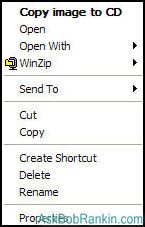
After installing, you can right-click on an ISO image file and you'll see a new option on the popup: Copy Image to CD. This option actually does what I wanted Windows to do... create a bootable CD that can be used to install Linux. ISO Recorder can burn CD images (and DVD images on Windows Vista), copy disks, make images of existing data CD/DVDs and create ISO images from a content of a disk folder.
ISO Recorder is free for personal use, and is recommended on the Microsoft website, so you needn't worry about picking up viruses or spyware when you install it. There a button on the ISO Recorder page to donate to the author via Paypal, which I think is a fine idea. If you find it useful, send him $5, $10 or whatever you like.


This article was posted by Bob Rankin on 27 Apr 2007
| For Fun: Buy Bob a Snickers. |
 |
Prev Article: Ubuntu Linux Feisty Fawn |

The Top Twenty |
Next Article: Goodbye to Analog TV |
 |
Post your Comments, Questions or Suggestions
|
Free Tech Support -- Ask Bob Rankin Subscribe to AskBobRankin Updates: Free Newsletter Copyright © 2005 - Bob Rankin - All Rights Reserved About Us Privacy Policy RSS/XML |
Article information: AskBobRankin -- Burn ISO Image (Posted: 27 Apr 2007)
Source: https://askbobrankin.com/burn_iso_image.html
Copyright © 2005 - Bob Rankin - All Rights Reserved
Most recent comments on "Burn ISO Image"
Posted by:

Mike
17 Jun 2007
Bob, I'm sure that this program is a great help for those with Windows XP/2003/Vista. But what about the rest of us schmucks who are still using Win 95, 98, 98SE, Me (I pity those souls), NT4 Workstation (there's gotta be some users left) and/or 2000 Pro?
None of us HAVE a built-in burning program (tho I'm not sure that's all bad) that can be tamed for burning ISOs. I have solutions for myself, but I'm sure there are others who don't. How about adding a Part II listing complete ISO burning programs for those using an older version of Windows (or somebody who doesn't like the built-in Windows XP/2003/Vista burning program) so that they can burn ISOs easily as well. In explaining burning ISOs to people, it seems to help if they can use a small, dedicated ISO burning program (at least initially) instead of figuring out how to do it in a full-featured program like Nero or Roxio ECDC.
EDITOR'S NOTE: Windows 98 is nine years old, and since it's no longer supported (no more security fixes) I would consider it an unsafe vehicle for the info highway. If you're still putting along on a W98 or (horrors) W95 machine, it's way past time to upgrade.
Posted by:

Ian
15 Apr 2008
All that money all those features and Windows XP cannot burn an iso image to CD. I tried a so called program and it doesn't even start because the CD device is grayed out. Those of us with DVD writers are left high and dry.
EDITOR'S NOTE: ISO Recorder works for me...
Posted by:

mensius
05 Jun 2008
hi.... i have problem with my hp 7100 writer i use that with any combination of jumper setting and cabel but os just detect that as cd rom i use win xp2 and vista and linux ...but i change the transfer system from dma to pio ..it and after that work randomly.
EDITOR'S NOTE: I'm not clear on the problem. Can you be more specific?
Posted by:

merso
10 Jun 2009
If you want to burn iso file/create iso image on mac,I share you below website:
http://www.infopirate.org/_how-burn-dvd-iso-file-mac
Posted by:

merso
23 Aug 2009
DVD Creator Std is the best choice to to burn your ISO Files to DVD on Mac.
Posted by:

sanjun
25 Aug 2009
Here share you 2 methods to burn iso to dvd on mac:
http://imediacreator.com/iso/2-methods-to-burn-iso-file-to-dvd-on-mac.html#131
Posted by:

Dalin Long
03 Oct 2010
How can i make an image or iso fille? When i do it, something happens like some files become jpg image. Tell Me How To DO It. Thanks.
EDITOR'S NOTE: It sounds like you're confusing an "ISO image" with a graphic image. An ISO image is a single file that represents the contents of an installation disk, and is meant to be burned to a CDROM disk. Since you mentioned JPG, I'm wondering if you're referring to a graphic image, such as a photo or clipart. Can you clarify your question?