


Virus Alert: Fake Anti-Virus and Celebrity Scams
Recently I got a popup warning me that a virus had infected my computer, and I needed to download some antivirus program to get rid of it. I did so, and later discovered it was a very slick FAKE security tool that really messed things up. How can I avoid fake antivirus programs in the future? |
Beware of Fake Antivirus Programs
People tend not to be skeptical of what they want to believe in. So it is no surprise that cyber crooks are offering false protection against dangerous viruses, and luring people to unsafe sites with pop culture come-ons. Yes, that free antivirus program you installed so eagerly may be a virus in disguise! And what about that Facebook link you just got, promising naughty celebrity pics? Con men have always known that the easiest way to deceive a mark is to offer what he or she wants most.
You may be surfing the Web when suddenly a yellow "hazard" triangle pops up and alarming words cry, "Your computer is infected by a virus! Download this antivirus program right now!" or words to that effect. A sudden injection of fear is a very useful tool for getting people to do what you want. And a lot of people do so without an instant's hesitation. Then they're in trouble.
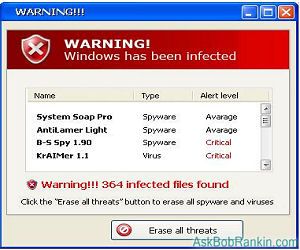
These rogue antivirus programs look busy running reports, and tell you they've deleted viruses. But in reality, they may have sniffed out your bank account data, passwords to sensitive sites, Social Security Number, and other things used for identity theft. Sometimes fake antivirus programs secretly install "bot" software, enslaving your computer to a remote mastermind who will use it while you're away to distribute spam or malware to other unsuspecting marks.
This covert activity sounds bad enough, but some rogue security programs will even try to hold you hostage, demanding a ransom. They'll proclaim that you have a terrible virus, which cannot be removed until you pay $49 to "unlock" the software. Others display p**n images on your screen, trying to embarass you until you pay the price they demand.
Sex, Lies and Video
Another common ruse involves celebrity gossip. Rumors spread like wildfire on social networks such as Twitter and Facebook that a popular celebrity has died, had a wardrobe malfunction, or that an embarassing photo or sex tape has been discovered. In almost every case, following these links will result in a nasty virus infection, which may not even be apparent at first.
If you get an email, tweet or wall posting that involves a celebrity -- and it promises juicy gossip or salacious content -- resist the urge to click. Keep in mind that the story behind the scam may in fact be true. Some recent examples include Nancy Grace on "Dancing With the Stars", claims that Lady Gaga was found dead in a hotel room, and rumors of a Miley Cyrus sex video. The celebrity/virus link problem has grown to the extent that security vendor McAfee now publishes an annual list of the Most Dangerous Celebrities.
Avoiding Fake Antivirus and Drive-by Virus Infections
By far the biggest driver of the drive-by virus problem is p**n, or the promise thereof. Avoiding "adult" content online, and steering your browser away from trendy celebrity gossip will go a long way toward keeping your computer safe on the Web.
As for the fake antivirus trap, watch out for well-known rogue products with names such as XP Antispyware 2011, Personal Shield Pro and Antivirus 360. But unfortunately, those are just the tip of the iceberg. So aside from the names, how can you recognize fake antivirus programs before it's too late? There are several tell-tale signs:
- High levels of alarm: those yellow triangles, jittering popup windows, lots of exclamation points, the word "alert" repeated six times per second -- all these things are done to induce alarm and cause you to act without thinking first.
- A phony free virus scan performed without your permission is another tipoff. Real antivirus vendors ask if you want them to scan your computer, fake ones often tell you they have done so and found malware the instant you land on their site. A full virus scan takes many minutes, not seconds.
- "Buy it right now" pitches. Every legitimate antivirus program lets you download a trial version before you buy.
- No links to reviews of the product in recognized publications. Don't be fooled by "testimonials" that were written by the malware maker himself.
There has been a significant drop in fake antivirus distribution activity this summer, due to some good police work and the busting of several high-profile criminal gangs. But you can bet that others will spring up and try to grab what they see as easy money being left on the table.
If you encounter a popup window alerting you that your computer is infected, DON'T close the popup window with a click of your mouse! That often triggers the secret downloading of a malware program onto your computer. Instead, close your browser with Task Manager. (Press Ctrl-Shift-Esc and kill the running task.) If you suspect that your computer is infected, run a malware scan immediately, with MBAM or your security tool of choice.
Perhaps the best way to avoid drive-by downloads and fake antivirus software is to have REAL security protection in place. And fortunately, there are some excellent and free internet security tools, which you can read about in my Free Anti-Virus Software article. These tools will not only scan your hard drive for existing malware, but they'll also block it from being downloaded in the future.
Have you been a victim of a fake antivirus program? Do you have tips for dealing with rogue security tools? Post your question or comment below...


This article was posted by Bob Rankin on 28 Sep 2011
| For Fun: Buy Bob a Snickers. |
 |
Prev Article: Radio Apps For Your Smartphone |

The Top Twenty |
Next Article: Wireless Data Storage Devices |
 |
Post your Comments, Questions or Suggestions
|
Free Tech Support -- Ask Bob Rankin Subscribe to AskBobRankin Updates: Free Newsletter Copyright © 2005 - Bob Rankin - All Rights Reserved About Us Privacy Policy RSS/XML |
Article information: AskBobRankin -- Virus Alert: Fake Anti-Virus and Celebrity Scams (Posted: 28 Sep 2011)
Source: https://askbobrankin.com/virus_alert_fake_antivirus_and_celebrity_scams.html
Copyright © 2005 - Bob Rankin - All Rights Reserved
Most recent comments on "Virus Alert: Fake Anti-Virus and Celebrity Scams"
Posted by:

Kim Norwood-Koonce
28 Sep 2011
Hi Bob. I'm glad you had posted Malware Bytes on your site. My PC was infected with a virus but the shocking part was while visiting a site with an avatar, I've noticed in small red letters stating "Bot is typing." I could not believe it. LOL If you're tired of Snickers, why not try a Butterfinger. Thanks Bob.
Posted by:

Sherry Rein
28 Sep 2011
We were also victimized by a fake virus alert. The message came from the tray where we get update info from Microsoft and looks for all the world like a legitimate message: "Your anti-virus software needs to be updated" or something like that. Once you click on the message, your computer is locked unless you send some outfit in London a ransom to unlock it. Had to take the CPU in to our local techs to get everything back. We still get the message; we just learned to ignore it. Obviously, our anti-viral software doesn't catch this.
Posted by:

steven
29 Sep 2011
I cannot believe ANYONE is still fooled by these fake antivirus programs. They have been attacking for years. When I eventually get attacked, I use Combofix(ignore the logs), followed by Malwarebytes free and finally super antispyware free, all old news.
Posted by:

JonK
29 Sep 2011
I recently had to rescue a friend's computer after she responded to a virus warning that she thought had come from her resident anti-virus software. Instead, the rogue program disabled all her executable files (except a browser) and demanded payment (via the browser) to fix the problem it had caused.
The program had made numerous changes to the registry as well as loading her computer with over a dozen junky pieces of adware.Since she did not have backups of her files, I had to restore the system without reformatting the hard drive and reloading the O/S. It was a mess.
The problem is that many users would be fooled by a ruse like this, thinking that it was indeed a message from their anti-virus software. As it turned out, another friend had experienced the same problem, but while I was out of town. Since he had backups, he took his computer to a local computer shop and had his drive restored, but at a cost of over $100.
Posted by:

TheRube
29 Sep 2011
This type of Rogueware can be QUITE Nasty!!!
That's why I have just the ticket to rid these from your computer and mine. I found the application at the following site: http://www.bleepingcomputer.com/virus-removal/
This website is simply Fantastic!
It has been VERY Helpful in getting rid of this vermin from my own computer and those of my neighbors!
(I keep the rogue-killer fully locked and loaded in my computer should I encounter this critter(s) in the future)
It is always better to be proactive when it comes to protecting your computer from these Miscreants!
TR
Posted by:

Luise
29 Sep 2011
Stupidly (of course), I seem to have bought two fake programs in the spring. When I looked up the charges in my credit card bills, both had the final letters BAKU AZE. Does this mean anything to anybody? More impt., can I get my money back in any way?
EDITOR'S NOTE: If you've already tried requesting a refund from the company that you bought it from, contact your bank and ask them to do a chargeback, due to fraud.
Posted by:

Ryan
29 Sep 2011
I remember when I first got on the net back in 2003. I use to fall for that stuff. If I'm not mistaken, correct me if I'm wrong, but, SpywarDoctor, started that way.
Posted by:

MmeMoxie
29 Sep 2011
Thank heavens, to date, I have NOT clicked on any 'random' alerts!!! Must be honest, I have been reading about Spyware, Malware, Viruses, Trojan Horses and Worms for years. I have had an Anti-Virus program, Ad-Aware and a Firewall program, since about 2000. This was during my 'Dial-Up' days, when everyone was saying that an Anti-Virus program, Ad-Aware and a Firewall program were NOT necessary for those who Dialed-Up. Yeah, right.
I thank all of the geeks, that I paid attention to, during those years, Bob Rankin, Leo LaPorte, Chris Pirillo, Steve Gibson, Patrick Norton and the rest, who were informing PC users about the 'dangers' of the Internet and 'surfing' it. I diligently watched TechTV, during that time. I have had a subscription to The Internet Tourbus, since 1997.
I first became aware of Spyware, reading Steve Gibson's commentary on his website, when all of this thing was started by RealNetworks and the GUID, back in the summer of 2000. All I can say, is that I downloaded Opt-Out as soon as it was available from Steve and then moved on the Lavasoft's Ad-Aware, when Steve said to.
While, I may not have had my computer 'hi-jacked' or compromised, I have had the occasional Virus or Worm or Trojan Horse, that has attached itself to my PC. How? This was before automatic updates of virus data bases was instituted. However...I have had to repair or fix many computers of family and friends, due to their lack of knowledge or simply clicking on anything that pops-up or going to XXX-Rated websites. Hey, this is NOT a judgment statement, just some facts, OK?
Again, continuing to read articles from my favorite geeks, I was able to learn and learn well.
I got several Phishes, right about the time they started to show up in your email Inbox. I still, don't know why, but I was highly suspicious of these emails and would forward them on to the company that they were suppose to represent.
One of the first Phishes that I got, was from a bank that I had NEVER had an account at and it was telling me, that I needed to 'update' all of my information, so that they could finish auditing my account!!! I didn't even know that they were being called Phishes. Then, I read an article on either ZNET or PCMag about Phishes and what they were trying to do and accomplishing, by people who were totally unaware. The 'word' was getting out on the streets.
Anyone can accidentally click on a Pop-Up or go to a 'bad' Website that has been compromised or bring home a floppy disk from work, where there is a virus in the whole network, so on and so forth and get into trouble. But, in all honesty, it seems as though the 'bad guys' are really out to get the majority of computer users and the Internet, these days. Heavens, they are even trying to get to all of the Smartphones, too!!!