


Internet Security Suites
I recently got a new computer, and the free trial of McAfee antivirus is about to expire. I've been looking at Internet Security Suites, but there are so many options and features that my head is spinning. What should I look for in an Internet security suite, and which one do you recommend? |
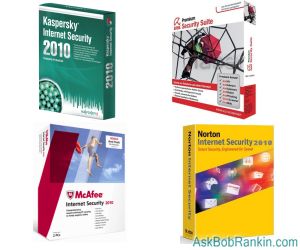
Which Security Suite is Best?
Internet Security suites are collections of software that guard against a wide spectrum of threats to your privacy, the integrity of your computer network, and your control of your computer. Typically, a security suite includes a firewall; antivirus protection; anti-spyware; and optionally, anti-spam and anti-phishing software components.
Let's start by taking a look at each of the components typically found in an Internet security suite:
A firewall controls traffic on the "edge" of your computer network, the point at which your computer connect to the Internet. Basically, a firewall protects you from intruders and keeps you from straying into trouble on the Internet. Depending on the features of the firewall and how you configure them, a firewall determines what kind of transactions can be done between computers on and off your network; what sorts of data are allowed in or out of the network; and what individual computers on the network can do with resources "out there" on the Internet. In other words, a firewall can keep hackers out; keep kids off p**n sites and employees off Twitter; and even allow you to do whatever you please while others are restricted.
Antivirus software guards against the downloading, installation, and execution of virus and other actively malicious software - things that can erase your hard drive; discover your personal information and send it to identity thieves; interfere with the operation of legitimate programs; allow remote hackers to control your computer; and so on. In real-time mode, antivirus software attempts to monitor every bit of data that comes into your computer and detect malware before it is written to your hard drive. Since malware can enter your computer via multiple channels, real-time protection monitors email, Web browsing, instant messaging, file transfers from removable media such as CDs, etc. In scan mode, antivirus software looks deeply into every file on your hard drive to see if any malware is hidden inside. Detected malware can be automatically removed or "quarantined" for later action.
Antispyware software roots out programs that monitor your computing activities and transmit this information to people who might use it for their own purposes. Spyware can range from relatively harmless things like advertising popups, to programs that record every key you press - including the passwords to your financial accounts - and send this data to identity thieves.
Anti-phishing programs try to keep people from doing stupid things, like falling for fake Web sites that pretend to be popular sites like Twitter or Bank of America; or clicking on links in email from strangers. If you (or others sharing your computer) don't think while you're computing then anti-phishing software is a good addition to your security suite.
Anti-spam software protects your inbox from unsolicited email messages. Spam can be merely annoying, as in the ones that hawk weight-loss or enlarge-your-bodypart products, or it can be dangerous. Spam emails that promote investment scams are common, and for reasons that baffle me, the Nigerian Scam is still going strong, even after decades of warnings against it. Then there are the spams that contain viruses and spyware in attachments, along with social engineering tricks to entice you to open. If you use a desktop email client such as Outlook, Eudora or Thunderbird, then anti-spam protection is a good idea.
Some security suites also offer advisories to warn you before you click into a rogue site, and various forms of identity protection.
Security Suites: Free or Paid?
You should know that there are three types of security suites: paid, free and roll your own. Some highly rated products in the paid category are Norton Internet Security, McAfee Internet Security Suite, and Kaspersky Internet Security. These products generally provide very good protection, and are easy to install and use. But they tend to be pricey (around $60 to $80) and require annual renewals. Norton in particular has a history of being a resource hog, and many have found that it's hard to uninstall. Magazine editors always seem to heap high praise on Norton products, but end users tend to have a negative opinion. That makes me wonder if there isn't some "incentive" involved in those reviews.
Free internet security suites typically bundle just the anti-virus and anti-spyware components, and they hope you'll upgrade to a paid package to get all the other goodies. AVG Anti-Virus Free Edition includes protection against viruses and spyware, and a link scanner to identify harmful sites. Avast! Home Edition ups the ante with rootkit detection, and secures P2P file sharing and instant messaging. Microsoft Security Essentials is more basic, with just anti-virus and anti-spyware.
The level of protection provided by the freebies is pretty much the same as their paid counterparts. The downside is that you'll have to hunt down the missing components -- if you think you really need them -- and install them separately.
Build Your Own Security Suite
But there's a third option, which is to build your own security suite, selecting from a wide array of free firewall, anti-virus, anti-spyware, anti-spam and other tools. Before you start, let me say that for most people, good anti-virus and anti-spyware will provide adequate protection from 99.9% of the threats that lurk in cyberspace. You will find helpful information in my articles on Free Anti-Virus Programs, and Free Anti-Spyware Programs.
As for firewalls, you can probably do nothing -- but that's not to say you don't need a firewall. I strongly suggest that you read my articles Do I Need a Firewall? and Free Firewall Protection before making a decision about installing any firewall software.
If you use one of the popular webmail services like GMail, Yahoo Mail or Hotmail, then you can skip anti-spam software, since they all have excellent spam filtering built in. If you use a desktop email program, see my Free Anti-Spam Tools article.
My personal preference is the roll-your-own approach. What's working for you? Post your comment or question below...


This article was posted by Bob Rankin on 7 Jan 2010
| For Fun: Buy Bob a Snickers. |
 |
Prev Article: Wireless N Routers |

The Top Twenty |
Next Article: Google Public DNS |
 |
Post your Comments, Questions or Suggestions
|
Free Tech Support -- Ask Bob Rankin Subscribe to AskBobRankin Updates: Free Newsletter Copyright © 2005 - Bob Rankin - All Rights Reserved About Us Privacy Policy RSS/XML |
Article information: AskBobRankin -- Internet Security Suites (Posted: 7 Jan 2010)
Source: https://askbobrankin.com/internet_security_suites.html
Copyright © 2005 - Bob Rankin - All Rights Reserved
Most recent comments on "Internet Security Suites"
Posted by:

Mark
07 Jan 2010
I agree with everything you say about thr rool your own approach I use Avast, SpybotS&D and Windows built in firewall with a great router. For Spam I forward all my email accounts to my GMail account which has the best imaginable antispam filters. I would warn against using Hotmail. Their spam protection is too aggressive. My GMX (and all GMX accounts) emails were blocked for months by hot/live mail (hence my hotmailsucks address which I originally opened to communicate with people on the LiveMail forum about the problem, which I now use as my throwaway email address).
Many other entire domains are often blocked by Live/Hotmail.
Posted by:

chesscanoe
08 Jan 2010
For a Vista or Windows 7 user, I suggest activation of the Windows firewall, and installation of the free Microsoft Security Essentials http://www.microsoft.com/Security_Essentials/ as well as installing the HOSTS file from http://www.mvps.org/winhelp2002/hosts.htm . SpywareBlaster from http://www.javacoolsoftware.com/spywareblaster.html and LinkScanner from AVG at http://linkscanner.avg.com/ complete the free software to do the job. Over the years I've used many free and fee firewall, antivirus, and other protection methodologies. This is the best way to go to date in my humble but correct opinion. :-)
Posted by:

Scott
08 Jan 2010
I recently built a computer from a kit and with some of the software that came along with it was a 60 day trial of Norton Internet Suite 2009. I have always used free stuff before, many of the things you mention in your article. I decided to try the Norton software after reading some reviews and I ended up purchasing it. I have been pleasantly surprised by it so far and it's not a memory hog like it used to be. Of course I don't worry much about that anymore because I have an Intel Core i7 CPU with 6 GB of DDR3 RAM. If you do have a lot of memory the Norton is a very good product. I installed it on my mothers new eMachines box which has 2 GB of RAM and it runs just fine. The Norton Suite seems to run better if you have Windows 7 installed instead of Vista which I have on both my moms and my computers. But
I guess that goes without saying, as everything does.
Posted by:

oldetimer
08 Jan 2010
Bob has given good advice but don't think you are 100% protected. My computer is constantly "protected" by one paid security suite, one paid and one free antispyware/antimalware, yet it was recently infected with a rootkit virus (which I had to pay Norton to have it removed) and an unknown severe spyware infection which NONE of my protection programs picked up, not just in real time, but even after I ran two comprehensive scans, and is causing alot of issues with my computer. Removing this embedded spyware has become a very major and serious problem. And this happened even though I make a point of updating these programs at least weekly.
Just don't expect perfection from any program.
Posted by:

Marilyn
08 Jan 2010
Thanks for the insight. It's good to understand the difference between anti virus, spam and all. I had AVG and then when it came pay up time someone recommended Avast. It has been great except I guess I unwittingly clicked on the pop up from Windows Security Alert that said I was unprotected as my firewall was off. It looked official and was from WIndows. How was I to know?
When I clicked on that all **** broke loose and I was days getting rid of the virus. Finally it was as simple as closing down the Windows firewall which evidently has a leak. Once done Avast knocked everything out really quickly.
However since then I can't activate Chrome - which I love - nor can I upload any photos from my computer. When I google for an answer I get to clear cookies. I am using Mozilla. One error said a firewall or proxy(?) was disallowing uploads. I can't figure it out.
As to email all my accounts go through Gmail - so simple and secure. Would that Google had anti-virus stuff.
Can you help, Bob?
Posted by:

paul redfern
08 Jan 2010
i used to use avg free. its good but i got advised to use NOD32. i looked it up. its great and i bought it and havent looked back. its reasonably priced and nothing, but nothing compares with it. it found 2 viruses, a worm and something else before it even finished downloading from the disc. i have never had a single intrusion since i got it and have had for over 3 yrs now. the local pc repair guy wont sell anything else but either. mate, u wont be sorry getting NOD32. i sure aint. i wont change no matter what. ur choice but NOD is the best
Posted by:

Allen
09 Jan 2010
I have the paid version of Avast which works really well. The most important tool on my computer is WOT, Web of Trust which picks out the baddies before you get there. I feel very secure. The other tool I have is "Threatfire" which is a last resort defence to pick out any suspicious actions on my computer. Allen.
Posted by:

Gary
09 Jan 2010
I must agree with Paul. My son has ESET (NOD32) on his netbook recomended my the ASUS shop we bought it a year ago. He has used it at/in his high school, on multi state road trips and at home.
It has never picked up a thing that has changed the way it runs, does not take up a lot of drive space and you don't have a clue it is working unless you see the little icon rotating on occassion.
It is a shame the computer media does not give it more credit, the company must not pay for thier reviews.
Anyway we now have the system on our other 4 computers and no more problems from Norton and McAfee. We run XP and Windows 7
Posted by:

Bill Van Skiver
09 Jan 2010
I switched from Norton which came preinstalled on my Dell 4700 in '05 and went to Zone Alarm and never looked back! I have upgraded to Zone Alarm Extreme Security Suite a few months ago and love it. It has a virtualization feature with it. You have make 3 cliks to enable it, but that's it. You're good to go. My PC has stayed clean ever since going to ZA Suite in late '05. It isn't even close to being a system hog like Norton was. It will NOT slow you down.
Posted by:

Mary
09 Jan 2010
I've read a lot of comments both here and on other forums about which security suite is best or which individual product is best. Seems to boil down to personal preference and whatever works best on YOUR particular machine.
Just because a combination of XYZ and ABC works well for you doesn't mean it will offer me the same protection. Not unless we have identical machines with identical operating systems. identical programs installed, and we visit the same websites, and we install the same updates at the same time, etc. Just too many variables to make a blanket statement that one product is really better than another.
From everything I've read, no security product is 100% effective 100% of the time. Look at the "best of" reviews over the years. XYZ might be #4 this year but #1 last year and #2 the year before that. I think the bottom line is to use something... because something is better than nothing at all.
Posted by:

chesscanoe
09 Jan 2010
I'd like to add 3 suggestions to my prior post above. 1) Use a router for another level of security. 2) Use OpenDNS for its valuable free services. http://www.opendns.com/ 3) Use common sense as you browse, click, and download. No single or even multiple layer security approach can offer 100% protection, but a little grey matter goes a long way.
Posted by:

lenr
09 Jan 2010
Old Timer's comment above hit the nail on the head.
He updates at least weekly. Stuff can slip in if it's newer and not on "the list".
I personally use Kaspersky 2010 and it's set to
update it self twice a day.
I also use Malwarebytes which I update everytime
I turn the computer on.
I've had a PC since the first one came out. And yes I've gotten an infection. Malware pares that right out of the machine.
Posted by:

Dave Roche
09 Jan 2010
I have tried most of the anti-virus names mentioned here, but found BIT DEFENDER the best of the bunch. It's ability to identify hidden Trojans that some of the others missed completely made me stick with this particular brand name for the foreseeable future.
Posted by:

Stanley
09 Jan 2010
I would like to vote for ZoneAlarm Security suite.
I have been using them for some time along with WOT with out any problems. Prior to that I used Zone Alarm firewall with LaveSoft's AdAware & AdWatch with only one problem years ago which LavaSoft was able to show and Reghance was able to eliminate very well.
I am still using XP but am considering Ubuntu Linux
Posted by:

Tom
10 Jan 2010
I used Norton for years, knowing it was a severe memory hog. But after too many instances of screwed-up renewal processes, I dumped it for the paid version of AVG Anti-virus and Anti-spyware. Now this 6 year old machine flies. I'm also using Spybot Search & Destroy and Ad-Aware free version and the built-in MS firewall. Being a home-alone machine with just another computer here linked by internet and printer, I feel these are adequate safegaurds. I will note that AVG will turn off the Windows Defender, which threw me at first but is not a problem. AVG also found "bugs" that Norton didn't find, so, adding that to the fact that AVG costs less and the subscrption lasts 2 years instead of just one, looks like a no-brainer to me.
Posted by:

Kent Butler
10 Jan 2010
I used McAfee for several years - auto updates and all that. Then I realized there were dangers it didn't cover and ended up with 3 other programs as well.
Then, about 3 years ago, I learned of PC Tools Spyware Doctor with Virvus Scan, which also does rootkits. I run a full scan of my hard drive every night and have not had any kind of problem since.
I certainly suggest giving PC Tools a good look!
Posted by:

Tom
13 Jan 2010
Like the other 2 posters I am using ESET as my main defense and highly recommend it. I regularly run ccleaner and iobit security 360 (both free) and throw in a regular helping of spybot s&d just to keep things on the up-and-up. I run the regime on 2 PC's and a laptop and have never had an issue that wasn't easily capture and eliminated by the software. I really believe that you can't rely on any one solution and you have to actively participate in keeping your computer clean. Just like driving a car. Just because it has oil and gas doesn't mean you're not going to run it up a tree once in a while.
Posted by:

Roelof
19 Jan 2010
On this page I came across a Google ad from spywareremove.com. Just curious, I Googled the name of that site and found out it has a bad rep. McAfee Siteadvisor for instance classifies this site as 'rogue'. Users' comments on the site are also very clear about what they think of the site. You're probably going to say "Google ad, not my responsability' but still it's a pity to see this on your site, right above an article on security suites at that.
EDITOR'S NOTE: Interesting, I never see that ad appear here in the US, and you're right that the ad selection is completely automated by Google. But I did some research and there's quite a mixed bag of opinions regarding that site and the SpyHunter software they offer. I've reported it to the Google Adsense folks. Let me know if you continue to see it on this site.
Posted by:

Prometheus1618
20 Jan 2010
Hello People
I my experience as a PC engineer, I have found that NO one program is complete answer when SPYWARE is concerned. My suggestion is go for a complete paid for package and add at least TWO other antispyware packages (suggest SuperAntiSpyware and Spyware S&D) and for good measure use SpywareBlaster or WinPatrol. The paid package I prefer is AVG Internet Security with Antivirus, Antispyware, Firewall, Link Scanner (free download if you do not use this package), Web Shield, Resident Shield (for remote and local protection), Anti-Rootkit, Anti-Spam and Email Scanner (if not using webmail). There are also some extra useful tools included if you want to check them out such as Services Tool for looking at what services are running, AutoStart Tool for managing autostart programs etc. Have a look and see what you think.
KEEP SAFE ONLINE.
Regards
Posted by:

M Wisdom
03 Feb 2010
I recently bought my first laptop with intentions of using it primarily at my barber shop. The building I am in supplies free wi/fi with a password, but everybody has the password. How can I be secure in useing my laptop for 'sensitive' purpsoses, such as banking, and purchasing on line with my credit card, without others accessing my computer and getting my info?
EDITOR'S NOTE: If you do all your business on websites that use encryption (look for "https" at the start of the web address) then you should be safe.