


TIPS: Buying An Inkjet Printer
Inkjet printers are the workhorses of home and office. There are hundreds of different models available, each offering dozens of features. Buying an inkjet printer can be confusing unless you know which options are really important. The good news is, inkjet printers are dirt cheap. The bad news: buying the wrong inkjet printer (even a cheap one) can be very expensive. Here's what you need to know... |
Inkjet Printers: What to Know Before You Shop
What's important when you're buying an inkjet printer? The price tag is the first thing many shoppers look for. But don't stop there. Typically, the bargain printers have much higher printing costs to offset the low initial cost. In fact, some inkjets are sold as loss-leader items, because the manufacturers know that sales of ink cartridges is where they make the real money.
Pay attention to the estimated cost per page figures when shopping for a printer. And do a little research to see if your printer is a good candidate for compatible off-brand cartridges or remanufactured inkjet printer cartridges. My article, Should You Buy Discount Ink Cartridges? goes into detail on this issue, and the reader comments contain some valuable real-world insights.
Other factors to consider are speed (pages per minute) for both black and color printing, paper tray capacity, and connectivity. Does the printer come with a USB cable? Can it operate wirelessly?
Home users who want to print photos should see if the inkjet can handle photo paper, and carefully check the specs on both cost and speed. Business users may need duplexing, the ability to print on envelopes and legal-size paper, or the faxing and scanning features found on all-in-one inkjet printers. My article, Five Inexpensive Photo Printers features several printers that do all of these tasks and more.
Print speed may not matter too much in light-duty home printing applications, but in a business setting time is money. You have to take manufacturers' ratings with a grain of salt; some advertised print speeds may refer only to draft-quality black-only prints. Look for the "ISO ppm" speed, which is the international standard for measuring print speed. Be sure to dig into print speeds of printing applications that truly matter to you.
Inkjets for Home and Small Business Users
Let's look at a couple of inkjet printers to see how these specs matter in the real world, for home, home office and small business users.
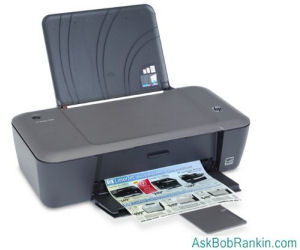
The HP Deskjet 1000 is a decent low-volume inkjet printer that anyone should be able to afford. Amazingly, the printer itself sells for around $29 online. The Deskjet 1000 is aimed at home users (PC or Mac), is easy to set up, and powers on quickly. The standard black ink cartridge ($14) is rated for 190 pages, and the XL high capacity cartridge ($28) at 480 pages. For color printing, expect 165 pages from the standard ($19) and 330 pages from the XL cartridge ($30). So using the XL cartridges, you can expect a cost of about 5 cents/page (black) or 9 cents/page (color).
I'd call that pretty good for a super-low-cost inkjet. On the downside, the HP Deskjet 1000's paper tray holds only 60 sheets, and you have to supply your own USB cable to connect it to the computer. There are lots of 4 and 5 star reviews on Amazon, but more than a few negative comments as well. Is it worth it? Hmmm, did I mention that it costs 29 bucks?
For an additional $40 or so, the HP Deskjet 3510 throws in a lot more value: WiFi connectivity, scanner/copier, a monochrome LED display for previewing before printing, and free apps that make printing from smartphones or tablets a breeze. It also does borderless printing for photos, flyers, and similar documents. Its tricolor ink cartridge costs around $29 (about 9 cents/page); black ink is $27 for two cartridges (7.5 cents/page).
The $69 Epson Workforce 30 Inkjet printer is a no-frills single-function machine that just prints. But it prints two times faster than competitors, which can be important in a business environment (ISO speeds of 16 ISO ppm (Black), and 5.5 ISO ppm (Color)). Four individual ink cartridges mean less wasted ink; just replace the color that’s run out instead of all three. Individual ink cartrides are only around $14; all-black text pages will cost about 6 cents each, while color pages run around 12 cents.
The Epson WorkForce Pro WP-4020 color inkjet wireless printer ($119) is a good choice for a small office. Wireless connectivity makes it easy to set up the printer wherever you need it, and even move it around without the hassle of messy cables. The WP-4020 has impressive two-sided print speeds of 9.2 ISO ppm (black) and 7.1 ISO ppm (color). In fact, Epson calls it "the World's Fastest auto two-sided printer."
The WP-4020's paper tray holds 330 sheets, and extra-large ink cartridges allow you to print several reams of paper. The 676XL Black cartridge sells for around $39 and is rated at 2400 pages. That's under 2 cents per page, which is very impressive.
Focus on Speed and Ink Cost
For most users, ink cartridge cost and print speed are the biggest differentiators in inkjet printers. If you're a home user who needs to print only a few pages per day, a low-cost, no-frills inkjet should work well. A home office or small business user can actually save significant money by purchasing a more expensive inkjet with a lower cost of operation. (If you print lots of full-page color sheets, a color laser printer will probably be even cheaper in the long run.)
Keep in mind that the manufacturers cost per page figures may not line up with your actual usage. They are estimates at best, and your actual cost will depend on how much of the page you're filling. For example, printing out a short email in black & white will use much less ink than a page that's filled with text from top to bottom. But they both count as a "page." With color printing, it's even harder to guess. A brochure with a colored background, or an 8x10 color photo, will use a lot more ink than a printout of a page with a white background and a few colored elements.
I'm not terribly brand sensitive when it comes to printers. I do love my HP OfficeJet Pro All-in-One but Canon, Epson, Kodak and Lexmark also make good products. Check out the computer magazine reviews for a specific model, but don't rely completely on them. To avoid editorial bias and get real-world customer opinions look also at user reviews on Amazon and Epinions before making your decision on which inkjet printer to buy.
Do you have a favorite inkjet printer, or one you think others should avoid? Post your comment or question below...


This article was posted by Bob Rankin on 12 Feb 2013
| For Fun: Buy Bob a Snickers. |
 |
Prev Article: Chromebook Versus Windows 8 |

The Top Twenty |
Next Article: Geekly Update - 13 February 2013 |
 |
There's more reader feedback... See all 28 comments for this article.
Post your Comments, Questions or Suggestions
|
Free Tech Support -- Ask Bob Rankin Subscribe to AskBobRankin Updates: Free Newsletter Copyright © 2005 - Bob Rankin - All Rights Reserved About Us Privacy Policy RSS/XML |
Article information: AskBobRankin -- TIPS: Buying An Inkjet Printer (Posted: 12 Feb 2013)
Source: https://askbobrankin.com/tips_buying_an_inkjet_printer.html
Copyright © 2005 - Bob Rankin - All Rights Reserved
Most recent comments on "TIPS: Buying An Inkjet Printer"
(See all 28 comments for this article.)Posted by:

Robert
12 Feb 2013
I recall reading not too long ago that Lexmark has exited the consumer printer business, and will only produce commercial units from now on. A check on its website indeed shows there are no such units in its line-up, although replacement ink cartridges are still available. With that in mind, any Lexmark inkjet printers still in stock at retailers should be available at discount prices, as retailers seek to clear out remaning units.
Posted by:

bem
12 Feb 2013
Good review and advice, as always. I would like to add a different criterion and see if you can possibly help me. After a long and onerous relationship with a Photosmart 2610 across multiple machines and platforms I have to ask, "Does a printer need to install 300M of programs to scan?"
My question to you is, "Are there any all-in-one machines that are completely self-contained regarding all functions?" It would be my next.
Thanks for all,
bem
Posted by:

Bill
12 Feb 2013
Sorry Bob, you lost me at "HP".
Quality has taken a huge hit on the HP Printers, and when they STILL have a problem with the printer not waking up, even after over 2 years of complaints, I am finished with them.
Granted, this problem is only present on some of the Office Pro models, but it is indicative of their overall lack of Customer Support now.
Yes, they used to make decent printers, and at one time I was a happy customer. Those days are gone, I'm afraid.
For my part, I have abandoned HP and taken my business to Samsung. I have no intention whatsoever of ever returning to HP.
Posted by:

Lee McIntyre
12 Feb 2013
I've used HP Officejet Pro printers for years. These are four-in-one printers (fax, scan, print, copy) that use a flatbed scanner.
They're not cheap, compared to the under-$100 printers Bob reviews here. Look to pay around $200.
These machines are designed for business use, and I've used them to crank out hundreds of copies of a class syllabus in a reasonable amount of time.
These printers come with a document feeder that allows you to feed a stack of originals. They even have a way to scan both sides of a sheet fed through the document feeder.
The machines can handle all possible combinations of one- and two-sided originals and copies, and the paper tray holds about 200-250 sheets. You can buy a model with a second paper tray (it raises the height of the machine 2-3 inches), in which you can load envelopes, or post card stock, etc.
There is one downside: These machines have approximately a zillion moving PLASTIC parts. I don't usually buy a service contract, but I have for my Officejets, and I've been glad.
On my first machine, without a service contract, a single sheet of paper jammed in the document feeder, and I could find no way to remove it. Customer service said I had to buy a WHOLE NEW PRINTER! Figuring I had nothing to lose, I carefully disassembled the document feeder mechanism and was able to finally clear the jam. I even got it put back together, with tiny springs and clips all in the right place.
Realizing my close brush with printer-death, I decided to buy the service contracts going forward, and have had machines replaced twice - for free, under the contract - in the last 10 or 15 years or so.
I have the HP Officejet Pro 8500A Premium, which is not the current model. The current model, HP Officejet Pro 8600, lists for $199.99 on the HP Website. The printer uses four separate ink cartridges, and HP claims the price per copy of color copies rivals color laser printers.
Posted by:

old gobbo
12 Feb 2013
One important point for me is ease of use. I have an HP C4500 (at least that’s what it’s called over here in cheese-eating country – also known as the HP37BF74) Printer/Copier/Scanner, which is economical and reasonably speedy. When I tried to get one for my ex who also has a home business, turned out the C4500 was discontinued and the nearest replacement was the HP B8500. (These both cost around 100€, 2-3 years ago - probably 50% more than you pay in the States.)
First, and unlike my dear C4500, the new one was a cow (and I apologise to cows, damn it, I like cows) to set up - I eventually had to settle for a lead rather than WiFi, and even then it was by no means easy to connect. It is much slower to warm up and in printing, and shakes about on the desk like an old-fashioned washing machine. But the worst thing is the touch screen controls.
To copy something, you press the screen and the choices light up. So you navigate to Copy. Then it offers you the choice of BW or Colour, and 10 times out of 10 you have to navigate to BW – it is not the first choice. Then it ask how many copies and you have to navigate again to get to 1. By that time, I feel it would be quicker to go 10 minutes away round to my place and do it there, where I press one button and get a copy.
But everyone seems to be going over to touch screens, and I fear the worst when it comes to getting a new machine.
Posted by:

James
12 Feb 2013
I purchased a Canon MP970 several years ago. It had 7 ink cartridges but the printing was fantastic. I downloaded Canon's MP Navigator for pdf's which was great. I did have some problem in finding it but called Canon and it took them less than 10 minuets to get it downloaded. The cost of the cartridges were a concern at first but then I discovered that you could find them online for about $5 each. For a small home office my printer gets used almost every day. It's a real workhorse.
Posted by:

Stuart Berg
12 Feb 2013
A Continuous Ink Supply System (CISS) is the way to REALLY save money on printers. I have an HP Officejet Pro 8000 Wireless printer and have used a CISS with it since the day the first cartridge ran out of ink. It's dramatically less expensive to just buy the ink instead of buying cartridges. The CISS makes it a breeze to add ink to the system. I use this one http://adaptiveink.com/ and have been very happy with it.
Posted by:

Steve
12 Feb 2013
Many printer companies follow the razor blade marketing concept--sell the printer cheaply and then charge a lot for ink cartridges. There is a long standing war going on between ink cartridge manufacturers and cartridge refillers. The manufacturers have lost lawsuits against refillers and try to prevent refilling by putting chips on cartridges that hamper or prevent refilling. I just refuse to pay $30-$40 for an ink cartridge and have been refilling my own for many years. I will also buy refilled cartridges. I have mostly older HP printers whose cartridges do not have chips in them. They are built so much sturdier than the new ones and are workhorses that always work.
Another thing to consider is whether or not the printer has print heads in the cartridges or permanent or semi-permanent ones in the printer. In the event of stubborn printhead clogs, one can always choose to replace the cartridge and get a new printhead on those so equipped. On printers with permanent or semi-permanent printheads, it can be a real headache to clear a stubborn clog and expensive to replace the printhead.
Before buying a printer, I always look up as to how much cartridges cost and whether they are available refilled
Posted by:

Rick
12 Feb 2013
I have an HP photosmart C7280 All-in-one. It has served me well. I'm told that HP doesn't support it any longer but I see no need to replace it because it just keeps printing. It does everything and everyone in the house is connected to it wirelessly. I have had cartridges expire before they went dry so I just buy the less expensive ones. I will be buying another HP when this one bits the dust but the way it is going that might be awhile.
Posted by:

East-Slope Charlie
13 Feb 2013
MY first printer was an HP Desk-top - B&W only, it worked so hard and so long in a student lab I ran, (think hundreds of pages a day until midterms or finals), that when it started to not pick up papers and the tooth-brush, alcohol, and scrubbing the rubber wheels didn't work, I was told: it's cheaper to get a new one than clean this one. The college threw it out and I saved it from the trash bin. It STILL works as a semi-reliable back-up (IF I pay attention to the arrow on the paper and fan the paper first). My next printer was a 'special' - again an HP 'all-in-one' office. Bought it CHEAP from a friend who belonged to the 'club' where it was sold. Problem, 10 years later it STILL won't send scans to the computer!!!!! So be VERY careful to READ what a printer will and won't do.
The 'Special' was picked up by a friend as a 'super deal' -- and I didn't get to read what it did and wouldn't (couldn't) do. But in my book, an HP will go outdated before it breaks (says my 20 year old printer in the basement which proves it - say!!, I wonder if a Diamond Dell fingernail file will let those glazed wheels pick up paper easier rather than jamming with several sheets grabbed all at once??? -- that file kept my Land Rover Series IIa with 550,000 mi. running for 2 years in one grad program when there wasn't money to buy points, plugs, or such. - the Diamond Dell saved me then, it just might save you when tooth-brushes and Ethanol fail) Next time I need it, I'll give it a try.
For all you who believed in NEAR LETTER QUALITY (NLQ) -- the HP was the first one that REALLY DID IT! --
One magazine which accepts NO advertizing dollars (subscription supported only) rates the
HP 7570 photosmart @ $100 as top of their test and a recommended 'Best buy' (without having a company pay for that rating as another magazine with a similar title does). @ $0.08/month (??sic!??)for paper and ink. This is about what the HP is across the board.
"The HP Photosmart 7520 prints using inkjet technology, which sprays liquid ink onto the paper from a moving head. It prints very good photos on glossy paper that most people would be happy with. Photo printing was very quick, only 0.8 minute for a 4x6, costing 35 cents. On plain paper, it prints very good 8x10 color photos, which are fine for casual viewing. Plain paper photos printed very quickly, in less than a minute. It prints text very well, nearly as good as a laser printer. Text printing was reasonably fast, 9.4 pages per minute, costing 5.3 cents per page. It prints color graphics such as charts and web pages beautifully, in presentation-quality, with no noticable defects. It has an auto duplex feature that lets you print on both sides of the page, though there's a slight loss of quality. Individual cartridges for each color let you change only the ones that are empty." from magazines web site 2/12/13
Epson XP 800 @$280, is second in line and is also a best buy, but all Epsons seem to run in the $0.10-$0.11/mo. range for 'paper and ink'.
"The Epson Expression Premium XP-800 prints using . It prints excellent photos on glossy paper, making it one of the best models for photographers. Photo printing was reasonably fast, 1.6 minutes for a 4x6, costing 50 cents. On plain paper, it prints good 8x10 color photos, OK for non-critical uses. Plain paper photos printed very quickly, in less than a minute. It prints text very well, nearly as good as a laser printer. Text printing was very quick, 10.7 pages per minute, costing 4.9 cents per page. Its color graphics printing is very good for reports, newsletters and web pages. It has an auto duplex feature that lets you print both on sides of the page, with no loss of quality. Individual cartridges for each color let you change only the ones that are empty. There's a second tray for full-size paper, allowing you to load letterhead paper, for instance. The printer can print directly on inkjet-printable CDs and DVDs." From magazines web site 2/12/13
You can find this magazine on store racks, or better yet in a library (those places with books inside that are for lease, not sale). This allows you to look for newly tested models, plus a 'yearly buyers guide' will let you compare brands year by year to see if they are good for only X years before Y fails. By law this magazine cannot allow it's name to be used in ANY kind of advertizing. The Librarian will whisper the name to you if you don't know it. They say the speed is for a sample size of 5 pages, using the average per page to calculate the cost/page.
The LOW seems to be in the $0.05 range and the high seems to be in the $0.10.x to $0.11.x range
Once there you can look for the one Bob mentions for $29.00. (ah, did I mention Bob mentioned one for, ah, $29.00?) But that was probably NOT for an 'all in one' printer. As the magazine points out ". . .[O]ne thing to consider when buying an all-in-one printer is that if one part breaks, the entire printer breaks."
Printers alone (bare bones) still has HP at 5 cents per text page, and others in the 11 cents to 13 cents per text page (Printers are $110 and $160 respectively, so price doesn't buy you economy of use).
A printer is my next purchase only because my 'feed tray' for copies (and faxes) has (finally) broken in a way I can't fix though the rest of the printer is perfect! - it's an HP! duh!
Posted by:

Michael Merrill
13 Feb 2013
One thing that I point out to clients looking at inkjet printers is to look for those that feature independent ink cartridges for each color. So that they do not have to replace a cartridge that carries all the colors when only one runs out.
Posted by:

Colin
13 Feb 2013
I was very impressed with your Inkjet common sense. You failed to mention however, or comment on the disabling action of waste pads. This is completely avoided by Octojet (http://www.octoink.co.uk/2m).
I have used this add-on successfully now for 2 years on my fortunately supported Epson Inkjet.
Posted by:

Charles
13 Feb 2013
I would suggest not buying an inkjet printer. My experience has been that when the cartridge still has ink in it says empty and the printer shuts down. This occurs when only on cartridge read empty. I had an Epson with 5 color and 1 black cartridge. Same thing with the Kodak I recently bought. They advertise low cost ink and program cartridges to run out prematurely. It has one multi-color and one black cartridge. I only use black for text documents and both cartridges run out about the same time. If you don't need color I suggest you buy a laser printer. That's what I will purchase next time.
Posted by:

John Zaylor
13 Feb 2013
Since I switched from an HP Deskjet 1000 to a Cannon MF 3010 I could not be happier. The Cannon prints and copies efficiently and at reasonable cost. I suggest that potential purchasers seriously consider the Cannon.
Posted by:

DJRosen
13 Feb 2013
Actually the printers in use 10 & 20 years ago were superior. They used standard typewriter ribbons and lasted forever. The ribbon, not the printer. All the printers are amazing in that something so delicately made lasted more than a month. You'd probably be better off making your own printer. Or buying into a printing service. Just email it to some company and let them worry about the maintenance issues.
Posted by:

Keith Freeman
13 Feb 2013
One of the biggest problems with inkjet printers for home use is that if they are not used frequently the inkjets get clogged up. Used several times a day this is no problem - but if used less then once a week it can be.
Posted by:

Melanie
14 Feb 2013
I work in tech support for our local school district. For years we were HP only. However,in the last couple of years, I have had the same experience as Marty S - the installation and software function of the HP all-in-ones has been abyssmal. Quirky is being polite! The most recent purchase of Epson WorkForce 5430s on the otherhand, has been a breeze. Reliable, easy to install (wireless network actually works!), function is great,quality of print is wonderful. In short, if you're in the market for an all-in-one, take a look at the Epsons!
Posted by:

Steve
16 Feb 2013
I use an HP Deskjet 6940. I will always buy HP because of their quality of printing and their software controls, which allows a great deal of flexibility and management by the user, in my experience. The ink cartridges run until the ink is gone, so there's none of that "no printing allowed" nonsense that other printers impose at low ink levels. I have used Epson printers in the past and was never happy. They seem to run through ink very inefficiently.
Some others who posted here had poor HP customer service experiences, but I had an excellent response when I called about a printer that was defective right out of the box.
Posted by:

Jean
01 Mar 2013
I bought an HP Photosmart 5510 recently and never again. It drives me bonkers. Every time I use it, up come multiple messages about aligning the cartridges even though I have done it. I went into the message settings and turned them off AND it still did it. The only way to remove them is to completely shut down my PC. I googled and discovered a whole lot of people complaining about the same thing. My old Brother was a much better machine.
Posted by:

john
18 Feb 2020
No more HP for me - HP continuously updates their software (I checked my updates and HP updates are installed even tho I choose not to) to prevent third party cartridges.