


What is OpenDNS?
What exactly is OpenDNS? I've heard that it can be used to make your Internet access faster, but I'm a little fuzzy on how it works, and if there are any gotchas I should know about. |
Should You Use OpenDNS?
First, let's define some terms. DNS stands for "Domain Name Service" and is the piece of the Internet that deals with routing and addressing. In a nutshell, DNS converts a human-readable domain name into a machine-friendly IP address. When you ask your browser to fetch a page from the AskBobRankin.com domain, it must query a DNS server to find out the numeric IP address of the domain. That IP address makes it possible for your browser to communicate with the Internet, route your request across the network, and fetch the desired information. The DNS server is typically provided by your internet service provider, but you don't have to use your ISP's DNS service.
Enter OpenDNS - a free, alternative domain name service that separates your DNS operations from your ISP and gives you faster, more reliable Internet access. OpenDNS speeds up your Internet access by connecting you to high-performance DNS servers that are faster and more reliable than the DNS service provided by most ISPs.
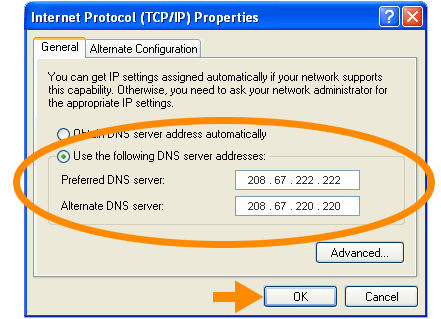 OpenDNS is totally free, and setting it up on an individual computer or a home network is easy. There's no software to download or install. To start using OpenDNS on a single computer, you just need to change your TCP/IP Properties so that your DNS server addresses point to OpenDNS. If you have a home network, just login to the router and tweak a couple of settings there. Complete instructions can be found on this OpenDNS Setup page. Note that you DO NOT have to create a free account to use the service.
OpenDNS gives you some additional benefits as well. Here are some of the highlights.
Phishing Protection
The anti-phishing protection built into OpenDNS can help to protect you from scammers who want to whisk you off to some dark corner of the Internet. OpenDNS utilizes the most respected phishing database technology available, PhishTank. This feature will not only warn you when a site is a phishing site, but it will also prevent you from accessing the site. Learn more about phishing in my companion article Phishing Scams.
Typo Corrections
Another perk offered by OpenDNS is typo corrections. This feature helps you find the site you're searching for by offering spelling suggestions when you mistype a web address. For example, if you type in "www.disneymoveyclub.com", OpenDNS will display a page that says "You tried to visit www.disneymoveyclub.com, which is not loading. Did you mean disneymovieclub.com?" And in cases where you make a simple typo that OpenDNS can figure out automatically, you'll just go straight to the desired site. For example, if you enter "google.cmo" or "craigslist.ogr" OpenDNS will do the right thing. This is a great alternative to the useless error page that normally appears when you enter a web address incorrectly.
Shortcuts
Another great benefit offered by OpenDNS is their shortcut utility. This allows you to assign a shortcut to long web address, similar to AOL keywords. For example, you can create a shortcut like "FF" for "www.FlowersFast.com" or "G" for "www.google.com" so that you can get to these sites without having to enter the entire web address. These shortcuts work great if you have a list of sites that you visit often, or if you have kids who have trouble typing long URLs. The Shortcuts feature requires that you create a free account and be logged in to OpenDNS.
Parental Controls
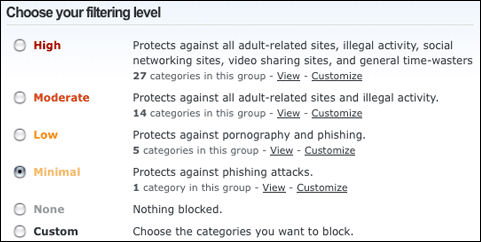 Parental controls are also offered by OpenDNS. What makes OpenDNS's parental controls special is that they offer so many different filtering choices. You can choose a filtering level of High, Moderate, Low, Minimal, None or choose Custom and then select the filtering categories that you want in effect. To create a filter all you have to do is check the box next to the filter category. Or if you like, you can filter specific sites that are off-limits for your kids. Parental Controls also requires an OpenDNS account.
OpenDNS = Better Internet Access
Overall, OpenDNS offers you a safer and more reliable Internet experience. In addition to protecting you from phishing scams and helping you to find the information that you actually want, OpenDNS also increases the speed and reliability of your Internet service. They accomplish this by increasing the speed at which your web pages load and reducing the amount of disruptions to your Internet service. Honestly, I don't see any downside to using OpenDNS. Questions, comments? Post your thoughts below...


This article was posted by Bob Rankin on 21 Apr 2009
| For Fun: Buy Bob a Snickers. |
 |
Prev Article: Internet Explorer 8 |

The Top Twenty |
Next Article: Best Portable GPS |
 |
Post your Comments, Questions or Suggestions
|
Free Tech Support -- Ask Bob Rankin Subscribe to AskBobRankin Updates: Free Newsletter Copyright © 2005 - Bob Rankin - All Rights Reserved About Us Privacy Policy RSS/XML |
Article information: AskBobRankin -- What is OpenDNS? (Posted: 21 Apr 2009)
Source: https://askbobrankin.com/what_is_opendns.html
Copyright © 2005 - Bob Rankin - All Rights Reserved
Most recent comments on "What is OpenDNS?"
Posted by:

MmeMoxie
22 Apr 2009
Bob, thank you for this article. I have never heard of OpenDNS and what it does. I am 'trial-testing' it right now, to see if, it really does access the Internet faster. I really like that it is FREE and you have 'control' over your settings. I have learned to 'listen' to you, over the years and have usually been quite pleased with your suggestions or insights. I am a BIG fan of Hulu, due to your article about what it is and does.
Posted by:

Mary
22 Apr 2009
I like the typo correction feature. Sometimes I transpose letters in a URL and OpenDNS has caught every one.
My only "complaint" is a couple of times the OpenDNS servers were down. Even though I had the radio button checked for "Obtain an IP address automatically" (in TCP/IP Properties dialog box), I wasn't able to access the internet until I removed the OpenDNS Preferred and Alternate DNS Server addresses.
I thought by having the radio button checked for "Obtain an IP address automatically" that if the OpenDNS address(es) were not available for whatever reason, it would default back to my own ISP's address. Apparently, that's not the case.
EDITOR'S NOTE: No, you are correct. Your IP address will always be assigned by your ISP. But you CAN use OpenDNS as the primary DNS server, and your ISP's DNS server as secondary. (Ask your ISP what address to use for the DNS server.)
Posted by:

Mary
22 Apr 2009
Follow-up to above: According to "ipconfig /all" my ISP IP address is xxx.xxx.24.37. It also shows a default gateway as xxx.xxx.24.38.
For clarification, are you saying I should use the OpenDNS IP address 208.67.222.222 as the Preferred DNS server and my ISP's address as the Alternate DNS server? If yes, do I use the xxx .37 or .38 (default gateway)?
EDITOR'S NOTE: No, you don't want to use your IP address or the gateway address as a DNS server value. Since it can be tricky to determine the ISP's DNS server, I'm changing my advice to "Ask your ISP what address to use for the DNS server".
Buf if you're geeky, read on... The trickiness arises from the fact that IPCONFIG /ALL will not report the correct DNS server numbers if you're connected to a router which implements Network Address Translation (NAT), and most routers do. You CAN login to your router, poke around a bit, and find the DNS server addresses on your own. But there are so many different types of routers, that I have to leave it as an exercise to the reader to navigate that path. :-)
Posted by:

Mary
23 Apr 2009
Last follow-up, I promise. No router, just a modem. I remembered when I first set up the modem I had to access a special IP address to input my user information. I returned to that IP address today and it included system information such as:
DNS Servers xxx.xx.156.1 dnsr1.sbcglobal.net
xxx.xx.157.1 dnsr2.sbcglobal.net
Now my question is should I use OpenDNS 208.67.222.222 as the Preferred DNS server and ...156.1 as the Alternate DNS server? Thanks so much for your time and putting up with this not-so-computer-literate person.
EDITOR'S NOTE: Yes! You got it right.
Posted by:

jim lennon
23 Apr 2009
sorry a novice here, we have three laptops, three gameing devices, playstation gameboy etc, and a couple of iphones all attatched to our wireless home network. sometimes they trip up getting a connection will they work better, or need setting up individually, if i use open DNS. thanks, jim lennon.
EDITOR'S NOTE: I don't think OpenDNS will help with your wireless connections. If you do try it, you won't need to do anything differently with your various wireless devices.
Posted by:

Ross
24 Apr 2009
This sounds like a very interesting service. I have a couple concerns. As this becomes more and more popular, will they be able to handle the demand? My ISP had a major outage a couple months ago when their DNS servers crashed. To the typical web user, it was a full out outage. OpenDNS will suffer the same from time to time. Using my ISP as secondary could reduce the impact if the router is smart enough to reroute.
Phishing filters are becoming common on most teir one ISP systems but they are an added advantage always.
My concern lays in will OpenDNS be able to keep up with demand? A smart ISP keeps their DNS servers very "close" to their users and upgrades / adds as demand grows. How long before OpenDNS becomes over utilized? Can they grow enough to not become a bottle neck?
Cable modem service was great in the beginning until it became so popular that it slowed to a crawl. Thankfully, most cable operators solved that with added capacity but they were making money. How will OpenDNS afford the servers and internet connections to grow?
I will try this service and see how we make out.
EDITOR'S NOTE: OpenDNS has been around for several years, and is processing billions of connections per day. They seem to have things under control. :-)
Posted by:

charles
24 Apr 2009
I am a novice and I had nothing but problems. Here is a summary not to ask for help but to make others aware there could be problems and it will be more than just a 2 minute setup. OpenDNS would not let me set up a network in the dashboard setting. When I clicked the IP# I kept getting message: "network is a subset of another members CLOSED network". Therefore I wasn't able to set anything else up on the dashboard because I would then get a message that I needed to add a network (catch22). I now had OpenDNS on my pc without a network so I could not adjust any settings on the dashboard & a lot of my websites were being blocked (ie Utube)evidently because controls were set high which I couldn't get to! I emailed for help from DNS & their response was you must petition your ISP to allow you to add a "child" network for your IP. Boy that cleared it up for me. I had to reset the DNS 1 & 2 on my router & go back to default so I could go to my websites.
Posted by:

James Barrett
25 Apr 2009
Hi Bob -
I'm one of your satisfied readers in Uk. My comment relates to that on the OpenDNS topic.
So my query to Google would go out to my router, across our natiomnal carrier BT's DSL circuit, into BT's core, over to the ISP's central pipe, into the ISP's core, past the VLAN containing their DNS servers, out their POP onto their 'fat pipe' to the internet and across to the data centre presumably in the USA where OpenDNS has their nameservers, where a front end srever checks your request against your user config before passing the actual request to the actual DNS...and then the info travels back again. The benefits to us outside the USA seem mainly in in configuriong blocking policies as far as we can see.
Web address shortforms? The last 3 iterations of browsers already recollect your browsing history to the extent of auto-completing the address you are typing. No, not for us.
Posted by:

Jeff
06 May 2009
Hi Bob - everyone knows that nothing is free, and OpenDNS would need to run a pretty big, expensive data centre. I visited the OpenDNS website to try to get some insight into their value proposition - nothing obvious there....so, how do they make money?
EDITOR'S NOTE: They make money from the advertising on the page that appears when you type an invalid URL. Who'da think it? Big money in typos.
Posted by:

Norman
07 May 2009
Hi - couple of things, one in repsonse to James Barretts' comment that using a DNS lookup service in the US would slow things down. I live in the UK and have used OpenDNS for over a year now, and I have never noticed any significant delay. This is because they have a "globally distributed network".
My only prob has been when using it in our church. We use a wirelss router to provide access to the internet, and use OpenDNS to provide content control. However since we have a dynamic IP address and OpenDNS uses the IP address to set the level of content control, every time the IP address changes we have to manually let OpenDNS know (we don't run with a PC permanently connected, just the modem/router). Good news is that, according to a recent newsletter from them, OpenDNS is linking with Netgear who will provide routers with OpenDNS configured to cope with dynamic IP addresses so that should take care of this issue. I don't have the problem at home as my PC runs an IP monitor which updates OpenDNS whenever my ISP assigns me a new IP address.
Posted by:

Andrew
07 May 2009
Thanks for this article. I have followed the instructions, have created an account and am giving it a try. With just a modem at the moment (and no router), the set up was straightforward and I haven't encountered any problems yet.
Much appreciated, particularly, are the 'parental' controls and the stats feature (disabled by default). I already have some protection against phishing and dangerous sites, thanks to Firefox/Google (I believe).
What concerns me is how they can offer this service free - TANSTAAFL! Are they selling net usage information? (Not a problem, so long as they don't sell identifiable information with it)
EDITOR'SD NOTE: As far as I know, their income derives from the ads on the OpenDNS Guide page, which appears when you type a keyword or URL that cannot be resolved. See http://www.opendns.com/privacy/
Posted by:

Allan
07 May 2009
I tried it. It didn't work. I entered the required data into my router, I set up my account, but it kept saying I hadn't done it and still needed to enter the 208..... numbers. When I check the router the new information is there. Any ideas?
Posted by:

Rob
08 May 2009
I too have experinced the same issue as Allan. But I think it's workng anyway. I went ahead and set up an account and I enabled STATS. I'm seeing a graph of statistics when I go in to view them, athough I don't know what they mean.
I have a Buffalo G54S router and connect via wireless and wonder if my router is operating much like Jim Lennon?
Thanks!
Posted by:

Gary
09 May 2009
Like Allan I tries to configure my router for OpenDNS, but kept getting the message that I was not connected to their service. I subsequently determined that I had set the preferred DNS servers in XP previously, but had forgoten this. I then set these to to OpenDNS and have been using their service for most of a year flawlessly.
It seems that if a DNS server is defined in XP it over rides the setting in my Linksys router.
Hope this might help.
Posted by:

Hector
11 May 2009
Thanks a lot Bob for this article. I tried OpenDNS in my Vista Laptop, but since I am a Linux fan I would want to know if: Can I set up my Ubuntu 9.04 operating system (installed via Wubi) to use Open DNS? Thanks in advance.
Posted by:

Daniel
05 Jun 2009
I've used OpenDNS for a little while and think it is a great service to add some protection for family surfing.
For Norman & a couple of others, look at downloading the "Dynamic IP" update software that OpenDNS offer (Windows, MAC & Linux). This runs on your machine and detects if your IP address has changed since the last time, updating OpenDNS's records. You just need to configure it with your OpenDNS account information and it will transparently keep your PC in sync with your account & preferences.
On many routers & ADSL/Cable modems there is an option to use Dynamic DNS already, you just need to put in your account information and point it to OpenDNS's machine (this option may be greyed and have dyndns.org as an example). If you have multiple PC's & laptops in the family, then setting up OpenDNS on the router is the easiest thing, as you'll only have to do it once! (all the machines will be able to get their settings as before from the router). Hopefully you have different password on the router to stop prying eyes from trying to circumvent the filtering...
Hector, of course you can use Linux! 80-90% of the world's infrastructure is using Linux or Unix. OpenDNS provide the ddclient package on their site for doing the dynamic update, although you may have to search for it, as the buttons on the webpage initially only offer Mac & M$. With ddclient you also have all the goodness of Open Source Software, you can examine it yourself to make sure it is not some trojan or spyware etc, and the writers even encourage you to give copies to your friends so that they can benefit too!
A final feature, for the struggling parent, individual sites can be blacklisted too. A fine-grained virtual "grounded" if you will, when their favourite online games/social network etc. site/s is/are put out of limits. Un-blacklisting is of course trivial allowing surfing privileges to be restored when the usual good behaviour returns - firm but fair me!
Posted by:

ardyanovich
03 Dec 2009
Okay, so let me get this straight: If I use OpenDNS, will I be getting free internet or will I be getting a faster connection for free (while still having to pay for my internet bill)?
EDITOR'S NOTE: No free Internet, just faster browsing.
Posted by:

Pili Potter
18 Aug 2012
Hi, the DNS numbers on my router website are 'fixed', meaning I can't do anything to them. I tried going into Edit mode, but I'm still not able to change them. Is this normal in some cases? I have Netopia router? modem?