


Don't Fall Victim to Scareware
A reader asks: 'I have heard of software, shareware, freeware, trialware and malware. And I think I know what all those things are. But what exactly is scareware?' Here's the scoop on these rogues that prey on misinformation and fear... |
What is Scareware?
You're surfing the Net and a popup warns you there is a problem on your computer. You're not sure if it's real or not, so what do you do? Here's another example. Windows displays a cryptic error code, and you Google it to find a solution. A free download promises to diagnose the problem, but after running the program, it demands money to apply the fix. Be careful, it could be scareware. I define scareware like this:
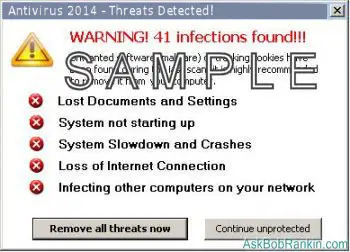
If you see a popup like the ones on this page, or messages like "CRITICAL ERROR! - REGISTRY CORRUPTED" or "WARNING - PRIVACY VIOLATIONS FOUND" ...then your scareware spider-sense should be kicking in. Scareware popups often warn about problems with the Windows registry, tracking cookies, spyware or viruses. The names sound innocent enough... AntiVirus Plus, WinDefender, or ErrorEND.
Some people are tricked into downloading free diagnostic tools that run a scan (or pretend to) and then present you with warnings about spyware or evil cookies that were detected. Typically, you must "register" the software to activate or download the code that will fix your problems. You may be charged you $29, $49, or another amount, but you may also be giving your credit card and/or bank information to identity thieves.
For years, scareware scammers have used popups appearing on web pages to lure people into their lairs. Flashing text and urgent warnings are common elements used. But a friend recently alerted me to a new technique, which appears more legitimate, but is equally insidious.
While setting up an email account, he got this message: “Error code 0x800CCCDD IMAP server closed the connection.” He Googled “Error code 0x800CCCDD” and the first result that popped up was this:
0x800cccdd.wiki-errors.com/
(Recommended)
Not realizing at first that it was an ad, he clicked on the link, trusting that his antivirus would warn him if anything was amiss. The domain name wiki-errors.com and the style of the pages there are designed to imitate a widely trusted source: Wikipedia. It looks familiar, and familiarity breeds complacency. People tend to believe what they read on a “wiki” of any sort.
The article on the page looks legit. It explains that there could be many configuration and system errors on a PC, and that they can cause actual damage to your system. Then it offers two methods of curing the errors: one apparently difficult and the other blissfully easy. The easy solution is to download and run a program called ErrorEND. It will discover all the configuration errors in your system and fix them while you watch, the article promises. ErrorEND’s technology is even touted as “patent-pending” to add to the air of legitimacy.
My friend was tech savvy, so he sensed trouble, but decided to proceed, just to see what he could learn. He downloaded the file, ran a virus scan on it: “no problems found,” Avast reported. (That doesn’t mean there won’t be problems. Any executable program with access to the Internet can download and install something else without you even realizing it.) After starting the program, up popped a screen that showed ErrorEND very busy for several minutes. The result is in this screen capture image:
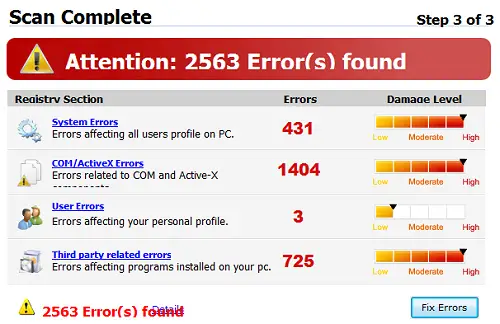
Over 2500 errors, and his computer was in the red zone, indicating a “High Damage Level!” In addition, a warm contralto female voice warned that he had better run the “fix” and urged him to “register” ErrorEND for a limited-time discount off the regular $79.95 price. His computer could be saved from imminent meltdown for only $29.95! Of course, he backed away slowly at that point. Subsequent scans by Avast, Advanced System Care Pro and Privazer revealed no problems at all. I think it’s pretty obvious that ErrorEND’s “scan” doesn’t really scan anything; it just presents nearly the same alarming results every time it’s run. I wonder how many people have paid $29.95 for no good reason. I also wonder what else was downloaded when they bought and downloaded the “fixer” part of ErrorEND.
Some scareware programs are marginally useful, and will actually diagnose certain problems. But there are plenty of free and reliable tools to do these things for free. See my articles Five Free PC Maintenance Tools and Clean and Sanitize Your PC With PrivaZer for some examples that are trustworthy.
BOTTOM LINE: Do not click, do not pass go, do not fall for the scam. If you have ANY doubts about a popup or error message, ask a computer savvy friend or your tech support person at work. If you have no friends and no job, try Googling the message on your screen.
What About the REAL Error Messages?
Of course you may occasionally see a warning or error message appear on your screen that's legitimate. Windows may ask for permission to install some new software, warn you that some other program is trying to modify your system settings. If you are in fact installing new software, you can be pretty sure that it's safe to proceed.
Your anti-virus program may find something, and ask you if it should be deleted or quarantined. If you recognize the warning as definitely coming from a security tool you have installed, then it should be safe to heed to warning.
And of course take pro-active measures to protect yourself. Use a firewall to lock out intruders. See my article Do I Need a Firewall? for more info on firewalls. Install high-quality anti-virus and anti-spyware protection. My article Free Anti-Virus Software will point you to some excellent FREE tool to protect against viruses, spyware and other cybernasties.
Have you been affected by scareware? Do you have any tips, words of warning, or questions? Post a comment below...


This article was posted by Bob Rankin on 4 Nov 2013
| For Fun: Buy Bob a Snickers. |
 |
Prev Article: SCAM ALERT: Mobile Device Insurance and Extended Warranties |

The Top Twenty |
Next Article: Big Brother Needs Your Help! |
 |
Post your Comments, Questions or Suggestions
|
Free Tech Support -- Ask Bob Rankin Subscribe to AskBobRankin Updates: Free Newsletter Copyright © 2005 - Bob Rankin - All Rights Reserved About Us Privacy Policy RSS/XML |
Article information: AskBobRankin -- Don't Fall Victim to Scareware (Posted: 4 Nov 2013)
Source: https://askbobrankin.com/dont_fall_victim_to_scareware.html
Copyright © 2005 - Bob Rankin - All Rights Reserved

Most recent comments on "Don't Fall Victim to Scareware"
Posted by:

Lucy
04 Nov 2013
Thanks for the warning Bob.
I use Adblock Plus, it is certainly great for not seeing ads of any kind. would it also block this kind of pop up as I guess it is really an ad?
Posted by:

Sean
04 Nov 2013
I've often wondered how that money cant be tracked back to the source and have these people shut down?
Posted by:

Retta Vesely
04 Nov 2013
Bob...your article is exactly what Avast told me, and when I phoned, (India), they said they could fix it for 77.00. Just give them your credit card # and they will "climb inside" your computer and fix what is wrong. Thank heavens, I don't have one! That's why I was surprised about last weeks recommendation for Avast. I like the actual antivirus, but not the people to deal with.
Enjoy your newsletters.
Posted by:

joseph
04 Nov 2013
Whoah just a minute. Now you ARE telling us to put in firewalls? Didn't you say a while back that these days routers are protected?
EDITOR'S NOTE: I'm guessing you didn't read the linked article "Do I Really Need a Firewall?"
Posted by:

Rick
04 Nov 2013
Thank you for making and keeping people aware of 'scareware'. Several years ago before 'scareware' was common and I was anything but computer savvy I responded to a 'scareware' WARNING. Unfortunately it advised me my system was compromised in 12 ways to Sunday. When I ran the free scan it was kind enough to deposit a virus which ultimately froze my system. At the time I was using an old old lap top which could barely operate smoothly with Windows XP so it took me awhile to figure out I had done something very stupid.
Once you do this and have the joy of reformating your hard drive and reloading an operation system without the proper system tools or information and knowledge you become acutely aware of the nightmares lurking online. It taught me a lot about computers and operations systems but it wasn't how I wanted to learn.
Even today sometimes I think I take things for granted and continue to be vulnerable to this kind of nightmare. So again, thank you for keeping this in front of all our faces to help us NOT to forget what is lurking just at the edge of our online world that is waiting to bite us on the ass in so many different ways.
Posted by:

Howard
04 Nov 2013
I got an unspecified error 0x80004005 which is a legit code. I googled and got the scam website with the same result of 2500 errors. I got away quick.
Posted by:

Dennis
04 Nov 2013
Oddly enough, when I did the free PC Matic scan I got similar results. I purchased it and one month later, after assuring me I was protected, I got a virus that morphed and destroyed my laptop along with peace of mind. I no longer use them. I've used other programs you've suggested and am having good results. Thanks for the info/updates.
Posted by:

Bob Bailey
04 Nov 2013
Following your article on Scareware I downloaded & installed Comodo System Cleaner. It opened scanning, found a few things that needed fixing. When I pressed "Fix", a new screen told me I had to "Upgrade" to "enjoy" getting the problems fixed.
This in itself is scareware and I really resent being sucked in by "FREE" software claims. I "Xed" out and removed the program with my favorite uninstaller - Revo Uninstaller
EDITOR'S NOTE: Seems that the Comodo has yanked System Cleaner as a standalone tool, and the link now goes to Comodo PC Tuneup, a paid product. Thanks for bringing this to my attention.
Posted by:

salim
04 Nov 2013
& all of that put together is:
scamware..
Posted by:

humbug7
05 Nov 2013
DLL Suite...I ran into this when researching an error that was ultimately traced back to ANOTHER "maintenance" program (Powersuite by Uniblue) removing "unused programs" without a comprehensive listing or the ability to pick and choose what they delete. They removed a DLL that is critical for operation of HP printers.
DLL Suite found over 400 "missing DLLs" on the preliminary scan...and of course, these can ONLY be fixed by buying their product. Turns out most of the "missing" DLLs were actually for older versions of Windows (which was readily visible in the file path included in the error message) or weren't really missing...they are just stored elsewhere in Windows 7. The relevant, really missing print DLL is available via Windows Fixit tool. Needless to say, I advised the friend I was helping to stay away from this type of "helpful" software (and also to seriously reconsider the use of Powersuite).
Posted by:

David Guillaume
05 Nov 2013
Hi Bob - Here is a little tip for windows users every morning as soon as my computer has booted up I create a restore point before I do anything else. Its a very simple thing to do. (IE DG04) being my initials and the date of the actual day.
This small task which takes only a couple of minutes to do has saved my bacon more times than I can count. If you get a nasty problem just run the restore and you are back to your computer purring like a spoilt pussy cat. Regards David
Posted by:

Peter M. Stellas
05 Nov 2013
Thanks for your very useful information, Bob. You have saved me from many a scam before, but this notice came a day late, after I paid the $29.95 to Driverupdate that claims that it is Microsoft Gold Certified. It appears to have done the updating as claimed, but I can never be sure that I had the problem in the first place.
EDITOR'S NOTE: Kind of like going to the auto mechanic, and he says "You need new brake pads, a pressure control valve, and a radiator flush." If you're not savvy about car stuff, you'll never know.
Posted by:

Tereasa
06 Nov 2013
I just used PrivaZer and found it to be as reported totally free (unless you would like to donate) which I did because the program is fantastic and did a wonderful job cleaning up my computer system and leaving me with a LOT of extra space! I thought I had a problem after I had scanned my computer and so I went to their support site and asked for help, I could not believe the turn around time, someone actually got right back with me! I found out before they did that the problem actually had nothing to do with the scan but my browser and I fixed that, however it was very comforting to find that someone will be there to help if anything should ever come up! Highly recommend PrivaZer and thank you Bob for the heads up! Very Grateful.