


Check Out These Roku Models for Cord Cutters
The Roku family of streaming video players has become the go-to product for those who want to drop cable TV and rely on Internet video sources like Netflix, Hulu and Youtube for their entertainment needs. Let’s see if one of these Roku devices can turn you into a cord cutter... |
Are You Ready for a Roku?
Millions of consumers are "cutting the cord" by cancelling their expensive cable TV subscriptions. Instead, they use a streaming media gadget like Roku to bring movies, TV shows and online video to their television screens. (Roku is pronounced like "row-koo.")
A Roku player plugs into one of your TV's input slots, and connects to your high-speed Internet to bring a wide selection of entertainment options to your living room. Hundreds of free channels are available, but additional charges apply for subscriptions to Netflix, Hulu, Youtube TV, Amazon video and other streaming services.
Most consumers find that some combination of the above can replace their cable TV service at a lower monthly cost. Today, we'll take a look at the new line of Roku devices that help to power the cord-cutting revolution. Cord Cutters Plus is a service that aims to help consumers save hundreds of dollars per year on TV, Internet and phone services. A live-streaming spreadsheet on the site compares the features and pricing for the most popular streaming services, and helps cord cutters choose the most economical package to replace existing cable TV service.
What's New, Roku?
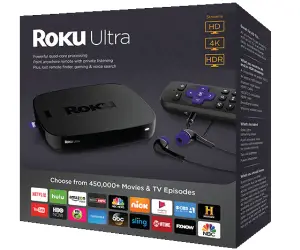
At the high-end, the updated Roku Ultra has 4K capability and the most powerful hardware specs of the line. The enhanced voice-enabled remote has personal shortcut buttons and TV controls. There's also a lost remote finder if you're prone to carrying it around the house. The Roku Ultra comes with Premium JBL Headphones and retails for $100, but Amazon has it for $80 with free Prime 2-day shipping.
One step down is the Roku Premiere, a player for HD and 4K Ultra TVs. The Roku Premiere sells on Amazon for $40. The Roku Premiere+ adds HDR capability, if your TV supports high-dynamic range. I recently replaced my older "hockey puck" Roku with the slimmer Premiere model and it works beautifully.
The updated Roku Express is just $30 (or $25 on Amazon). The processor in the latest model is five times faster than previous generations, which should improve performance. The Express model includes a high-speed HDMI cable to connect to your TV. It's great for first-time streamers, or for a secondary TV in your home.
The $42 Roku 4K Streaming Stick+ is a smaller gadget that plugs directly into your TV’s HDMI port. A dual-band WiFi adapter built into the power cord greatly improves throughput, especially when streaming super-high-definition 4K and HDR content. This is a direct competitor to Amazon’s 4K-capable Fire TV stick.
Amazon sells most Roku models at a discounted price, and has free 2-day shipping if you're an Amazon Prime member. You can checkout the full Roku lineup now, or order directly from Roku.
Roku's Latest Innovations
All Roku boxes and Roku-enabled TVs are getting natural-language voice control. Speak into the remote and say what you want to watch, and Roku will search for results available in the streaming channels available.
One really nice feature for cord-cutters with a Roku-enabled TV and an HD antenna is the Smart Guide. This easy-to-use program guide shows you what’s playing on your local over-the-air broadcast channels.
Roku is the current leader in the streaming device arena, but others such as Apple TV, Google's ChromeCast, and Amazon's Fire TV Stick are worthy competitors as well.
Are you a cord-cutter? If so, what combination of services have you used to replace your cable TV subscription? If not, why not? Your thoughts on this topic are welcome. Post your comment or question below.


This article was posted by Bob Rankin on 12 Dec 2019
| For Fun: Buy Bob a Snickers. |
 |
Prev Article: Geekly Update - 11 December 2019 |

The Top Twenty |
Next Article: Extra Security: Offline Malware Scanners |
 |
Post your Comments, Questions or Suggestions
|
Free Tech Support -- Ask Bob Rankin Subscribe to AskBobRankin Updates: Free Newsletter Copyright © 2005 - Bob Rankin - All Rights Reserved About Us Privacy Policy RSS/XML |
Article information: AskBobRankin -- Check Out These Roku Models for Cord Cutters (Posted: 12 Dec 2019)
Source: https://askbobrankin.com/check_out_these_roku_models_for_cord_cutters.html
Copyright © 2005 - Bob Rankin - All Rights Reserved
Most recent comments on "Check Out These Roku Models for Cord Cutters"
Posted by:

Linda
12 Dec 2019
We cut the cord several years ago, but then went back to getting Directv through AT&T because the cost of internet alone was almost the same as getting a bundled package. In fact, internet plus one of the services (such as Youtubetv) would cost more than we pay to have 120+ channels.
Posted by:

Dan Morgan
12 Dec 2019
I have been a long time user of Roku and can't recommend it enough. I currently have a Roku-enabled TV and Roku Ultra and don't miss cable at all. If there was one improvement I'd make to Roku it would be to enable HD antennas on their devices like the Ultra. I suppose, though, that would be a more appropriate comment on the Roku website than here.
Posted by:

Doug W.
12 Dec 2019
We still have cable, which provides our house with TV, 200 MB internet, and VOIP telephone. We only watch "free" channels on cable, and enjoy the many channels that cable provides. We don't subscribe to any other paid programming (Netflix, HBO, YouTube TV, etc) and don't miss them. Each year, I call the cable company and re-negotiate our subscription to their current low-cost special promo deal, and they are always happy to oblige. We have a fire stick on a back room TV, and I get tired of always logging in to my cable account to permit watching their locked content, which I'm guessing I'd have to pay for anyway without my cable account.
Posted by:

AlanRC
12 Dec 2019
I cut the cord a few years ago, and we went to over-the-air broadcast of local channels with a TIVO box for time-shifting. We love the TIVO, but the local broadcast signal sometimes varies. Our HOA does not allow rooftop antennas, so we have been using indoor antennas. It worked great at first, but the signal strength has deteriorated recently for some reason. We haven't tried Roku, but we did try Pluto TV and also Hulu. The problem I see with those services is that they don't give live broadcast of local channels, plus most have subscription fees. (Pluto is free) I still haven't found the perfect solution.
Posted by:

Richard R
12 Dec 2019
I have had Roku players for about 10 years, to stream Netflix and Amazon Prime. Last year, I cut the cord when my TV provider raised the price again. I already had four ROKU players on four TV's because of Netflix and Amazon. My TV provider raised the cost to $160 plus internet which included T/V and 10mb internet. No more expensive tv box fees, I gave them back. My cost went to $84.95 a month for all the TV channels I care to watch on 4 TV's.
Posted by:

Walter
12 Dec 2019
Love the Roku's, have mostly the top of the line 4K ones. Great for older smart TVs where Hulu won't work anymore. The chromecast is a waste of time. We've had various streaming services and antenna for the last several years. If I get rich I might get cable, but otherwise not.
Posted by:

Phil
12 Dec 2019
I echo Doug W's comment exactly. I've got my cable/internet subscription down to $107/mo including all the fees. If I cut the cable then my internet goes up $15/mo. I have amazon prime and Netflix and that's as far as I'll go with subscriptions and it's plenty of tv. I'd like to hear how other cable cutters record shows.
Posted by:

Colton
12 Dec 2019
I have Roku, love it. I'm too far out of the city to get over the air, so, yes, have cable subscription with internet. Best find for watching is MHz. Just dropped Netflix, can do without.
Posted by:

Tim
12 Dec 2019
I cut the cord a year ago. I was paying $265/month for the triple-play bundle at Comcast. Too much! I use two over-the-air (OTA) antennas connected to an HDHomeRun Quatro tuner which provides DVR capabilities. I use a Plex server to manage the DVR recordings, and it all feeds via wired/wireless network to Amazon Fire TV 4K Sticks running Plex on three TVs. Once it is set up, OTA is FREE, and the broadcast resolution is much higher than the compressed cable signal. I supplement the broadcast TV with Philo for an extra 58 channels such as A&E, Discovery, Hallmark, History, TLC, etc (many of the channels that are in cable bundles). I already had Amazon Prime and Netflix, which I continue to use. I save a lot, which quickly paid for setting it up. The Plex software provides the up-to-date guide grid, and manages recordings and playback.
Posted by:

Michael
12 Dec 2019
I have a Roku TV (TCL X5000)which is several years old and the built in Roku device works great. Additionally, I have subscriptions to Hulu, Netflix, and Amazon Prime. Even with all this we had cable to watch the local channels. About 6 months ago I cut the cord, got an antenna, a Tablo, and an external hard drive. With the Tablo and the hard drive I can watch and record local television. I spent about $300 on the antenna, Tablo, and hard drive and reduced my cable bill by $100 a month. I do subscribe to the Tablo guide ($4.95/month) All together, with my internet service, which I also use for home computers, tablets, and phones, my monthly bill comes to a about $105 a month, and I have more entertainment sources than I can use.
Posted by:

John
13 Dec 2019
Seems like a plug for Roku as there are several equally if not better alternatives. I personally do not like ROKU as I got burned years ago. My 1080P Roku stick became obsolete within a year. I personally prefer the 4K Firestick as it can do all that Roku can do, plus you can load your own apps. I have Firefox and PIA installed. I know others who also install Perfect Player, LiveNet TV, and KODI. The Firestick is very versatile.
EDITOR'S NOTE: I've owned several Roku devices and two Chromecasts as well. Roku seems to have edge in terms of depth of content, and I think that's because they are not bound to the Amazon, Google or Apple ecosystems.
Posted by:

RandiO
13 Dec 2019
@John >> "Seems like a plug for Roku...": I thought maybe it was a plug for amazon, since quick ebay search shows that the RokuUltra at the same total price (free S/H) but without needing a paid 'prime' membership.
Posted by:

Linda
13 Dec 2019
We 'cut the cord' a couple of years ago and I miss it!! Netflix does NOT replace cable. I used to watch a lot of sports, documentaries, dramas, and comedy shows on cable. I no longer have a TV so getting a Roku, with the added cost of getting a TV, is probably too costly.
Posted by:

Emily Booth
13 Dec 2019
I watch primarily movies so I opted to not get cable service from my HOA even tho my assmt includes it. I started with Netflix DVD, added Amazon Prime and recently added Criterion. My monthly fee altogether is $27 and Amazon Prime has other services. I like Amazon Prime and Netflix because it's very easy to add streaming cable and movies for one time viewing and cancel.
Posted by:

John T
23 Dec 2019
I cut the chord over 4 years ago. Don't miss it at all. I invested in a Channel Master DVR and 2 antennas in my attic for my local over the air channels. I also later purchased a Roku3 which I still have and it works fine for my streaming of Sling TV and Netflix. I am now looking into the AirTV box that will stream my local channels and place them in my Sling TV channel list! And like with my Channel Master DVR I can record my local channels to an external HD then stream those to any TV that is linked to my home network.
Posted by:

David
27 Dec 2019
I think I watch too much T/V, but i'm not stopping. I pay just over $300 per month for Directv with whole home DVR and a wireless genie box and separate internet. The problem is the only thing I watch live is football and baseball. I am a huge racing fan (esp. NASCAR) and I watch everything after the fact (usually the same day).
I need something to cover all of the major sports, incl. racing, and the different networks they are broadcast on, with DVR and local channels (though I do have an antenna for locals when satellite rarely goes out).
Anything that meets all criteria?
Posted by:

Kerry
12 Aug 2021
I've had Roku for a long time and recently "upgraded" from the "hockey puck" to the Premier. The only disappointments were, no Ethernet and no
5 GHz wireless feed. The 2 GHz is very crowded here but, so far, works ok.
Posted by:

Eric
16 Sep 2021
We cut the cord a year ago with a 4K Firestick. The experience with it was not good. There were a lot of freezes and reboots. All of our cord cutting friends were claiming great results, so we decided it had to just be the firestick causing our woes. We switched to a Roku Ultra LT that we picked up at Wally World and have been much happier. We have since discovered that our freezing and rebooting issues were caused by our Cox Internet. The Roku handles it so much better than the Firestick did. Overall, even with the dodgy Internet issue, we are happier. Our bank account is a lot happier.