


[HOWTO] Convert Vinyl Records to CD or MP3
For seasoned audio purists, nothing compares to good old-fashioned analog recordings on vinyl LP records. But those old records are fragile... here's a step-by-step guide to help you convert vinyl to CD disc or MP3 files so you can enjoy them for years to come... |
Going Digital: How to Convert Your Old Records to CD or MP3 Format
Ahhh... the warm tonal attributes, those faint pops and crackles, the life-sized artwork, just the act of setting needle to groove, they all bring to mind an immersive experience of days gone by. Although advances in audio technology may bring about improved sound quality, they also result in a new set of difficulties that music enthusiasts must overcome.
With the appearance of compact discs (CD's) in the early 1980's, the production of vinyl records began its decline. Compact discs were not nearly as susceptible to degradation from repeated playback, dust and scratches. And as digital audio reproduction improved, the CD with its greater storage capacity, physical durability, and general portability, quickly became the preferred format, leaving vinyl records to slowly fade away. (See Lifetime of a CDROM.) And how that digital downloads have become the preferred way to buy music, the MP3 file format is another alternative for converting the contents of your vinyl record collection.
The number of recordings that ceased to exist with the declining popularity of vinyl is huge. For some audiophiles, this presents a very real problem; because of the inherently fragile form of vinyl records, as well as the slight degeneration of sound quality that comes with every listen, not to mention the fact that many simply can not be replaced, owners of these relics often leave them unplayed for years at a time, collecting dust, and relying on nostalgia to fill the void.
But just as the compact disc was largely responsible for the demise of vinyl, it is this same medium that can help resurrect and preserve these analog veterans from deterioration and obscurity. And for some, MP3 files may be even more convenient, since they allow for completely digital music collections that can be enjoyed on a computer, portable music player, smartphone or tablet. Let's look at several techniques for copying vinyl records to digital format.
All-in-One Solutions
There are a few all-in-one or combination systems that make it relatively easy to transfer your vinyl recordings to compact disc or MP3 format. DAK's LP to CD System (US$69.90) is a complete package of hardware and software that will copy your treasured vinyl records to CD discs or MP3 files. It includes a Preamp Mixer, RCA to stereo cable, and software to help you optimize the audio, then burn the CD. The DAK software will remove scratches, hum, hiss and pops, and more importantly, it automatically separates the audio stream into separate tracks. If you need a high-quality turntable, you can add that for $169 extra.
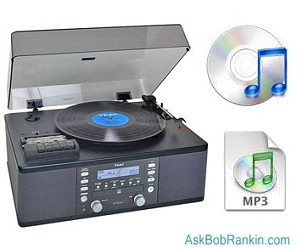
The Teac LP-R660USB-PB Turntable and CD Recorder (about US$350) is a simple all-in-one unit that lets you record both vinyl and cassettes to CD. There's no need to connect it to your computer, and no software to install. Just pop in a CD, hit the Record button, and your record or cassette will be transferred to the CD while it plays. This model also has a USB output so you can transfer music files to your computer.
Roll Your Own: Required Audio Components
 Chances are, though, you already have the necessary hardware to breathe new life into your old records. Most computers have a writable CD drive (CD burner) that will accept CD-R (record-once) or CD-RW (rewritable) media. If you don't have a CD burner, external CD-R/RW drives that connect with USB cables are readily available, priced at US$30 and up.
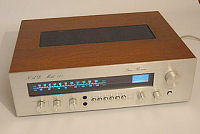 Of course, a record player (turntable) is also required. Thanks to the popularity of hip-hop and electronic music DJ cultures, there still remains a niche market for the production of turntables with both consumer and professional use in mind. Most lack built-in amplification, so a stereo amp or receiver is required to boost the signal from the player to the computer. If you need a turntable or receiver, you can find them at most large electronics stores, starting at around US $100. And of course there's always eBay.
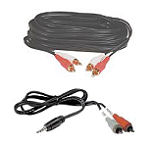 Most turntables have a pair of red and white RCA output jacks, often accompanied by a grounding terminal. Connect the color-coded outputs from the turntable to the corresponding inputs on the stereo receiver using a stereo RCA cable, ideally one that includes a third wire with U-shaped connectors that can be secured to grounding terminal screws on each component.
Your stereo receiver should include a pair of main or auxiliary outputs, which need to be connected to your computer via either a stereo RCA or RCA to 1/8-inch cable, depending upon the inputs of your computer's audio card.
For a simpler solution, the ION Audio Compact LP 3-Speed USB Conversion Turntable ($50) lets you play your treasured vinyls on this compact machine, but also comes with free downloadable audio software, and a USB cable to connect it to your computer. It may not be the highest quality turntable, but it does eliminate the need for an amplifier. RCA output jacks and RCA cables are included if you want to connect to a home stereo system.
NOTE: All of the techniques above apply equally well for transferring cassette tapes to CDs. Just substitute your cassette player for the turntable. If your cassette player does not have RCA-style audio outputs, use a 1/8-inch to RCA cable shown above.
Audio Software
In terms of software, the only real prerequisite is a simple two-track audio editor. Of course, investing $1000 in a ProTools system will certainly do the trick, but that's almost certainly more complex and expensive than you need. Instead, many shareware and freeware audio editors are available that will allow you to record, edit, and export your newly digitized audio to be burned to disc. A quick search online will produce hundreds of audio editors for both Windows and Macintosh platforms. Audacity is free audio software that comes highly recommended. See my companion article Free Audio Software for other options.
Convert vinyl to cd - Audacity audio software Most audio editors function in a similar manner. Consult the manual or help screens of your preferred application for capabilities and specifics. Be sure that your audio software is set to record the incoming signal as a 16-bit stereo .WAV or .AIF audio file with a sampling rate of 44.1 kHz, so that additional file manipulation will not be necessary prior to burning the audio onto a CD. It's also a good idea to clean the record that you are about to capture, removing as much dust and residue as possible in order to minimize noise.
Plug and Play!
Once all the wires are connected and you've fired up your audio software, just press the Record in your editing program, drop the needle in the groove, then sit back to enjoy your seldom-heard recordings. When playback is complete, stop the audio editor, at which point you will see a waveform display, serving as a visual representation of the audio signal. From here, you can keep the audio completely intact, perfectly mimicking the record itself, or you may choose to divide the recording into its constituent songs. The free Audacity can do track splitting, but it can be a bit tricky, and will require a lot of typing to enter the album, artist and song titles. But the Spin It Again software, ($35) makes converting, separating and tagging the tracks almost effortless, by integrating with online music databases. If you have a sizeable collection to convert, this will save you many hours of tedious labor.
Either way, the audio can now be burned to a CD with the aid of Windows Media Player, iTunes or the Mac OS X burning software. Commercial CD burning software such as Nero or Roxio will do the job as well. It's important to make the selection to create an Audio CD (rather than MP3, data or video). Some software also requires that you "finalize" the disc. This will ensure that your CD's are compatible with the majority of CD players. In addition, when choosing blank CD media, opt for high-quality, name brand discs; it would hardly be worth the energy if the entire process had to be repeated in just a few short years.
Digital, Safe and Portable
Getting your music collection in digital form, and having it available on your computer is good. But making sure your collection is safely backed up, easily portable, and available for listening on other devices is even better. You accomplish that by uploading your MP3 music files to cloud storage. One way is to use Google Play Music Manager. You can keep up to 50,000 songs in Google Play for free, and listen on the web or your mobile devices. The Music Manager software (Windows, Mac, or mobile) lets you upload your music collection from iTunes, Windows Media Player, or local folders.
pCloud is another option. This file sharing service lets you stash up to 20 GB of music files online, and access them on your desktop, laptop, smartphone or via a web browser. pCloud software (Windows, Mac, Linux, and mobile apps for iOS and Android) lets you easily upload and listen on the device you choose.
Got comments about converting vinyl records to digital? Post your thoughts below...
|
|
|


This article was posted by Bob Rankin on 1 Mar 2018
| For Fun: Buy Bob a Snickers. |
 |
Prev Article: Geekly Update - 28 Feb 2018 |

The Top Twenty |
Next Article: Is Satellite Internet a Good Choice? |
 |
Post your Comments, Questions or Suggestions
|
Free Tech Support -- Ask Bob Rankin Subscribe to AskBobRankin Updates: Free Newsletter Copyright © 2005 - Bob Rankin - All Rights Reserved About Us Privacy Policy RSS/XML |
Article information: AskBobRankin -- [HOWTO] Convert Vinyl Records to CD or MP3 (Posted: 1 Mar 2018)
Source: https://askbobrankin.com/howto_convert_vinyl_records_to_cd_or_mp3.html
Copyright © 2005 - Bob Rankin - All Rights Reserved
Most recent comments on "[HOWTO] Convert Vinyl Records to CD or MP3"
Posted by:

Lucy
01 Mar 2018
I recommend if you are looking for a turntable you check out Estate Sales or a Charity Thrift ... Goodwill always seem to have a great selection of electronics. The shipping cost can double the price if you buy online from eBay.
As an avid reader I haunt Estate and Yard Sales all summer looking for books.
I noticed last year that LP's that sellers couldn't even give away previously are now selling at a premium. I often see a group of younger folk sitting crossed legged on the floor passing around LP collections, occasionally excitedly waving one in the air! They do seem to be fashionable again!
Posted by:

Renaud Olgiati
01 Mar 2018
As I already had a turntable, I only bought a RCA to USB converter from Amazon for $30 https://www.amazon.com/Behringer-U-Control-Low-Latency-Interface-Digital/dp/B000KW2YEI and have had no problem at all, using that together with the Audacity free software under Linux.
Posted by:

RandiO
01 Mar 2018
How very nostalgic... Thank you!
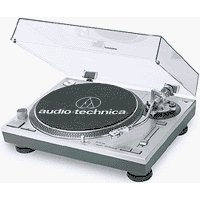
Pictured turntable appears to be mid-70s Technics SL-1200MkII, which currently can fetch up to $1k in mint condition.
A 22 year-old CS student was naively forced to devise a method of "visually" recovering audio signals from an LP record (http://www.cs.huji.ac.il/~springer/DigitalNeedle/index.html)
EDITOR'S NOTE: I think it's actually an Audio-Technica AT-LP120-USB Direct Drive Professional Turntable (about $300).
Posted by:

Cold City
01 Mar 2018
Great to have vinyl to digital, but MP3 and CD quality is poor compared to vinyl. It should be at least DVD quality. Deutsch Grammophon sells even classical music in BluRay format.
It would be nice to have a discussion in view of the audio quality of conversion.
Of course if the intent is to have background music, MP3 and CD quality is good enough.
Posted by:

Cameron
01 Mar 2018
If you're going to "roll your own hardware" and plan on using a turntable and receiver or amp, you need to make sure it's an older receiver or amp with a phono input. While most of the inputs are interchangeable (CD, aux, tape, etc. are just labels), the phono input has a preamplifier built in. The turntable will not work in the other inputs, unless you acquire an external phono preamp. (Come to think of it, if you use a phono preamp, you don't need the receiver!)
Posted by:

David
01 Mar 2018
Similar devices that could play/record etc. VHS tapes would be good to know about, in similar detail as explained in this article. I bet quite a lot of folks has old tapes of family members & holiday etc. that they'd like to get into digital format as economical as possible.
Posted by:

Richard Herath
01 Mar 2018
A pre-amplifier is only needed if your turntable has a magnetic cartridge (best quality but lower output signal). If it has a crystal cartridge a pre-amplifier is not necessary.
Posted by:

Fred
01 Mar 2018
If you are a true audiophile. you would NEVER convert to MP3.
Posted by:

Lucy
01 Mar 2018
@David .. if you want free and you have the following equipment you are gold for doing it yourself.
You need a VHS player and a DVD recorder, use RCA cables OUT of VHS machine to IN on DVD recorder, then hit play on the VHS and Record on the DVD machine.
It is slow, but when we did it we all enjoyed watching the VHS tapes by viewing via DVD machine / TV as we copied.
There are also professional companies that do it, but it can be pricey if you have a lot to transfer.
Good luck.
Some bought movies won't copy though.
Posted by:

Kenneth Heikkila
01 Mar 2018
If you are going to invest in a USB turntable (or even if you just want a new turntable for all the new vinyl being produced today, or the many, many albums available in thrift and used record stores) I highly recommend spending a bit more (~$300) for the Audio-Technica AT-LP-120 (they have a $100 model, the LP-60- I wouldn't bother,) if you want to capture a far better sound on a much better turntable. It has many of the features an audiophile would want in a turntable- direct drive high-torque motor, die cast aluminum platter, s-shaped tone arm, adjustable counterweight, built in pre-amp & pitch control. The ION is way inferior, pretty much all plastic. Our low-watt community radio station bought the ION and had to throw it out in a couple of weeks because the speed was so erratic.
Posted by:

Neuronz
01 Mar 2018
I just purschased a new Toyota Prius Prime and guess what? No CD player! Per the salesperson, CD players in cars are on the way out. If you want to listen to your own music, have it loaded on your smart phone as MP3s and connect with Bluetooth.
Posted by:

Rick
01 Mar 2018
I have a bunch of albums and started to concert them to CDs some time ago but the sound quality was so bad that I stopped. Are you telling me that there is software that will remove the pops and crackles? If do then I'm all in. Thanks Rick
Posted by:

Denis
01 Mar 2018
Once you have the MP3's created, run a normalizer or equalizer program on them to get the volume levels similar. This is a good idea if you plan to listen in the car. Before I did this I found I was adjusting the volume each time a new track started.
Posted by:

bb
01 Mar 2018
"Cold City" (with respect) You don't know what you are talking about. "MP3 and CD quality is poor compared to vinyl" is, at best, uninformed. CD quality exceeds that of human hearing. Sound engineering of vinyl and CD are different and that, not the basic technology, accounts for differences in user acceptance and quality ratings.
We agree on high-compression MP3s, they are terrible. Low compression MP3s, or FLAC for that matter, satisfy the best size to quality ratio.
Posted by:

wlo
02 Mar 2018
I've used Vinyl Studio with great success to convert some of my vinyl collection to CDs. Has 'click & pop' removal, track separation, and many other features. Some may want to give it a try -- www.alpinesoft.co.uk. Many positive reviews.
Posted by:

James Thornton
02 Mar 2018
Lucy is correct we have about 2500 VCR tapes and many vinal records and about 8 years I began to copy them to CD's or DVD' by simply hooking them up to my VCR recorder. It does a great job and I have put about 100 of them on U-Tube.
J.L.T.
Posted by:

Bear
02 Mar 2018
@Rick
rip the albums with WavePurity Professional, it has the ability to remove crackles, pops, clicks & record player rumbling noise; it is on the left hand side under audio restoration
cheers