


Does PCTools Threatfire Boost Security?
I've seen magazine ads for a security tool called PCTools ThreatFire, but I don't quite understand what it's supposed to do. Will it replace my anti-virus software, or do I need both? |
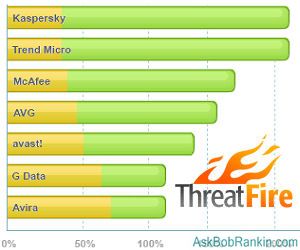
Adding PCTools Threatfire to Your Security Arsenal
You don't need to know a burglar's name to know that he's a threat to your home security. Likewise, you shouldn't need to know a computer virus' name in order to stop it before it does damage to your computer or sends your bank account password to some felon on the other side of the planet. But that's exactly how some anti-virus programs work.
PCTools Threatfire anti-virus software works differently, and can significantly boost the virus detection rate of your existing security software.
Some anti-virus programs rely on digital "signatures" of known malware programs for identification and blocking purposes. A signature is often a "checksum," a single, relatively short number that represents a theoretically unique characteristic of a program such as the sum of zeroes and ones in a program's bits. When a program is downloaded to your computer, the anti-virus program calculates its signature, compares it to its database of known viruses, and if the checksum is found in the database an alarm is sounded and the program is quarantined. There is an obvious shortcoming in this approach.
Signature-based virus detection won't detect viruses whose signature isn't in the database. All the Evil Hacker has to do is change one bit and his malware has a new, undetectable signature. This is why your anti-virus program downloads an updated database of signatures frequently; there is a never-ending war of changes between malware writers and anti-virus software developers.
ThreatFire - A Behavioral Approach to Virus Detection
You don't really care about the fingerprint, signature, or shoe size of a piece of malware. What you care about is what a downloaded program is doing. PCTools' Threatfire monitors the behavior of all programs running on your machine, and sounds alerts when a program does something that might be harmful.
When a program acts suspiciously - say, attempting to open a password file that it did not create - Threatfire blocks the potentially dangerous activity and attempts to verify the program's identity against a database of signatures. It tells you, in effect, "This program is up to something, and we have/haven't identified it as a known piece of malware." Then it's up to you to decide whether to block the suspected software or let it continue what it's attempting to do.
It should be noted that this breed of behavior-based security software has its own shortcoming. It sometimes blocks the running of perfectly legitimate software based upon "suspicious" behavior. Such "false positive" alerts are like being stopped by the police and questioned because you are carrying a violin case. Violin cases are known to carry machine guns sometimes, so the cops stop you even if you're just carrying a violin. It's annoying but harmless.
PCTools' ThreatFire consumes very little computing resources and does not conflict with traditional signature-based anti-virus programs' operations. Therefore it is a good complement to signature-based protection. In other words, if you're using AVG, Avira, McAfee, Norton or some other well-known anti-virus protection, adding ThreatFire will provide even more protection.
In its basic, free-for-home-use form, PCTools' Threatfire does no more than actively monitor running programs and block suspicious activity. An enhanced Pro version ($29.95/year) will also scan your hard drive for known threats based upon their signatures. You also get telephone support with the paid edition; the free version comes with email-only support.
Do you have something to say about ThreatFire or other behavior-based computer security tools? Post your comment or question below…


This article was posted by Bob Rankin on 23 Nov 2009
| For Fun: Buy Bob a Snickers. |
 |
Prev Article: Free Alternatives to GoToMyPC |

The Top Twenty |
Next Article: Should I Buy an HD Monitor? |
 |
Post your Comments, Questions or Suggestions
|
Free Tech Support -- Ask Bob Rankin Subscribe to AskBobRankin Updates: Free Newsletter Copyright © 2005 - Bob Rankin - All Rights Reserved About Us Privacy Policy RSS/XML |
Article information: AskBobRankin -- Does PCTools Threatfire Boost Security? (Posted: 23 Nov 2009)
Source: https://askbobrankin.com/does_pctools_threatfire_boost_security.html
Copyright © 2005 - Bob Rankin - All Rights Reserved
Most recent comments on "Does PCTools Threatfire Boost Security?"
Posted by:

Bob
23 Nov 2009
Hi there, I understand that I can run this with Avira without conflict. I am also running tall emu's online armor. Will Threatfire add to my security or not and do you know if it will conflict with online armor? Many thanks for your valuable guidance.
EDITOR'S NOTE: Online Armor and ThreatFire both have a similar Host Intrusion Prevention System feature. What I've read tells me you should pick one or the other.
Posted by:

Gus Lopez
23 Nov 2009
About Threatfire
I owe my gratitude to Threafire,it's a very good program that has saved me money and many trips to the local Computer shop.
So, before you go out and format your drive for some malware that has gotten into your system, you might want to think about Threafire.
I am a firm believer!
Thank You Threafire
Posted by:

JC
23 Nov 2009
Thanks for letting us know about this AV program Bob. I hadn't heard of it before, and after finding a few virus/malware threats recently when scanning my system, I am keen to beef up my security further.
After becoming disillusioned with AVG9, I recently installed Avira as I read it had good standalone protection (as proved in the chart above). However the chart also shows Threatfire is dramatically more effective when used alongside 'weaker' AV software like Kaspersky, which is confusing somewhat. Surely if Threatfire doesnt conflict with existing AV's, then there shouldnt be such major differences in performance?
Anyways keep up the good work!
Posted by:

Balthazar
23 Nov 2009
Bob, this article reads too much like a paid ad. On the flip side: any package from PC Tools will significantly slow down your machine. Yes, I have completely tested ALL their apps.
EDITOR'S NOTE: Well then where's my check, Mr. PCTools? Nope, not a paid ad. PCTools doesn't even know who I am, or that I wrote this article. Glad you enjoyed the prose, though. Oh, and most other people who have reviewed ThreatFire remarked on how little resources it uses...
Posted by:

Joe Hathaway
24 Nov 2009
I downloaded the truly free edition, but the usual warning box (that I have McAfee installed, the AVs will conflict, and I should uninstall McAfee first) popped up and prevented my installing Threatfire. McAfee is provided "free" from AT&T and I do not want to remove it. Why?
Posted by:

Darryl
24 Nov 2009
Does Threatfire do anything that WinPatrol and Spybot Search & Destroy's Teatimer together won't do?
EDITOR'S NOTE: I think those are both signature based spyware scanners, correct?
Posted by:

Rich
24 Nov 2009
I downloaded Threatfire on my laptop ....Oh my ...It took me about 2 hours to finally get everything corrected. This program didn't play well with my set-up ......Let's just say it certainly " Threatened my Fire !!! " ( pun intended )
EDITOR'S NOTE: It would be nice to have some details...
Posted by:

D.W. Whitlock
24 Nov 2009
Bob, I have had Avira on my machine for several months. I also use MalwareBytes. Of the two, I only have Avira's realtime scanner running in the backround. I am satisfied with them so far. I added Threatfire 3 weeks ago. My only complaint is a distinct slowdown in web browsing & app launch speeds. If Threatfire truly protects as promoted, then its a small price to pay given the hair I have pulled out over past malware infections. Keep up the good work.
Posted by:

Ralf Kuehnel
24 Nov 2009
Can Threatfire and ZoneAlarm both be installed? ZoneAlarm stops new programs from accessing the trusted zone. Would installing both programs cause a conflict?
Posted by:

Bev
24 Nov 2009
I have read the information that you gave on the Threatfire, and I noticed that my Anti-Virus was not listed on the chart. I use E-Set and have been very happy with it, is there a reason it was not listed, I am curious to know.
Posted by:

Geoff
24 Nov 2009
I recommend extreme caution with this program. I tried it out about a year ago, but decided to remove it. After doing so, I lost all keyboard functionality. After some searching on the internet, I discovered that when ThreatFire is removed, it actually leaves behind the keyboard hook that it installs.
There was a workaround that I was able to use to get my keyboard back. But I found that this problem was somewhat common, and went totally unaddressed by PCTools for a couple years. I don't know whether they have fixed the issue yet.
In my mind, this experience was the end of all PCTools software for me. A program that is supposed to protect you but leaves behind harmful remnants upon removal is, to me, unconscionable.
Caveat emptor.
Posted by:

Fred Havn
24 Nov 2009
I'm also interested in feedback regarding ESET NOD32 Antivirus since I have it on this machine. I also have TreathFire. Looking forward to any feedback.
Posted by:

Darryl
25 Nov 2009
Spybot S&D does use signatures for scanning, but Teatimer and WinPatrol are both versions of HIPS, which is what Threatfire is if I'm not mistaken. Any further info regarding this would be helpful.
Posted by:

John
29 Nov 2009
I have Avast antivirus and Malwarebytes installed on my machine. Avast updates automatically at least daily, and malwarebytes is simple to update and use and I've never had a problem. My motto: if it ain't broke, don't fix it - with apologies to my mother who was a stickler for grammar.
Posted by:

GottaBigOne
30 Nov 2009
Afternoon Bob and my fellow Rankinites!
John I am with you. I love my setup of Avast and Malwarebytes for the reasons you stated above.
Plus I got the Online Armor Firewall to complete my security mix.
(No one can guarantee 100% security for one's computer but I think my setup comes Darn Close!)
[I tried Avira briefly - - a Fantastic product - - until the company had the situation with the STOPPED Updates with the free version]
. . . But to give credit where it's due it was a Monumental technological glitch and the company did it's Darndest to get the Updates back on track!]
The Paid version of Avira was NOT affected by this glitch.
ThreatFire: I get Goosebumps thinking about this Thang! Some years ago I found out that it was the Hardest thing to remove from my computer. It wouldn't budge, initially! To this day I wonder if said application was some kind of malware!
I eventually had to literally perform surgery with the help of Windows SEARCH to Finally get rid of this monstrosity!!!
Thank You for Listening,
GBO
Posted by:

Rich A
03 Dec 2009
" For me " , Threatfire crashed my computer ...I was using Computer Associates Anti Virus .....After downloading Threatfire , My computer simply shut down.....When I finally got it running again .... The CA had vanished .....and all of a sudden I had a old version of AVG running ??? What on earth happened ?? After getting into Safe Mode ...... I deleted everything BUT it got worse ...Finally back in safe Mode ...." System Restore " saved the day for me ! amen to that !
Threatfire ??? Certainly was a " Threat " to my computer.
Posted by:

Sheri
28 Aug 2011
After reading Bob's article thoroughly, I downloaded Threatfire and was very keen to install it - until I saw so many reviews reporting that Threatfire left behind a keyboard hook, that prevented the user from using his keyboard and others reporting that they had to perform deep surgery on their PC to remove Threatfire have definitely put me off trying it!
PS. I find it very poor for any website offering computer security tips NOT to be a secure website itself! I so nervous about typing in my email address on a page that did not start with https:// that I typed it into Notepad first and then copied and pasted it into the box, hoping that may help prevent keyloggers stealing my email address!
EDITOR'S NOTE: I couldn't find any recent chatter about the keyboard hook problem -- it was all from 2008 or so. I'd be very surprised if that problem wasn't fixed long ago.
As for the unsecured page requesting your email address, I don't see that as a big deal. Your email address is exposed every time you send or receive an email. Also, your notepad idea won't work to defeat a keylogger. Keyloggers can see ANYTHING you type -- they are not limited to operating inside a browser.