


Free Online Backup and Software Options
Did you know... March 31 is World Backup Day? You know you need to backup your computer, but who has a lot of money to spend on getting it done? Here's some good news -- I've got some FREE options for online backup, and free backup software that you can start using today. Read on to learn more about backup options now... |
Free Backup Software and Services
If you run a business on your computer, or just use it to store your personal documents, photos and music, a hard drive failure can be devastating. Failure to backup up your data on a regular basis can lead to data loss, heartbreak and costly recovery fees. If you're not convinced, see my personal story in How I Got Hacked... And Why You MUST Have a Backup!. I've heard plenty of excuses for not backing up, but fortunately "backup software is too expensive" no longer applies.
There are several free backup software tools and even free online backup services that you can use to backup and restore your files. There is a free backup utility that comes with Windows XP and Vista. I don't generally recommend it, because the feature set is pretty basic, and not all features are available in all versions of Windows. However, Windows 7 has a much improved backup feature. See my article Windows 7 Backup and Restore for the pros and cons.
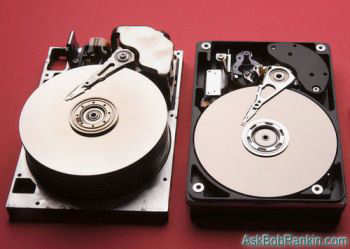
If you have a Mac, Time Machine is an excellent automatic backup tool that's built into Mac OS X Leopard and higher. Backups are automatic, and if you lose a file, or need to see how it looked in the past, you can recover it with a few clicks. Speaking of Time Machine, Windows 8 has a new feature called File History that offers similar features.
The free backup software that comes with Mac and Windows computers will do the job, but other 3rd-party backup products offer more features and flexibility. So let's look at a handful of free downloadable backup solutions.
Free Downloadable Backup Software
Easeus Todo Backup Free is widely touted as as top choice for free backup software. Aimed at Windows home users, and designed for ease of use, Todo Backup Free offers "one-click backup and restore" to protect your files and help you recover in the event of a data disaster. The software backs up your entire hard drive including the operating system and installed software. You can schedule your complete backups to run automatically, or backup only selected files and folders on a daily, weekly or monthly basis.
Macrium Reflect Free is best known as a tool to make system images, but it's also an excellent backup software option. It can clone a hard drive (make an exact file-for-file copy) or create a backup image with optional incremental updates. I use Macrium Reflect to create a weekly backup image and daily incrementals, so my backup is never more than one day old. You can also use it to backup just selected file or folders. The scheduling feature lets you automate your backups. The user interface of Macrium Reflect isn't quite as intuitive as other products, but it does offer outstanding flexibility and some advanced options that power users and system admins will love.
 Are you prepared for a total loss of your hard drive due to a virus, hardware failure or some other disaster? I encourage you to read my ebook Everything You Need to Know About BACKUPS, where you'll learn about backup strategies and how to protect the data in your computer, tablet, smartphone and online accounts.
CrashPlan started as a commercial backup service, but the software is now available for free (PC/Mac/Linux). You can use the free version of CrashPlan to backup to an external hard drive, but it also has one unique feature I really like. If you have more than one computer, you can install CrashPlan on each, and they'll backup each others' files. You can even back up your data to a friend's computer, over the Internet. CrashPlan encourages users to have redundant backups -- multiple copies of your backup -- for maximum protection. See my article describing CrashPlan, and how I use it to "backup my backup."
Another good choice is Comodo Backup. If you are familiar with the Comodo name then you know that this software manufacturer has a good reputation. Comodo Backup works with Windows XP and later Windows versions. It will allow you to backup your files and store them in a folder on your hard drive, a portable storage device or on an FTP site. This program also allows you to schedule your backups and compress your ZIP files to save disk space.
Every time I write about backups, several readers mention Microsoft's SyncToy. This free tool isn't a full-featured backup program, but it lets you sync folders on your desktop or laptop with a flash drive, external hard drive, or a shared folder on your home network. You can use it to make sure that two folders are synchronized with the same files, by automatically copying, renaming or deleting files as needed. The sync can be configured to copy files in one direction only, or to always ensure that the latest copy is available in both folders, regardless of where the file was modified.
Free Online Backup Services
There are still a few companies that offer free online backup services. One of the most well known online backup services that still offers free accounts is Mozy. Mozy's Free Backup Service offers 2 GB of storage space for Windows and Mac users. Your backup files will be encrypted and stored in a secure, remote location that's only accessible to you. This service is compatible with Windows as well as Mac OS X 10.4 and higher.
You might also check into IDrive's free account, which offers you 5 GB of storage space. To learn more about online backup services and other free online storage options, see my article Ten FREE Cloud Backup Services.
Selecting a Free Backup Option
Obviously you have many backup options to choose from, and I've only mentioned a few of the choices in each category. So which is better, local backup, or an online backup service? Some people are nervous about the security and privacy of online backups. But if you do backups locally, there's always the chance that your backup media could be lost or corrupted.
I recommend a combination approach, with copies of your backup files stored in more than one location. A good start would be a full backup on an external hard drive, and your critical files stored online. For more tips and advice, see my related articles Demystifying the Backup and Online or Local Backup: Which is Best?.
Post a comment and tell me about YOUR backup strategy. Also mention if you use free backup software, or a commercial backup solution.


This article was posted by Bob Rankin on 31 Mar 2014
| For Fun: Buy Bob a Snickers. |
 |
Prev Article: Announcing Malwarebytes Premium |

The Top Twenty |
Next Article: Texting ATMs For Cash? |
 |
Post your Comments, Questions or Suggestions
|
Free Tech Support -- Ask Bob Rankin Subscribe to AskBobRankin Updates: Free Newsletter Copyright © 2005 - Bob Rankin - All Rights Reserved About Us Privacy Policy RSS/XML |
Article information: AskBobRankin -- Free Online Backup and Software Options (Posted: 31 Mar 2014)
Source: https://askbobrankin.com/free_online_backup_and_software_options.html
Copyright © 2005 - Bob Rankin - All Rights Reserved
Most recent comments on "Free Online Backup and Software Options"
Posted by:

Carole
31 Mar 2014
Last November, I had a similar problem. I booted up my computer one day and everything had changed. All my email disappeared. My favorites were gone. I had a problem tracking down my Windows Explorer. Other things changed too. I tried a restore, but it didn't work. I had already stored a lot of information on my external hdd & flash drive, thank goodness. If you want to keep something, make certain you back-up your files or the same thing oould happen to you.
Posted by:

Egbok
31 Mar 2014
I backup my laptop (W7) and netbook (XP) to my desktop (Vista) and my desk top is backed up to a 1.5 TB external HD. It's all local. My Mac is backed up by Time Machine on a local hard drive. Thanks Bob for this article, it gives me ideas to set up a couple of remote HD's at my daughter's house. I don't have any horror stories but my backups have made things easier a time or two.
Posted by:

Rick
31 Mar 2014
What about windows 8? I know that my laptop has a second partition that I think is suppose to be all of the original files that came on the computer but I don't know how to us it if I had to. Plus it doesn't have my current files on it. Also, I haven't heard anything good about 8.1 so I have not upgraded yet. Should I do that?
EDITOR'S NOTE: Yes, I do recommend the 8.1 update. The new Refresh and Reset features can be used to restore your computer to your ideal configuration, or return your system to its "factory fresh" state. See http://windows.microsoft.com/en-us/windows-8/restore-refresh-reset-pc
Posted by:

Michael Webb
31 Mar 2014
Bob, there's a factoid that needs updating in this article. You state that Comodo Backup supports "Windows XP, Vista and 2000". I just went to the site, and the system requirements are now "Windows XP SP2, Windows Vista, Windows 7, Windows 8 or Windows 8.1". The processor and RAM requirements are unchanged, but the hard drive requirement is now 23MB. A quick Google search didn't find an overt reference to support for Windows 2000 until I found an old CNET Download.com link to version 1 (It still worked!
There was a reference on a Comodo forum about a problem with reinstalling to a Windows 2000 machine which was resolved (presumably using a newer version), tho it apparently isn't overtly supported under Win2K. Just thought I'd let you know in case the issue comes up about Win2K--someone else is already asking about Windows 8 support.
EDITOR'S NOTE: Fixed that, thanks.
Posted by:

Michael Webb
31 Mar 2014
P.S. I also found Comodo Backup v1 at Tucows at this link, FWIW:
http://www.tucows.com/preview/500810/Comodo-BackUp
Posted by:

Lee Hamilton
01 Apr 2014
Re Rick 31 March 2014: has a “second partition that I think is suppose to be all of the original files that came on the computer”.
This is called a restore partition, and generally requires a magic keystroke during boot or some other method to get into recovery mode (Acer uses ALT-F10 during boot). Among other things this includes a tool to wipe out your system partition and restore it to as delivered factory condition. Note that it will probably wipe out the other partitions on the drive as well except for the recovery partition itself.
CAUTION: backup all of you disk files somewhere before proceeding with a restore, including the user directories. It could be another disk drive, portable disk drive, or other offline or online storage.
The recovery partition is normally not listed in Win Explorer, but can be seen by various partitioning tools, usually as a non bootable primary partition. It has a few tools to help explore the damage and recover your system to factory state.
Speaking of backups: I have backed up this recovery partition to another subdirectory of my tools partition as an ISO image (easily done with bootable Linux or Cygwin DD command) and another subdirectory copy of the individual files.. This also allows me to go exploring.
Note that if you have to restore your disk backups to a different drive, the restore partition probably won’t work on that drive. Acer (Vista) has a tool in the recovery partition that updates the system disk boot sector to include support for the magic restore boot key stroke. On my system the tool is RYTOOLS/MBRWRWIN.EXE.
Once a restore is done, you have to run Windows Update, install your preferred virus software (integrated firewall and virus software recommended: e.g. Comodo), install all additional software, set up user accounts and restore user files from your backups… Be very careful about internet access until updates and virus software is installed. Once I had done this I made a backup of the “perfect condition” system for next time.
Posted by:

Gary Schwartz
01 Apr 2014
A great source of shareware software is sourceforge.net. A program on that site called "Create Synchronicity" is a backup program that synchronizes individual files or directories. I use it to keep the contents of my flash drives backed up. It will work equally well with hard drives.
Posted by:

Craig
03 Apr 2014
Another great program for synchronizing directories is FreeFileSync. The data files on my work and home computers are organized into a relatively small number of folders that I back up daily to a USB Passport drive using FreeFileSync. One nice feature is that you can refer to the backup drive by its volume name, for example [My Passport], which is useful for USB drives that can be assigned different drive letters over time when plugged in.
It's fast, accurate and flexible.
Here is the link: flexible.http://freefilesync.sourceforge.net/
Posted by:

Shirley Welch
03 Apr 2014
I amnot as computer literate as some of your readers. I enjoy reading your netter and have advanced my knowledge.
My question: since I am replacing my XP with Win 7, am I correct in my assumption that I need only backup important files and not do a full system backup with restore.
I wish I could pack up my cpu and have you take care of all this for me. This old dog is about her limit of remembering all I need. I am sure I have redundent folders thinking that will keep my information safe from deletion. I feel like my own hacker. Thanks for reading my untechnical email.
EDITOR'S NOTE: For most people, all you need to back up are your documents, spreadsheets, email, photos, music and other files that you have created or accumulated. If you have installed programs that you need to migrate to the new system, you'll have to re-install them.
Posted by:

Frank
30 Dec 2016
Bob, I am truly late to the game. Just downloaded Macrium Reflect Free Edition to go with my IDrive One External Hard Drive. I, like many others have noted, am a bit concerned about backing up my files online/cloud. But, as I follow your advice religiously, should I make use of my IDrive One Cloud storage space and not worry? As others remind your readers, I am not as computer-literate as others following your thread; but I learn gobs of new and useful information and do my best to absorb and incorporate it all to make my machine more secure, as worry-free as possible and as up-to-date. Thanks for ALL the suggestions, recommendations and links to helpful data.
Posted by:

drjawn
06 Feb 2019
Crashplan home free is no longer available or functional
"This is a reminder that after October 22, 2018, the free version of CrashPlan for Home will no longer work. This means that any data that you previously backed up using the free version will be inaccessible and you will not be able to back up or restore files, even to local folders or friends’ computers"