


My Favorite Software
In the course of doing my job, I use certain programs on a regular basis. On any given day, I might be doing word processing, web design, programming, image editing, trouble shooting, and of course email and web surfing. Here are some of my favorite software applications to get the job done... |
Bob's Favorite Software Tools
These are some of my favorite software applications. I run on multiple operating system platforms, so I've indicated which ones run on Windows, Mac and Linux systems. Most are free to download, so check them out and give yourself a productivity boost!
- FireFox - my web browser of choice. Widely touted as more secure and flexible than Internet Explorer, the free and open-source Firefox browser also has a vibrant user community creating fun and useful add-ons. (Runs on Windows, Mac and Linux computers.)
- GMail - my favorite email client. This free web-based email service lets me check my email from any computer with an internet connection. With a traditional email client like Outlook or Thunderbird, you're tied to one computer where all your mail is sent and received. I even access my Gmail account from my Voyager cell phone. (Runs on Windows, Mac and Linux computers.)
- NoteTab - a text editor that I use all the time, is a drop-in replacement for the rather limited NOTEPAD editor that comes with Windows. NoteTab can handle plain text, and is also an HTML editor. The tabbed interface lets you open multiple files, and you can create macros to speed up your work. NoteTab Light is free, but you can upgrade to the Std or Pro versions to get additional features like a thesaurus, spell checker and programming tools. Mac users will find similar features in the BBEdit text editor.
- LogMeIn - remote control of your computer over the Internet. Lets you remotely login to your home or office computer using a web browser. View the desktop, launch programs, open files or play a game, just like you were sitting in front of the remote computer. I use this to access my home computer when I'm travelling and also to do remote tech support on occasion. LogMein is secure and for my needs, the free version does everything that GotoMyPC ($20/month) does. (Windows or Mac)
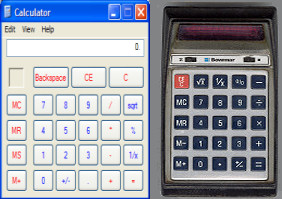 Calc - Good old Calc, the built-in Windows calculator. Not so fancy, but it sure can add, subtract, multiply and divide. Come to think of it, Calc looks a lot like the Bowmar Brain my brother had back in the 70's.
- PuTTY - a secure open-source telnet client. I use this free program to remotely login to Linux-based web hosting accounts when I need root access to a server. Comes in handy when you need to fiddle with the webserver config file, set up cron jobs, or install new software on the server. I used to use Secure NetTerm, which has some nice additional features, but costs $70.
- PaintShop Pro - is sometimes called the poor man's Photoshop, but PaintShop Pro for Windows is actually a full-featured photo/graphics editor with many advanced image manipulation features. And at around $49, the price is ten times less than Adobe Photoshop CS3. Adobe Photoshop Elements is a lower-cost slimmed down version of Photoshop, and is available for both Windows and Mac systems. I should also mention IrfanView for Windows, which is a nifty freeware graphics editor for basic tasks like cropping, resizing and converting from one format to another.
- Acronis TrueImage - an automated backup solution that I use to make nightly backups of my hard drive to an external hard drive. You can do full or incremental backups, and the software makes it easy to restore a single file from the backup image, or do a full restore if necessary. You can download a free trial version or purchase Acronis TrueImage for $49. Mac users, check out Retrospect for top-notch backup software.
- iTunes - a free digital music manager and jukebox for Windows or Mac users. I find it handy for importing CDs, and keeping my music collection organized. The iTunes store offers music downloads for 99 cents, which I think is a great alternative to buying a whole CD to get that one song you like.
- Audacity - free, open source software for audio recording and editing. I like Audacity because it can record live audio, from a mic or anything that's being played through your sound card. You can edit, splice or mix sounds together, and save in a variety of audio formats. Audacity is available for Windows, Mac OS X and Linux.
- RoboForm - remembers all your passwords and automatically fills in web forms for you. This is a huge time saver, and eliminates the need to scribble passwords on a piece of paper. The free version of RoboForm (Windows only) is limited to 10 saved passwords, and the Pro version ($30) is unlimited. I have not been able to find a comparable password utility for Mac, but browsers that run on Mac OS X, such as Firefox and Safari, do have some rudimentary password management support built in.
- X-RayPC - a powerful diagnostic tool for Windows machines, which I use in addition to anti-virus and anti-spyware scanners, to help identify malware or questionable files. X-RayPC shows you EVERY process that's running on your machine, as well as startup programs, browser helper objects (BHOs), toolbars and downloaded program files. The built-in expert system gives you a Good, Bad or Undetermined rating for each, and shows the name of the software developer so you can decide whether to keep or delete an item.
- Foxit Reader - a free PDF document viewer that loads fast and is quick to download at only 2.5MB. (By comparison Adobe Reader is a 20MB download.) I like Foxit because it's fast and doesn't clog up system memory after you close the program. (Windows only)
- SpeedFan is a nifty freebie utility that displays the temperature at which your CPU and hard drives are running, and can adjust fan speeds to cool down overheating components. Heat is an enemy of electronic components, and can cause myterious shutdowns, restarts and other problems. (Windows only)
- Google Desktop - makes searching your computer as easy as searching the web. Google Desktop continually indexes your files and their contents, so you can quickly find a file that contains a certain word or phrase -- a very handy freebie for Windows, Mac and Linux computers.
Do you have a favorite software tool or productivity booster? Share the goods! Post a comment below...


This article was posted by Bob Rankin on 9 Jun 2008
| For Fun: Buy Bob a Snickers. |
 |
Prev Article: Do I Need a Registry Cleaner? |

The Top Twenty |
Next Article: Defrag Your Hard Drive |
 |
There's more reader feedback... See all 23 comments for this article.
Post your Comments, Questions or Suggestions
|
Free Tech Support -- Ask Bob Rankin Subscribe to AskBobRankin Updates: Free Newsletter Copyright © 2005 - Bob Rankin - All Rights Reserved About Us Privacy Policy RSS/XML |
Article information: AskBobRankin -- My Favorite Software (Posted: 9 Jun 2008)
Source: https://askbobrankin.com/my_favorite_software.html
Copyright © 2005 - Bob Rankin - All Rights Reserved
Most recent comments on "My Favorite Software"
(See all 23 comments for this article.)Posted by:

Lucile
11 Jun 2008
Easy Cleaner is Great
Posted by:

fastfreddie1959
11 Jun 2008
Here is a list of software programs that i use on a daily basis...
http://rocketdock.com, updatechecker.exe, Wise Registry Cleaner (http://www.snapfiles.com/get/wiseregistry.html), and CCleaner (http://www.ccleaner.com).
Posted by:

Gary
11 Jun 2008
I see that a lot of your favorite software is also my favorite. I don't know anything about Notetab as a text editor but my favorite is "EditPad." I have built around two thousand web pages using it and swear by it. One other favorite of mine is "Clipmate." It is a great clipboard extender. I just wish it worked on Linux.
Posted by:

Hector
02 Jul 2008
I an from Latin America so i write documents in Spanish, aka accented characters. When I installed Note Tab i was unable to write simple documents using accented characters.
EDITOR'S NOTE: What specific problem did you have? NoteTab does have a multilingual spell checker, so I would assume it supports multiple languages.
Posted by:

David Howland
05 Jul 2008
I like the new photo, the hat really makes it Bob. Good call. -- C. D. Howland, Fort Worth, Texas
EDITOR'S NOTE: I'm not a Texan, but I do like the hat. :-)
Posted by:

B Dall
16 Jul 2008
I use the freeware GIMP for photo editing on both Windows and Linux platforms, rather than PaintShopPro.
I use the freeware PDF Creator program (on Source Forge) that installs as a Window printer with a few extra features. I add it to almost every system I work on.
Gotta' agree on Irfanview, but another product you may have overlooked is MWSnap (also freeware) -- it is absolutely great for screen captures (full or partial).
Posted by:

larry
16 Jul 2008
X-rayPC downloads from xblock.com and ZoneAlarm posted this message: "ZoneAlarm has found that http://xblock.com may be unsafe. This website has been known to distribute spyware." Is this true, Bob?
EDITOR'S NOTE: Definitely a false positive -- Xblock is squeaky clean. Probably sets off the alarm because it contains the "signatures" or identifying elements of various spyware and viruses.
Posted by:

Walter
16 Jul 2008
I use Gimp instead of Photoshop. I did a little reasearch and although the interface is somewhat different it can do almost anything that can be done in Photoshop. And it's free. The name is horrible though. My wife who is disabled thinks it's funny that she's a gimp using gimp. Gnome Image Manipulation Program. http://www.gimp.org/
Posted by:

T-10
16 Jul 2008
1Password is the Mac OS X equivalent of AI RoboForms. Integrates nicely on all browsers and the developers at agilewebsolutions.com are personable and responsive.
Posted by:

kwhiz
16 Jul 2008
For some reason, the Calc URL was not highlighted in my newsletter. All the others were (by the way I use 5 out of th total already). Would you send it out or reply to this posting with the URL? Thanks.
EDITOR'S NOTE: That's because CALC is a Windows program, no need to download it. Click Start->Run then enter CALC.
Posted by:

Leslie
16 Jul 2008
I like IObit Advanced WindowsCare Personal Edition and IObit SmartDefrag (www.iobit.com). They're both free.
Posted by:

Kearney Bothwell
16 Jul 2008
Password programs for Mac include: Web Confidential ($20 for Win or Mac version or $35 for both) and 1Password ($34.99). A free one that I haven't tried is Password Gorilla, which is available for Mac, Win, Linus, Solaris, BSD, etc.
Posted by:

chris
16 Jul 2008
Actually, Windows Calc will do sines and cosines and such. Pull down the 'view' menu, and select 'scientific'. It's no TI99, but it is serviceable for most basic trig functions and such.
Posted by:

Roelof
17 Jul 2008
Couldn't agree more on EditPad (Gary, June 11). It's one of the first things I install on a new PC.
Another outstanding editor is Crimson Editor. I use it almost exclusively for CSS stylesheets, but it can do a lot more. Check it out.
Posted by:

Dan
31 Jul 2008
I use Moffsoft Freecalc - it doesn't have the scientific capabilities of Calc, but it has a running tape of what you did, so you can see if you made a mistake. Very handy.
Posted by:

Cathy
05 Oct 2008
I use the software Photostory 3. It very intersting. I can make my own photo story like a movie. Try it.
Posted by:

mark
27 Feb 2009
I definitely agree with yo on Irfan Viewer. It's my default viewer AND I use it to scan as it has great features for that.
I also love Total Commander from Ghisler.com as a Windows Explorer replacement. It has soooo many featutes: 2 file windows, multi-file rename, program launch shortcuts, basic ftp, zip/un-zip, dos command line, a non-indexed search and more. It's similar to the old Norton Commander.
After using it for free for too long (it functions forever with a 3 button nag screen) I got a licensed version in appreciation for the value of this great times aver.
I always carry it around om my usb toolkit for working on people's computers. It works as a standalone if you copy the folder from the My Programs folder.
Posted by:

Miles3298
04 Dec 2009
Informative, I like it. But, that thing about the Windows Calculator is misinformed:
"Good old Calc, the built-in Windows calculator. It doesn't do any fancy stuff like sines and cosines, but it sure can add, subtract, multiply and divide."
Actually, you can go to View > Scientific to get more functions (namely sine and cosine, among others) to show up. So, it does do (slightly) fancy stuff, but it's no TI grapher. Just thought I'd point that out, good sir.
Posted by:

Steve
15 Jul 2020
I was a huge fan of logmein until speed, on premise deployment & security became my only concern. Hence, switched over to R-HUB remote support servers. It works from behind my company’s firewall, hence better security. Plus utilizes optimum bandwidth, hence better speed.
Posted by:

Cajundweeb
14 Sep 2020
Google Desktop hs been discontinued for several years. Please remove the link to it.