


Wifi Sniffers
I'm thinking about buying a Wifi sniffer to help me find wireless networks when I'm travelling. How good are the various devices, and are they legal? |
What is a Wifi Sniffer?
No doubt, we're becoming a wireless society. But what good is that wireless laptop or PDA if you don't have access to a wireless network to get online? Meet the Wifi Sniffer -- clever little devices that scan the area for wireless networks and alert you when a signal is present. If you're away from home and need to get online with your laptop, iPhone or other portable device, just cruise the strip with a wifi sniffer and you'll see where the wireless networks are, and their relative signal strengths.
Are Wifi sniffers legal? Yes -- they don't actually connect to the wireless networks, they just tell you where they are. A related issue, though, is the legality of connecting to an unsecured network without the permission of the owner. Some people use the term 'wardriving' when referring to the act of driving around looking for unsecured wireless networks. Is it okay to mooch someone's wifi connection if they haven't bothered to protect it with a password? The laws, their interpretations, and local enforcement policies vary widely -- so I encourage you learn more. Read Is Free Wifi Illegal? -- before you connect to a wireless network that's not your own.
That being said, let's take a look at some devices that will tip you off when there's a wireless signal at hand. Of course, if your laptop is turned on, you can also use it to display the available wireless networks near you. But you'll look funny walking down the street with your laptop open, or perching it on the steering wheel of your car. And you'll probably drain your battery in the process. So let's focus on small, portable wifi sniffers...
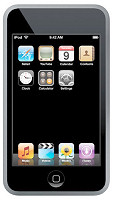 If you already have an iPod Touch, look no further for a wifi sniffer. From the main menu, tap on the Settings icon, then tap the Wi-Fi icon and it will open the Wi-Fi Networks control panel, which polls the airwaves and displays any wireless signals found.
- IOGear's Wi-Fi Finder will help you find 802.11b and 802.11g signals. The company claims that it can capture the signals without interfering with other electronic devices, and with no Internet connection. You can find one of these key chain-size devices at Amazon for a mere $23.76.
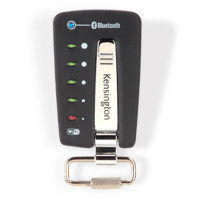 Kensington's WiFi Finder Plus hooks up to your laptop case or key chain. The silver case has 6 LEDs to alert you to the level of signal and filters out the 2.4-Ghz. It also contains a Bluetooth indicator. The one-button detector comes with the bonus of a built-in flashlight for nighttime searching. With a year warranty and free tech support, it will set you back $29.99.
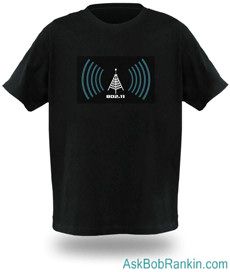
- If you want everyone to know that you found the signal first, you could get your own WiFi Detector Shirt. The black cotton tee, available in 5 sizes, displays the current signal strength and the decal is removable for washing the clothing. The removable battery pack is located in a small pocket inside the shirt and runs on 3 AAA batteries (not included.) You can be everyone's BFF at the next company picnic for $29.99.
 Montreal designer Stefan Dukaczewski, working for the ASRD project, has designed a WiFi shoe. Consisting of a pair of Nike Dunk SBs, the detection unit is embedded under the left shoe flap and is activated when the user walks. It also uses an LED display to let you know the signal strength. Although this one is in the prototype stage, I wouldn't be surprised if Nike goes for the idea.
One more option... if you want to search an online database to see where the nearest wireless network is located, JiWire's Wifi Hotspot Locator will search over 200,000 Wi-Fi hotspots in 135 countries. You
simply enter a city, state, or zip code and the directory will show you the hotspots in that area.
Do you have a wifi sniffer? If you'd like to comment on this topic, post your thoughts below...
|
|
|


This article was posted by Bob Rankin on 8 Oct 2008
| For Fun: Buy Bob a Snickers. |
 |
Prev Article: Gmail Labs |

The Top Twenty |
Next Article: Is Free Wifi Illegal? |
 |
Post your Comments, Questions or Suggestions
|
Free Tech Support -- Ask Bob Rankin Subscribe to AskBobRankin Updates: Free Newsletter Copyright © 2005 - Bob Rankin - All Rights Reserved About Us Privacy Policy RSS/XML |
Article information: AskBobRankin -- Wifi Sniffers (Posted: 8 Oct 2008)
Source: https://askbobrankin.com/wifi_sniffers.html
Copyright © 2005 - Bob Rankin - All Rights Reserved
Most recent comments on "Wifi Sniffers"
Posted by:

chesscanoe
08 Oct 2008
If you have a laptop handy, use this Vista Wi-FI gadget sniffer:
http://www.xirrus.com/library/wifitools.php
Posted by:

Oscar
08 Oct 2008
Do these devices tell you whether the network detected is secured or unsecured?
EDITOR'S NOTE: Yes, they should all do that.
Posted by:

Chas
11 Oct 2008
I've noticed that my TiVo equipped with a wireless adapter is a very sensitive "sniffer." However it doesn't provide any information other than the names of the networks.
Posted by:

terry
17 Oct 2008
i have seen on the web a device , (pricy) called the yellow jacket, like a wi-fi spectrum analyzer, check it out ,let me know.
EDITOR'S NOTE: It looks like a wifi sniffer on steroids. I'm not sure who this product is targetted to.
Posted by:

swati
04 Feb 2009
Can i design a software in java or c# for detecting wifi signals and map them in my map??.
what all h/w i will require to do that?.
Posted by:

wifiman
11 Feb 2009
The editor's note concerning how all of these products should be able to tell between secure and unsecure networks is incorrect. Neither the IOgear or the Kensington product (which isn't even released yet according to the company) detect the difference, making it essentially useless as you have to boot up anyway to find out whether the network is accessable without a key.
EDITOR'S NOTE: You can buy the Kensington WiFi Finder Plus at many online stores. I know the iPod Touch will indicate if a connection is secure or not. The others don't seem to indicate either way on their websites.
Posted by:

Mr Jay
01 Apr 2015
Google GeoLocation is uploading my and other MAC addresses within range without my permision and this is just the same as hacking.
They are breaking the law and get away with it because they bribe our politicians and this needs to be stopped.
EDITOR'S NOTE: Uploading your MAC addresses? What does that even mean? Your computer's MAC addresses is just an identifer (like a serial number) for the network adapter. What do you think Google would want with your MAC address?