


Five Very Affordable Photo Printers
It's true, you can print any photo on your trusty inkjet printer, but photo printers offer some features that make photo printing better and easier. Here are some high-quality, low-cost photo printers you should consider... |
Which Photo Printer Should You Buy?
For starters, a dedicated photo printer will provide higher resolutions and more vivid inks than you can get with general purpose printers. Their paper feed mechanisms are designed for stiffer, glossy photo paper so they don't jam as often as printers designed for uncoated copier paper. Some include LCD screens that show you the photo and let you edit it before printing.
Some even print on optical discs or make wide-format panoramic prints. Others are designed for portability, and can run on battery power in the great outdoors.
Photo printers come in all sizes and price ranges, from large-format commercial models that cost thousands to all-in-one home printers that happen to do photos for under $100. The key factors to consider when buying a home photo printer are print resolution, print speed, cost, and supplies. Here are five photo printers for home use that won't break the bank.
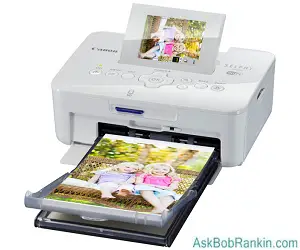
The Canon Selphy CP910 costs just under $100, but it’s packed with features you would not expect for so little money. It prints 256 levels of color at 300 x 300 dpi. Built-in WiFi means you can place the printer anywhere in your home and print to it from any device on your network. With the Easy Photo Print app, you can even print JPG files from your iOS or Android device directly to the Selphy CP910. The 2.7 inch tilt-up LCD display gives you previews of pictures.
The dye-sublimation printing technology produces longer-lasting prints than inkjets, although it is more expensive in terms of ink cartridges and special paper. Canon says the CP910 will produce a water-resistant color photo in just 47 seconds, that should last up to 100 years! If you want portability, a battery and chargers are available but they will set you back about $160.
The Epson PictureMate Charm Compact Photo Printer is 4-color inkjet printer that retails for $199 (but I found it online for $175 at B&H with free shipping.) It includes a 2.5 inch LCD preview display, red-eye correction, and manual color enhancement. It spits out a 5760 x 1440 dpi 4 x 6 inch print in 37 seconds. It’s not wireless; you have to connect it to a digital camera or PC. And not to be outdone by Canon in the speed department, Epson claims the Charm will print "superior quality photos in as fast as 37 seconds." The Charm is very portable, sporting a carrying handle and optional rechargeable battery, just in case you want to print some photos while birding in the Himalayas.
The HP Photosmart 6520 is an all-in-one photo printer that also copies, scans, and faxes documents (without a fax phone line, using Internet faxing). It retails for $149 but you can find it at Amazon and other online outlets for $119. The 6520 is a great deal in a wireless photo printer. The 3.45-inch color touchscreen guides you through the print, copy, and scan options, and can even display online content to print images directly from the Web. It has two paper trays (80-sheet regular paper, 20-sheet photo paper) so you can leave photo paper loaded while printing ordinary documents. A free app lets you print directly from your smartphone. The 6520 can duplex, and prints up to 12 pages per minute (ppm) black, and up to 8.5 ppm color.
The Canon PIXMA IP7220 Premium Wireless Inkjet Photo Printer lists for $100 but I’ve seen it online for as little as $79 with free shipping. It makes high-quality prints on 4x6 photo paper, or regular paper up to 8.5 x 11 inches, and has a maximum resolution of 9600 x 2400 dpi. Built-in auto-duplexing lets you print on both sides of a page, saving paper. You can print frames from HD videos using Canon’s ZoomBrowser or ImageBrowser software. Free apps enable printing from iOS and Android devices. A 4 x 6 inch borderless color print takes about 21 seconds. Note that the IP7220 can connect ONLY with wifi; there's no option to connect via USB or wired network cable. On the plus side, it can print directly on CD, DVD and Blu-ray discs.
Check out the VuPoint Solutions Photo Cube portable photo printer if compact and portable are high on your list of priorities. Connect your mobile phone or tablet directly to the Photo Cube dock, or with a USB cable. No computer is needed. The Cube prints 4 x 6 inch 300dpi photos using a dye sublimation thermal transfer process. It can also output panorama photos sized at 4 x 11.2 or 4 x 16.4 inches. A starter cartridges containing both paper and ink will print 12 photos. Additional cartridges that print 36 photos cost about $20. The manufacturer says that the Cube will print a photo in about 55 seconds, so it's no speed demon. But the price is right -- you can find it for $99 at Staples, Office Depot and many online stores.
Compact, portable and inexpensive photo printers are certainly the way to go if you are an avid shutterbug. Do you have a favorite photo printer? Post your comment or question below...


This article was posted by Bob Rankin on 4 Mar 2014
| For Fun: Buy Bob a Snickers. |
 |
Prev Article: Is Bittorrent Downloading Illegal? |

The Top Twenty |
Next Article: Geekly Update - 05 March 2014 |
 |
Post your Comments, Questions or Suggestions
|
Free Tech Support -- Ask Bob Rankin Subscribe to AskBobRankin Updates: Free Newsletter Copyright © 2005 - Bob Rankin - All Rights Reserved About Us Privacy Policy RSS/XML |
Article information: AskBobRankin -- Five Very Affordable Photo Printers (Posted: 4 Mar 2014)
Source: https://askbobrankin.com/five_very_affordable_photo_printers.html
Copyright © 2005 - Bob Rankin - All Rights Reserved
Most recent comments on "Five Very Affordable Photo Printers"
Posted by:

TheOtherAl
04 Mar 2014
I found that, with my PictureMate Dash, the ink tends to dry out pretty quickly. Given that I only want to print pictures every 6 months or so, I almost always have to buy new ink. Darn, ....
Posted by:

RandiO
04 Mar 2014
Thank you Mr. Bob Rankin.
Would you please comment on the cost of replacement cartridges for these "photo printers"? The initial cost of buying such a dedicated printer may sound attractive but the cost of replacing the toner cartridges may end up being the 'gotcha' for the end user.
Posted by:

Clifford Maddox
04 Mar 2014
Canon PIXMA IP7220 Premium Wireless Inkjet Photo Printer now comes with USB connectivity and also wireless with any wireless computer or by wireless router. Thanks for your very informative news letter. Have a nice day.
Posted by:

RandiO
04 Mar 2014
This is what my pricing search has yielded (prices from manufacturer links above):
Canon Selphy >> Ink+36Sheets = $16.99
Epson PM >> InkPack = $33.44 (for 100 photos)
HP 6520 >> 4Colors = $43 (for 300 'pages')
Canon ip7220 >> 5Colors = $60
............ >> 20sheet Photo Paper = $13
VuPoint >> Cartridge+Paper = $22 (for 36 photos)
Posted by:

Gary
04 Mar 2014
I gave up on printers at home for photos. Stores such as Target, Walgreens, etc are now so inexpensive per photo, it much less hassle for me to just have them printed at a local store. Don't have to worry about buying ink cartridges, paper, etc. If any get screwed up, they eat the cost, and they have expensive equipment to print that I could never justify (or afford). Plus, I can uupload them over the internet, so only one trip to the store to pick up.
Posted by:

TK
04 Mar 2014
This is one of those items that, I fear, is not cost effective, no matter which way it is viewed. The ink tends to cost more than the printer, and for the amount of time and money spent printing the pictures, it is more cost-effective to upload the pics to a service (even WalMart has this service), have them processed, pick them up at the store, or have them delivered. Really hard to justify.
Posted by:

james
05 Mar 2014
Good article and informative as usual. You do say at the beginning that Dye sublimation technology is cheaper than inkjet and in the Selphy you state the reverse?
Also it would be useful to state that the HP 6520 does not have ADF auto doc feeder) which i find very necessary to have.
EDITOR'S NOTE: Inkjet is generally cheaper, sorry for the confusion.
Posted by:

Todd
05 Mar 2014
Im with TK and Gary on this one. I will or my kids will once in awhile print a photo to our HP8520 - but for mass printing of photos we upload them to Walgreens and have them shipped. Much more cost efficient and less wear and tear on the printer. The HP 6520 is an awesome printer however - except for envelope printing where the paper needs to be removed and the envelope inserted.
Posted by:

Phil
05 Mar 2014
A good summary, Bob. I agree with those who use the services at the stores....quite a bit cheaper. BUT...for the serious amateur like myself....using my PhotoShop Elements program....I prefer to print my own. After having owned Canon...Epson & HP...I find that I prefer the HP PhotoSmart. Mine is wireless....so it serves our entire home net, including my wife's iPad and iPhone....plus both laptops and my desktop. The built-in scanner is also very good. And...even more important...we have never had any problems with our HP printers over the last 10 years or so.
Really enjoy your newsletters, Bob. I read 'em all.
Posted by:

Karon Strickland
05 Mar 2014
I have had a DELL computer for almost 5 years, which I really like and understand it. It is indicating I need a new battery to the tune of ? I like my computer and really cannot afford a new one at this point. My question is: if I only type on the computer when it is plugged in, should I be ok for another year with it. I do use it a lot for church articles and emails being sent to many folks. I will follow your comments, lots of your knowledge has come my way and I give you all the thanks. I have asked many folks what I should do and they all say, "get a new computer." Help......
EDITOR'S NOTE: You'll only need a battery if you want to use the laptop when it's NOT plugged in to the wall socket. No reason you can't keep using your current laptop.