


Dirty Mouse?
When I click on the Windows Start button it jumps up and down like a jack in the box. Even worse are arrowed pop-up boxes, as it takes clicking on the arrow 4 or 5 times, before it calms down and steadies itself. I don't know if it's a virus or something else, but it's driving me nuts... can you help? |
How to Clean a Mouse
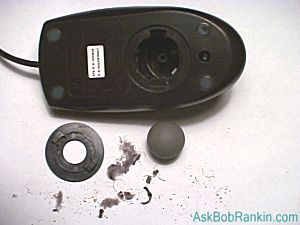
At first glance, erratic mouse behavior like this might seem like a virus or someone playing a prank. But most likely, it's caused by a dirty mouse. As you move your move across your desktop or mousepad, it can pick up dirt, dust and hair that accumulates on the ball and rollers inside the mouse. Just look at the photo on the right to see all the gunk that was inside my mouse. Yuck!
Fortunately, it's easy to clean your mouse. On the bottom of the mouse, you'll see a ring that surrounds the mouse ball. Turn it counter-clockwise and it will pop off and release the ball.
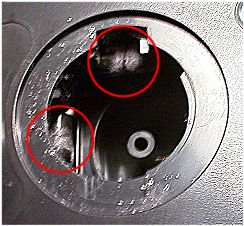 You can clean the ball with alcohol and a swab, then move on to the rollers. In the photo at left, you can see the buildup of dirt and fuzz on the rollers. The will prevent the mouse from properly detecting the motion of the ball, resulting in the erratic behavior of the mouse pointer. Use tweezers or your fingernail to remove the debris that is wrapped around all three rollers, then swab them with alcohol to make sure they're squeaky clean.
Tap the mouse on your desk to make sure any remaining debris falls out. Re-insert the ball, twist the ring back on, and you're done with the cleaning process. Most people find this 5-minute fix will restore normal functioning to a mouse.
Got an optical mouse? Although they have no moving parts to pick up dirt, sometimes the optical sensors on the bottom of the mouse get mucked up and your mouse will act sluggish. Use a swab to clean the bottom and it should do the trick.
Got comments about mouse cleaning? Post your thoughts below...


This article was posted by Bob Rankin on 24 Oct 2006
| For Fun: Buy Bob a Snickers. |
 |
Prev Article: Itunes Music Skipping |

The Top Twenty |
Next Article: FireFox Extensions |
 |
Post your Comments, Questions or Suggestions
|
Free Tech Support -- Ask Bob Rankin Subscribe to AskBobRankin Updates: Free Newsletter Copyright © 2005 - Bob Rankin - All Rights Reserved About Us Privacy Policy RSS/XML |
Article information: AskBobRankin -- Dirty Mouse? (Posted: 24 Oct 2006)
Source: https://askbobrankin.com/dirty_mouse.html
Copyright © 2005 - Bob Rankin - All Rights Reserved
Most recent comments on "Dirty Mouse?"
Posted by:

Chris Buechler
26 Oct 2006
Another potential cause of weirdness like you describe, or completely different very strange behavior, is a stuck key on your keyboard. If one of the keys like the Windows key, Ctrl, Alt, or any other key that doesn't type things gets stuck, you may have a difficult time realizing what's going on (you'd notice quickly if a letter or number key was stuck). This happens mostly with older keyboards as they collect "crud" over time.
Posted by:

PSK
19 Jan 2010
for wireless mouses, just take a quick look to see if the battery is low or the cell is leaking,etc.
try replacing it with a new cell/battery also.