


Is Your Computer Obsolete?
An AskBob reader says: 'Our computer is about five years old, but one friend says it is obsolete. He says it will soon be unsupported, and advises us to buy a new computer with a faster CPU, more memory, bigger hard drive, and a larger monitor. Do I really need to do all that? Can you give me some of the pros and cons of upgrading versus buying a new computer?' Sure, here's my advice... |
Time To Replace Your Computer?
Many years ago (this was back in the late 1980s) I saw a cartoon of a guy proudly driving home with his brand new state-of-the-art IBM 386 computer in the back seat of his convertible. In the background was a huge billboard advertising the 486. (I couldn't locate that old cartoon, but with a bit of AI magic, I got something reasonably close.) The message: his computer was obsolete before he even got it home.
Technology is always changing... it's hard to be sure if the system you have will support the newest software, operating system and peripherals. So how do you know when it is indeed time to buy a new computer, or when it is best to ignore the commercials that tout the latest "gotta-have" technology?
You May Need To Buy A New Computer If...

• ...your processor speed is less than 3.0 gigahertz (GHz). Most operating systems and application software these days demand a lot from your system. A speedy processor will help you browse the Internet, run your word processor and play games with ease. On a Windows PC, click the Start button, type system information and press Enter. If the speed is listed in megahertz instead of gigahertz, see if any friends need a new anchor for their fishing boat.
• ...your computer has 4 gigabytes or less of RAM memory. Again, the System Properties window will show how much RAM is installed. I recommend a minimum of 4 gigabytes (GB) of RAM for smooth performance. Go for at least 8 GB of RAM if you use more than one program at once, or have multiple browser tabs open.
• ...you are running a version of Windows that begins with a "3", "7", "8", "9", "V", or "X" (Windows 3.1, Windows 95, Windows 98, Windows Vista, Windows XP, or Windows 7/8). These obsolete versions lack the security features and technological advances required for safe computing and protection from identity theft. Windows 10 is still serviceable, and official support will continue through October 2025. If you have a Mac that's NOT running some version of OS X, the same applies. Windows 11 was released in October 2021, but unlike previous editions, it won’t work on many PCs happily running Windows 10. If your computer is more than three years old, it probably won't meet the stringent hardware requirements that Microsoft has in place for installing Windows 11. I personally don't think it's a must-have upgrade, so if you want to keep your Windows 10 PC for another year or so, that's fine. If you decide you need to upgrade before then, you'll be looking at a Windows 11 system.
• ...you have a monitor that's 14-inch or smaller. Most websites will not display properly on an old 14-inch monitor, and larger 20+ inch models are now standard. (I have dual 22-inch widescreen monitors on my desk!)
• ...you try to install a program and you get the error "Operating System not supported."
• ...you try to upgrade the Operating System and get an error message that the hardware is not supported. (See note above about Windows 11)
• ...your computer has no USB ports. Most peripheral devices such as the mouse, keyboard, printer, scanner and external hard drives now use USB connections.
• ...your hard drive is making a persistent ticking sound, and the fan is moaning like the sound track of Poltergeist. A ticking hard drive is an omen of impending data disaster, and a moaning fan indicates bad bearings and sub-par cooling ability.
• ...your computer has a 5.25 inch disk drive! Actually if you have even a 3.5-inch floppy disk drive, you may qualify. Software has outgrown the floppy disk, and the mere presence of a floppy drive on your machine may indicate that it's time to take it out back and shoot it. Even CD-ROM drives are not found on many newer computers, since software installations are accomplished by downloads, and music/video is streamed online.
• 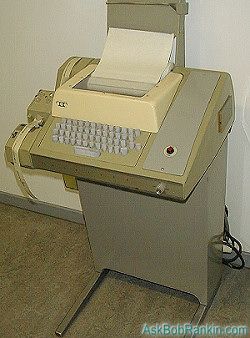 ...your computer says Radio Shack anywhere on the packaging. I had lots of fun on the TRS-80 we had in high school, but that was over 40 years ago. I actually owned an HP Model 33 Teletype (pictured here), which was the first computer terminal I used. It could go online with a 300-baud modem (about 10,000 times slower than broadband today) and saved programs on paper punch tapes.
• You get errors such as "General Protection Fault", "IRQ conflict", "Abort, Retry, Fail?", or "Printer on Fire". The latter message originated from early Unix operating systems, and served as a placeholder for a serious but undiagnosed error. Similar to the "Something Bad Happened" error that sometimes popped up in Windows 8.
• ...your only web browser is Netscape Navigator, and your screen saver is a flying toaster.
• ...you have enough time to make a cup of coffee, read the morning news, and take a short nap while waiting for your computer to start up.
All of the above scenarios warrant shelling out the dough for a new computer. There are cases however, where you might have a relatively new computer, (less than 3 years old) and it is acting up enough to make you want to replace it with a new one. Before you do that, let's look at a few ways you can "soup up" a fairly new machine:
Your Computer Is Running S-l-o-o-o-w-w
This is probably the number one complaint heard by Help Desk techs worldwide. If your computer is less than 3 years old, there are a myriad of reasons for the slowdown in performance. For instance, you may not have all the latest security software installed. Operating Systems, device drivers, anti-virus programs and other applications have frequent updates releases to their original product. Keeping up with the latest releases or patches of any software you are running, is a good way to keep your computer free from viruses and spyware that can slow it to a crawl.
Hardware also has updates, called firmware updates. Check with your hardware vendors to make sure that your computer, wireless router, cable modem, printer, etc... all have the latest firmware updates. A cable or DSL modem that's overheating can throttle your Internet speed. If you find that turning off the modem and then waiting an hour or so boosts your surfing speed, you may need to replace it.
Sometimes a slow running computer is one that is lacking memory. As applications get more feature rich, more memory (RAM, not hard drive space) is required to run them. A lot of times, computers will be sold without the maximum capacity of RAM that they can actually run. Again, check with your computer's manufacturer. Find out if the memory is expandable, and how much RAM you currently have intalled. Upgrading RAM is a fairly easy and inexpensive way to speed up your computer. See my companion article for help with understanding and adding RAM: Does Your Computer Need More Memory?
Your Computer Is Running Out of Space
You are noticing degradation in your computer's performance, and you are also noticing "Running low on disk space" messages. Low disk space can slow a machine down, and also cause problems running applications. Hard drive space is getting cheaper and cheaper these days; the newest computers often come with 500 GB or 1 terabyte (1000 GB) hard drives as a standard. You don't have to buy one of these new computers though; you can replace a smaller hard disk drive with a larger one, or upgrade to an SSD drive. But before you do any of those things, see my article Clean Hard Drive for tips on getting rid of the junk and clutter on your hard drive.
Your Computer Has Less-Than-Great-Graphics and So-So-Sound
The characters in that cool, new game you installed, have herky-jerky movements or maybe there's a tinny sound when you blast the bad guys. Or perhaps the photos you download from your digital camera have a grainy, dull look when opened on your computer. On a relatively new machine, these problems can often be remedied by multimedia upgrades. Upgrading your graphics card or sound card can add a whole new level to your computing experience. A newer monitor will make everything look crisper.
It's important to know when to let go of an old clunker of a computer. It's just as important to realize when your computer needs a "tune-up". The goal is to find a happy medium between being able to experience the latest that technology has to offer, but not being pressured into throwing a perfectly good system away because of slick sales ads, feature envy or industry hype.
Your thoughts on this topic are welcome. Post your comment or question below...


This article was posted by Bob Rankin on 30 May 2024
| For Fun: Buy Bob a Snickers. |
 |
Prev Article: The High Price of Anonymity |

The Top Twenty |
Next Article: How To Become a Tech Support Superhero |
 |
There's more reader feedback... See all 26 comments for this article.
Post your Comments, Questions or Suggestions
|
Free Tech Support -- Ask Bob Rankin Subscribe to AskBobRankin Updates: Free Newsletter Copyright © 2005 - Bob Rankin - All Rights Reserved About Us Privacy Policy RSS/XML |
Article information: AskBobRankin -- Is Your Computer Obsolete? (Posted: 30 May 2024)
Source: https://askbobrankin.com/is_your_computer_obsolete.html
Copyright © 2005 - Bob Rankin - All Rights Reserved
Most recent comments on "Is Your Computer Obsolete?"
(See all 26 comments for this article.)Posted by:

Dan
04 Jun 2024
Interesting that this article arrives just as I am setting up another round of ex-school Dell 3540 (circa 2014) laptops for refurbishing. I have added 8-16 GB RAM and internal SSDs to about 30 of these while preserving and updating the early Windows 10 OS loads.
I hand these out to older clients / friends as completely usable basic machines, capable of web surfing and online finance and Libre Office functions. Microsoft will officially orphan W10 in late 2025 - though does anyone else recall that MS advertised W10 as the "the last OS you will ever need"? Even then these machines will still chug along. And they run Linux quite well; I have given one to a young friend who is interested in IT and programming.
Notes to the article: not all the listed scenarios are sufficient reason to upgrade the whole computer.
- A small desktop monitor can be replaced with a larger one; a laptop can even be connected to a huge one (think docking station).
- A grinding hard drive can (should!) IMMEDIATELY be replaced with an SSD.
- USB ports can be added - either internal on a desktop machine, or via a powered port extender / docking station for laptops.
- Do not overlook the role of BIOS updates! My school threw out the Dell 3540s because they had a glitchy and very very basic BIOS, dead-slow mechanical hard drives, and only 2 GB RAM. I salvaged the lot; the first step was to upgrade the BIOS, which enlarged the RAM capacity to 16 GB. (SSDs and W10 updates completed the conversion.)
- I am still running XP on an older machine that is isolated from the internet. It runs needed programs that won't run under W10.
Having said that, I admit my daily driver is a much newer Dell desktop with a 32" TV as a monitor, 32 GB RAM, an optical drive, and four internal drives. I publish large PDF projects, and the 3540 would not cut it. It is among the earliest motherboards capable of running Windows 11, but I will hold off that particular problematic upgrade until the last possible moment.
Posted by:

Larry Mills
04 Jun 2024
Hello Bob, Well my current computer is now 11 years old. Microsoft informed me that they couldn't download the latest web browser as my machine won't support it. PC Matic has done a wonderful job of keeping my computer in the game until this spring so I told the boss that it's time for me to get a new box this Christmas. She has worn out two laptops during this time and is in need of another. Have a great day!
Posted by:

Maurice
04 Jun 2024
I only use my PC to check my mail a couple times a day. Do I really need a new PC...
Posted by:

Bruce Thompson
04 Jun 2024
Everywhere I read that Windows 11 can not be installed on an old Windows 10 PC, but here is a video that says it can be done. Do you agree? Thanks
Bruce
https://youtu.be/XyXS4ny7WzM?si=75wgr0BNBGB1kuxC
Posted by:

Bill Sampson
04 Jun 2024
Orville, in the comments above, asked about security. On Bob's recommendation I use PC Matic and have done so for several years now. I bought the lifetime license. It works and I don't think about it. I'm quite pleased and second the recommendation.
I've got a several year old HP laptop with Win 10 Pro. I dodged Win 8 and hope to dodge Win 11 also. Time will tell.
Posted by:

Dave
04 Jun 2024
I would only add 1 short paragrapgh to the article.There should be a reference to disposing the computer environmentally after wiping th hard drive. Add a link to another article on this topic.
Posted by:

MartinW
04 Jun 2024
I have only old computers. (Several of them, some working, some waiting for me to put in new, already purchased, hard drives. I also have no money for new computers.) Two of my old computers can run Windows 10. Absolutely none can install Windows 11. I have several different Linux distros on them, either alongside Windows or on their own. They generally work a lot faster for me, and are a lot of fun. This is not to just hype Linux (it sometimes has problems too), but this is my solution.
Posted by:

cho
04 Jun 2024
I personally like Windows-11.
The TPM 2.0 resident encryption chip is a tremendous asset. TPM 2.0 is a required attribute to install Windows 11.
If you prefer the W10 interface, that can be done on W11. And still be a Windows 11 system.
I am fond of the Lenovo ROG (Republic Of Gaming) laptops. They are affordable and standup well.
Posted by:

Jeanine
04 Jun 2024
I'm sick and tired of the planned obsolescence forced on us by tech industry. It burns through resources, creates a ton of waste, and is bad for our environment and pocketbooks.
Posted by:

gene
04 Jun 2024
When Windows 10 came out, it was supposed to be the LAST iteration, well, that didn't last did it? I'm running an HP Pavilion, six years old this fall, with 16GB Ram and it could run 11 but I don't WANT it. I'll wait till support for 10 expires to buy another desktop. I like desktops because of the ease of connecting peripherals and I use a 32 in HD monitor, older eyes like the big screen. But I've an iPhone 15, iPad 12.9 and use both as much as my desktop. Migrating from one PC to another is always a pain, except with Apple products. So this one works just fine, I still have the Pavilion I replaced with this one, update it every month, can't run 11 and only has 8GB Ram, but it still functions just fine. I loathe built in obsolescence. And not just with tech.
Posted by:

Steve_K2
04 Jun 2024
Gosh, I wish it were possible to reply to individual comments. So many deserve a followup question or comment.
My plan, for when Win 10 loses MS support next year, is to use an old Chromebook for financial websites only. Checking balances, transferring to/from credit union and Vanguard, online taxes, etc, all to be done on the Chromebook.
Everything else -- YouTube, AskBob, online chess, Drudge Report, etc -- to be done on the Win 10 PC I'm using now and that's perfect for my needs.
When I need to copy something from the Chromebook to the desktop, I'll use the good old sneaker net.
I wish I could keep using the Win 10 desktop for everything, as I do now, and protect it after MS support ends next year with a robust anti-virus program. But that's not secure apparently, for reasons I don't understand.
Posted by:

Dana Lynch
04 Jun 2024
It is definitely not time to replace computer if you can't upgrade to spying Windows 11. Just switch to Linux and keep your money. My computer is 9 years old and runs just as good as I purchased it. It is fast with plenty of free memory and ram. I installed upgrade graphics card. I'm a basic user and so I'm switching to Linux and keep my money in my pocket.
Posted by:

Ernest N. Wilcox jr. (Oldster)
04 Jun 2024
I currently run Windows 11 on my desktop, and my primary laptop PCs. I have an older laptop that I inherited from my wife when she passes away in 2019. It currently runs Windows 11. My desktop and primary laptop PCs also dual-boot Windows 1 deals with all the AI features they1 with Solus Linux, RebornOS, and Garuda Linux. RebornOS and Garuda are derivatives of the Arch Linux distribution. My older laptop dual-boots Windows 10 with Garuda Linux.
When Windows 10 reaches EOL, I'll probably remove it, and my older laptop PC will become a GNU/Linux-only machine. What happens with Windows 11 will depend on how Microsoft deals with all the AI and 'Advertising' 'features' they appear to be planning on including into the new 24H2 release. If I can't turn off all that junk, I intend to drop Windows all together, and switch to GNU Linux as my daily driver. At that point, if I find that there are things I miss about Windows 11, I'll install it in a VM on GNU/Linux, then use it only for those things I miss (currently, just a few games from the Microsoft Store I like to play).
I also have a very old (to me) laptop PC. It boots from the BIOS (not UEFI) system base, so I don't use it much anymore, although I do perform a few experiments with it, just to see what still works with that old setup. Interestingly, I can run ChromeOS on it, and several GNU/Linux distributions, albeit, very slowly. I've given it an SSD drive, and maxed out its RAM (8GB IIRC).
I don't throw out old computers, I re-purpose them, until they either stop working, or I can't find an OS that'll run on them. For those machines that can no longer be used, I recycle them. If you ask me, computer vendors should provide a recycling service at the point of sale, so when your computer doesn't work for you anymore, you can recycle it by sending it back to the vendor.
I hope what I do helps others,
Ernie (Oldster)
Posted by:

Christopher
04 Jun 2024
Out of curiosity I bought a tiny Gigabyte box with 4 GB ram and using an extremely weak Celeron CPU.
Ues an SSD. Can it run Win 11. Yes it does. That's what it came with. Just stick to running one app at a time and browsing the net and word processing are quite acceptable. Would I use it as my main PC? What do you think?
Chris.
Posted by:

Jillian S
05 Jun 2024
I agree with Jeanine and others about the planned obsolescence of equipment! And it ought to be easier and cheaper to dispose of devices no longer needed. As for longevity, I used my initial laptop (Toshiba) for eleven years and then bought this one three years ago (HP). I had Windows 11 installed last year, and of course griped about the changes, even though they were small. This laptop is quite small, which would be handy for transport, except that I use it as a desktop and don't take it anywhere.
Posted by:

Wolf
05 Jun 2024
It is always good to see more articles with interesting information from Bob. Like Jeanine and others, I find the planned obsolescence disgusting. [It will be interesting to see what an archaeologist 5,000 year from now "discovers" after excavating our landfills!] In my case, my ASUS desktop computer was purchased in December 2015, which had Windows 8. I upgraded it to Windows 10. Then, when Windows 11 came out, I did that check for hardware compatibility. Since that failed, I replaced the motherboard, upgraded to Windows 11, and installed Ubuntu Linux, where I have a dual boot system. All works GREAT. The result: I didn't have to waste money on a new computer and save resources. The future: Will a Windows 12 come out? If so, when? When is Windows 11 supposed to be "decommissioned? It is better to be checking the computer, instead if chucking the computer! We live in interesting times! Thank you Bob for another informative article!
Posted by:

Chuck
05 Jun 2024
My wife has a Dell laptop that needed a new hard drive. We took it a computer repair store. They replaced the hard drive and at the same time upgraded the OS to Windows 11 even though it was not "upgradeable" It seems to work great. As noted in a previous post above there IS a way to up grade to Windows 11.
I wonder why MS doesn't release a version that can be used to upgrade older OSs and say "Take your chances"?
Posted by:

Frances
08 Jun 2024
I'm using a Dell Vostro laptop, running windows 7, bought in 2012. The hard drive has been replaced with a SSD. And I just had to replace the electric socket because the plug wouldn't stay connected; cost me a whole $20. So far, it does the job.
I do have a Windows 11 computer that belonged to my late husband and I need to learn how to use it because I'm sure the Dell will eventually give up the ghost.
Posted by:

Orville
09 Jun 2024
Windows 12 looks like it will happen, as it was mentioned in passing on a TV news report a couple of days ago, in conjunction with news that Microsoft is going to invest heavily in their Chat AI program. I had read that all this (Win12, AI) can be / will be best supported with updated hardware features.
I'm really curious about all this AI. At this moment, I think I'll wait as long as I can (shortly after MS ends Win10 support) and seriously consider buying a new computer with Win12 and AI enhancements built in....
Posted by:

BAW30s
23 Jun 2024
Thanks, Bob, for the laughs: some of those obsolete computers you mention even make mine sound modern!
That said, this is being written on an XP desktop which is over 20 years old. I have some Windows 10 machines too, but this one remains my favourite, as I like the look of the XP interface and have all my programs on it.
There are disadvantages: apart from the potential security issues, it needs niche browsers to function on the web and some research to keep my emails going on Outlook Express.
If I were into gaming or social media, I would have to upgrade, but as I'm not, I'm not in a hurry.
Most websites, like Bob's, present no problems, even with my 14" monitor.