


Do I Need a Registry Cleaner?
My computer seems to get slower and slower. A friend told me I need a registry cleaner. Will that really help? If so, where can I get a good free registry cleaner to do the job? |
Cleaning the Registry
The short answer is: Yes, your computer will run better if you occasionally clean your Windows system registry. But first, let's define exactly what the registry is...
In layman's terms, the Windows Registry is a hideously complex ball of string, rubber bands, duct tape and bailing wire that's supposed to keep track of Windows system settings, your hardware configuration, user preferences, file associations, system policies, and installed software. In slightly more technical terms, the registry is a database in which Windows keeps track of relationships between hardware, software and the operating system.
It was supposed to be an improvement on the collection of simple text-based INI files that stored Windows configuration settings, but too many pocket protectors got involved in the design and the result was an over-engineered, over-complicated mess that makes Windows much more fragile and harder for users to maintain. Since it is a single point of failure, problems with the Registry can make a Windows system slower, less reliable, unbootable, and in extreme cases can only be fixed by reinstalling the operating system.
That's why you need to use a registry cleaner every once in a while.
Oh, That Waxy Buildup!
It's not uncommon for the registry to grow very large over time, which tends to slow down the computer's startup and can make it unstable. You can end up with lots of unnecessary registry entries that are created when you install or remove software and hardware on your computer. Sometimes an "orphaned" registry entry can confuse Windows during startup and cause a delay. In general, slimming down your registry will make Windows run faster.
The REGEDIT command will allow you to view and edit the registry, but if you don't know what you're doing under the hood, just put down that wrench and back away slowly. You can do a lot of damage to your system by flailing about with a registry editor. Specialized programs exist to examine the registry, compare what's in there to what's really on your system, and either correct or delete erroneous entries.
 REGCLEAN is a utility program included in Windows 95 and Windows 98. This program is no longer officially supported by Microsoft, but some users report that it works fine on Windows XP systems. However, I don't recommend that it be used on XP, because the structure of the registry is different in XP than it was in earlier incarnations of Windows.
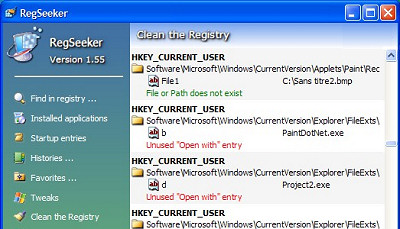
RegSeeker is a highly rated (and free) registry cleaner that I like. RegSeeker is an aggressive cleaner, and in some cases may delete registry entries that are needed. Some RegSeeker users have reported that using a RegSeeker exclusion file can prevent it from making erroneous deletions.
Another popular free registry fixer/cleaner is CCleaner, which does some additional things like cleaning up your browser's temp files and deleting unneeded files. CCleaner has a reputation for being less aggressive so may be a better choice for non-expert users who want a free registry cleaner.
Uniblue RegistryBooster is not free (US$29), but seems to be the most advanced tool in the class. Some 3rd-party tests have shown that it improves both boot time and application launch time. In the past, I've read about people with problems uninstalling the Uniblue Registry Booster software after downloading a trial version. To my knowledge, the company has resolved those problems. If you are a non-techie, I'd recommend this tool over the others.
There other registry cleaners available, some free and some not. If you want to play the field, read some reviews by reputable sources like CNET or PCWorld before you install. If you're not careful, you can get an adware or virus-laden registry cleaner wannabe that claims to do the job, but will have nasty side effects. See my companion article Free Registry Cleaners for some others that have earned good reputations.
A Few Caveats...
Before using any registry cleaner, I highly recommend that you create a System Restore restore point, and even better, do a full registry backup with the ERUNT utility. In some cases, aggressive registry cleaning can remove entries required for some programs to operate.
I should mention that technology experts have differing opinions on the value of registry cleaners. Some adamantly claim that they cannot possibly improve system performance. Others say they might help a little, but point out that in some cases they can cause damage as well. And of course others believe they can offer significant benefits. I tend to be in the latter camp, but recommend caution when using a registry cleaner. Choose the tool that suits your level of technical expertise, and do your preparatory backups.
Making Windows Faster
I should also mention that there are lots of other things that can cause your computer to bog down. Viruses, spyware, a hard drive that needs defragmenting, and other factors can contribute to the problem. In my article Make Windows XP Run Faster! I share my special recipe to clean the icky goo out of your computer's pipes, so Windows will start quicker, run more reliably, and go faster on the info-superhighway.


This article was posted by Bob Rankin on 29 May 2008
| For Fun: Buy Bob a Snickers. |
 |
Prev Article: Password Protection for Windows XP |

The Top Twenty |
Next Article: My Favorite Software |
 |
There's more reader feedback... See all 59 comments for this article.
Post your Comments, Questions or Suggestions
|
Free Tech Support -- Ask Bob Rankin Subscribe to AskBobRankin Updates: Free Newsletter Copyright © 2005 - Bob Rankin - All Rights Reserved About Us Privacy Policy RSS/XML |
Article information: AskBobRankin -- Do I Need a Registry Cleaner? (Posted: 29 May 2008)
Source: https://askbobrankin.com/do_i_need_a_registry_cleaner.html
Copyright © 2005 - Bob Rankin - All Rights Reserved
Most recent comments on "Do I Need a Registry Cleaner?"
(See all 59 comments for this article.)Posted by:

dusty
05 Mar 2011
i cant believe nobody is mentioning glarys utilities home edition. the pro edition costs but you only get scheduled automation. it IS really one click repair that has noticable results.its as effective as ccleaner and does more. the one click fix also fixes bad shortcuts, checks start up progs, temp files and checks for adware. it also has a registy defragger in its toolbox, plus file splitters, joiners, undeleters, duplicate files finder. about 20 specialty diagnostic and repair tools. the best tho is a browser hijack restorer which when you need it, your glad to have it. esp with facebook being EVERYWHERE and cross site scripting being what it is. glarys is my pick with ccleaner a close second
Posted by:

D.W. Whitlock
21 Jun 2011
I've been using Ccleaner and its built in registry cleaner for 5 years without a single issue. The registry cleaner built in to the Glary Utilities Free works better and finds more items. The best cleaner I've yet used is the stand alone Eusing Free Registry Cleaner. It finds even more things in the registry than Glary's does. I use all three cleaners and have never had any registry problems afterwords. I do back up my registry before each and every cleaning with ERUNT cuz you just never know. I must place myself in the camp that has received significant performance improvements after a good registry cleaning. After running the Eusing Cleaner on a friends PC that found nearly a thousand items, a cleaning made a major improvement to that PC's speed. I'm a believer.
Posted by:

BJ Gray
05 Jul 2011
RE: CCleaner -- Bob: Your article fails to mention that this software includes the Google Toolbar and there is no way I can see to avoid installing it along with the Cleaner.
EDITOR'S NOTE: There is a checkbox during the install process. I just tried it with a fresh download...
Posted by:

Beth keck
08 Jul 2011
Hi, Bob, I need help that about my facebook thats has locked me out and I dont know what causes it....so I also need clears as all of thur the internets and my mobile facebook ( my cellphone) plus need stay " Onlines "....I thinks probably from virus or hacked or something go on.......Its need stop from any causes it.......thanks
Posted by:

Otto
31 Jul 2011
I ran CCleaner and fixed everything it found, ran it again and found no problems. Immediately ran Uniblue and it found 140 errors. Then ran RegSeeker and it found 758! I don't know what to make of the monstrous discrepancy, whether CC is inadequate or RegSeeker is too aggressive? Does this mean Uniblue is just right???
Posted by:

Dave
12 Aug 2011
I would nor recommend RegSeeker to a novice, I have found that as long as you only delete the green entries from RegSeeker your not to bad. RegSeeker can find hundreds if not thousands of entries so be carefull as if you have not made a restore point, you may end up that you have to do a reinstall.
360 Amigo is a good free one.
Posted by:

hideki
21 Sep 2011
I've been using cc cleaner for a couple months and it works perfectly but also I've used Eusing Free Registry Cleaner and it seems to work fine but I prefer cc cleaner it seems more helpful in my opinion
Posted by:

gabriel
27 Oct 2011
as always you dont need a register cleaner !!... simpel remenber how many accident did hapend and after they came to asks for " " HELP " " its just to sell a usless system , so good luck
Posted by:

Al
27 Oct 2011
Bob, what do you think of ADVANCED SYSTEMCARE? I do have and run daily ccleaner and after that Advanced SystemCare. Some times after running ccleaner, AdvancedSystem care does find other registry entries to delete.
Posted by:

Bill
27 Oct 2011
CCleaner is free to do a scan but doesn't seem to do any cleaning until you pay for it. That doesn't sound free to me.
EDITOR' NOTE: Are you sure you downloaded the right program? I just ran the latest version of CCleaner, and all of the Analyze and Cleaner functions ran fine. I was not asked to pay for anything.
Posted by:

Bob Deloyd
27 Oct 2011
Thanks for the review Bob!
Some say you need to clean the Registry, so say not.
Some say to leave your computer on all the time, some say not.
Me, I turn off my computer when I'm done working with it, and I run Ccleaner just to get the unwanted junk lazy Programmers were suppose to cleanup out of the registry after the uninstall of their programs in the first place :P
Posted by:

Craig
04 Nov 2011
I have been using different reg cleaners for many use with my computers with XP, and having mixed results s,imilar to many comments on this forum. I have recently upgrade to Win 7 on two of my machines and have been thinking about reg cleaners for them, but have read on many forums that this can be dangerous, especially with reg seeker, as the registry is supposed to be much different on the latest windows OS.
So... is a reg cleaner needed for Win 7??
Posted by:

Bobby
27 Mar 2012
I just purchased Speedy Computer to fix over what it scanned as over 6000 registry errors. I ran the program and it claims all my errors fixed. My computer runs slightly faster now, but videos are still loading slow. Does this particular program have any known problems/bad reviews?
Posted by:

Bob
12 Jul 2013
I have been using RegSeeker v.1.55 for over ten years, on both XP and Windows 7 Pro, and have never trashed my registry I use ONLY the AutoClean, set to 2 passes, and it gets the job done now, automatically, removing only the green entries: never had a problem.
Now and then I use the excellent and thorough Wise Disk Cleaner which misses what CCleaner (also excellent and indispensable) finds. Lastly I clean the registry with RegSeeker's AutoClean. Now and then I use Wise Registry Cleaner which has #1 spot in Gizmo's TechSupportAlert for free registry cleaners and also sports a registry backup facility.
RegSeeker is very good for finding left-overs from
the free Revo Uninstaller, which always leaves plenty of keys behind, also files and folders in the OS, but one must exercise care to enter the EXACT name of the uninstalled program, even to spacing. Well-defined names that would make nonsense words with prefixes or suffixes, present no problem, but names like Opera will bring up pages of opera in blue, with "tion" adjoining it in black - RegSeeker has found plenty of keys with "operation" as well! So a search through the findings will reveal the true Opera left-overs.
"Everything" (Search) is excellent for finding Revo's left-overs in the OS. Everything finds everything! Again, exercise care. Leave well alone if you are not sure. And by the way, left-overs can be deleted right from Everything.
If one double-clicks an entry, it takes one to the
place where the item is installed, so it can be identified.
If you need an outstanding tool, buy iolo Technologies' System Mechanic. It's often available for $14.99, and will keep your OS running fully optimized. It can be scheduled too.
It has an excellent registry cleaner and registry backup facility. Tweaking.com All-in-one also has a perfect Registry Backup and Restore option.
(Major Geeks)
Thank you Mr Editor of Ask Bob Rankin's outstanding site for allowing us a voice!
Posted by:

Ivan
23 Aug 2014
Be very very careful with using any registry cleaner, more often that not it can do great damage to your computer or at the very least not boot at all. I have been through this many times myself. Being a computer tech, I can tell you to use great caution to using them.. The answer is, if your not sure of yourself, then don't.
There is little proof that it actually helps at all in all reality and you may (as I have) end up sorry and angry you used one. If you do use them, which is optional with you, know what your doing. All too often it if it sounds too good to be truth it probably is.
Just my opinion is all and one wants to be especially careful with windows 8 and 8.1 as it is very fussy about what is deleted, sometimes it pay to just leave well enough alone if your not having problems. I have cleaned out registries many times and saw no real improvement accept to make me feel better and then there were times I would say, Oh no here we go again, problems.
When in doubt don't and any computer tech will tell you, if it is the registry, don't unless there is no other choice....
Posted by:

Mike
22 Dec 2014
For my registry maintenance needs I use the Registry Clean Expert, which is not free but works great. I've been using it for years and have never had any problems.
There is a free registry defrag utility available for download that works just as well.
http://www.registry-clean.net
Posted by:

clyde
22 Aug 2015
Yes I have been using regedit for many years but do be do use care be sure to back it up before you do anything
Posted by:

nancy
01 Nov 2015
Hi Bob,
I am relatively new to your website. I didn't know exactly where to go with my request so I'm posting it here, although my issue is not with the Registry function of CCleaner.
My question is: Can you advise how to rectify this problem?
I have been having difficulty with the free edition of CCleaner.
While in the Analyze stage when it gets to "Firefox Internet Cache" it gets gets stuck at the 34% mark.
I then cancelled the session and proceeded to use the Run Cleaner tab.
After cleaning was complete I receive a notice saying "Firefox-Internet Cache-skipped" and "Firefox-Internet History-skipped."
This has happened every time I run the program.
Any advice to get CCleaner to proceed normally would be very much appreciated.
My system is: Vista Home Basic 32bit Service Pack 2
Many thanks for your time and expertise.
Posted by:

Ken
28 Nov 2016
G'day Bob
Intend purchase of Galaxy 10.1" tab.How to transfer from laptop to tab, and what extra items would I need for this. Regards : K.C.
EDITOR'S NOTE: The Galaxy Tab runs the Android operating system, not Windows. So you can bring your photos, documents, etc. But your Windows software will not work on the Tab. I suggest you upload your important files to Google Drive, and then you'll be able to access them from the Tab.
Posted by:

Richard Gfeller
23 Apr 2019
This is a perfect example of my earlier request that you DATE your articles. I got really excited about attempting reg clean... until I read the comments going back to 2011 and realized this is really old and likely not relevant in the age of Windows 10.
Oh, well. Back to the drawing boards.
Again, it would be helpful if you would date your articles.
Otherwise, keep up the good work. BTW - I like your wry sense of humor displayed in the opening paragraphs to this article.