


Free Calls With Skype
My friend has gotten rid of his landline phone in favor if something called Skype. He claims he can make free calls all over the world. What exactly is Skype, is it really free, and is it legal? |
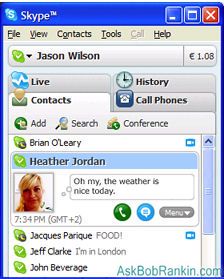
What is Skype?
Skype is a software package that lets you make 100% legal, free calls to almost anyone, almost anywhere in the world. But there are a few points to ponder... Skype's free calls are computer to computer, so you'll be using the microphone and speakers (or headset) attached to your computer, not a regular telephone handset. Oh, and of course the person you're "calling" must also have the Skype software on their computer. Even though calls travel across the public Internet, they really are free, and the voice quality is quite good. You can even have free conference calls with up to nine people on Skype.
You can also use Skype to call regular landline phones and mobile phones. These "SkypeOut" calls aren't free, but Skype offers some pretty inexpensive rates. Skype's Unlimited Calling option gives you unlimited calls to anyone, on any phone, within the US and Canada for $2.95/month. For calls outside North America, you can use SkypeOut to call and pay low per-minute rates. Most countries are about two cents (USD) per minute.
SkypeIn - Inbound Calling
If you're liking the idea of free Internet calling, you might be tempted to toss your existing phone and cut the phone company out of the loop. But what about non-geeky friends who aren’t using Skype -- how will they call you? With SkypeIn, anyone can call you by dialing a regular number, and you can receive the call with Skype. A SkypeIn number costs about USD$60 per year, or less if you use a subscription plan.
A SkypeIn number can benefit both you and your friends. If you're in Europe, and you have friends in New York City (or elsewhere in the USA) you can get a NYC-based SkypeIn number. When your USA friends dial your SkypeIn number, they'll pay whatever their phone company charges them for making a phone call to New York, and your Skype will ring in London, Paris, or Rome! If you have friends in many places, you can get up to 10 SkypeIn numbers in different places and give the your correspondents the one that's cheapest for them.
Skype Downloads and Accessories
 If you have a computer running Windows, Mac OS X, or Linux, you can download and use Skype in 27 languages. A broadband (high-speed) Internet connection is recommended for voice calls, although it will work on a dialup line. Skype can be sketchy on a satellite connection. You'll need speakers and a microphone, or a headset. To make video calls you’ll need a computer with at least a 1GHz processor, 256 MB RAM and of course a webcam.
you prefer something like a real phone instead of the microphone and speakers, you can buy Skype phones that easily plug into the USB port on your computer. You can also get a wireless Skype phone that will enable you to access your Skype account without turning on the computer, by connecting to Skype at Wi-Fi hotspots.
At the Skype website, you can download extras and customize your Skype software. Try 3D talking heads for Skype, animated with your own voice. Or check out the Pamela Call Recorder if you want to record your Skype calls. For fun, Ringjacker lets you hijack your friend's Skype ringtone.
Got comments or questions about Skype? Post your thoughts below...


This article was posted by Bob Rankin on 26 Jan 2007
| For Fun: Buy Bob a Snickers. |
 |
Prev Article: Changing Disk Partitions |

The Top Twenty |
Next Article: Medical Advice Online |
 |
There's more reader feedback... See all 21 comments for this article.
Post your Comments, Questions or Suggestions
|
Free Tech Support -- Ask Bob Rankin Subscribe to AskBobRankin Updates: Free Newsletter Copyright © 2005 - Bob Rankin - All Rights Reserved About Us Privacy Policy RSS/XML |
Article information: AskBobRankin -- Free Calls With Skype (Posted: 26 Jan 2007)
Source: https://askbobrankin.com/free_calls_with_skype.html
Copyright © 2005 - Bob Rankin - All Rights Reserved
Most recent comments on "Free Calls With Skype"
(See all 21 comments for this article.)Posted by:

David
31 Jan 2007
A friend of mind has a therapy consulting business and has a Skype link on her web site. Click the button and it rings on her computer. No numbers to even enter. Same can be done in an email. Its also worth noting that Skype has been bought by eBay so is well funded.
I'd highly recommend a headset mic if you plan to use this. The mic then stays an equal distance from your mouth as you move around. No phone to hold.
Some of the Instant Messaging clients also have voice conversations, such as Google Talk. Both ends have to have it as with Skype and the call quality can be a bit more variable. But some also allow you to leave voice messages which arrive as mp3 files attached to emails.
And finally, I got this today - have not tried it yet. It uses your regular phone and the internet, no software required.
Jajah.com: "from this website you can call anyone on your telephone anywhere in the world completely free of charge if they are also registered. on the website you type in your phone number and the phone number you are calling. your phone will ring and you answer. then the phone you are calling will ring and voila. if the person you are calling is not registered you can still call them from you phone but it will cost .034 per minute. anywhere in the world."
Posted by:

Jerry Filipiak
31 Jan 2007
Skype is fantastic! I paid the $15 annual fee and have unlimited calls to Canada and CONUS and, for $0.026 per minute, I can phone the United Kingdom. There are a lot of minutes in a $10 bill. Reception is generally very good. Highly recommended.
Posted by:

John.
31 Jan 2007
Using Skype with dial-up - even with a fast connection- is pushing a wheelbarrow up hill. ADSL broadband (if available) is essential if only to allow incoming telephone calls simultaneously. The clock-speed is not too critical but a continuously fast download is. Remember, each call, although cheap, is added to your download total by your provider John.
Posted by:

jeff
31 Jan 2007
Skype is great but voice quality can be very poor, regardless of bandwidth available. I use Jajah for voice, and Skype, or Yahoo messenger for video.
EDITOR'S NOTE: Remember that the voice quality is very much dependant on the bandwidth on both ends of the conversation.
Posted by:

bob
31 Jan 2007
I really like Skype. But be prepared for frequent cut outs during conversations. It happens almost every time. I notice it happens more to me, the Skype user, than to the person I am talking to.
Posted by:

Bob Deloyd
31 Jan 2007
I have dialup and can't use Skype, Gizmo, or any of the others. What I use is Yahoo Messenger to place calls to land lines. Remember years ago when you could do it for free? It used to behave like your talking on a CB radio! Well they improved the software from back then and it now works better than any of the messengers I have tried recently for dialup and is pretty dang cheep, about 2 cents a minute. Just don't be surfing the web or making any downloads! If you know of a better one for dialup let me know cause I will be monitoring this post.
Posted by:

Don Jeffrey
31 Jan 2007
An English friend of mine who now lives in the US talked me into trying Skype. He's been using it for quite some time and makes numerous calls to his family and friends across the Atlantic. I was impressed with what I saw so, for Christmas, I purchased a Skype phone and inexpensive Logitech camera for my son and his family who live in Iowa. The two pieces cost less than $50. At the same time, I bought an identical set for me. Since then, we've been having weekly video chats without cost from PA to Iowa and can keep pace with his growing family.
Posted by:

Ian Foster
31 Jan 2007
I'm from the UK but work overseas, so bought one of these, a cordless USB phone for just under GBP 30...
http://www.tescointernetphone.com/
This gave me a free incoming UK number, no monthly charges. Only have to pay for outgoing calls to 'normal' phones (mostly 2p per minute) & has free voicemail when offline.
Posted by:

David Spangler
31 Jan 2007
I've found Skype PC-to-PC calls audio to be quite satisfactory, but Outgoing PC-to-phone calls audio quality to be quite poor. (And these calls are charged per minute, not free.) Not network loss/latency/jitter problems, but extreme high-end rolloff ("muffled"), etc. It's bad enough that some people I've called can't recognize my voice.
Yes, I've walked through all the suggested PC configuration settings per the Skype FAQs. I'm using DSL, and again, the PC-to-PC calls are fine. Am I the only one experiencing this phenomenon on Skype Out calls?
Posted by:

Hubert
01 Feb 2007
I am very surprised that you do not mention any security concerns in this article. See what I have collected from various Internet sources in my own
Skype recommendations page at: http://www.boku.ac.at/zid-skype.html?&L=1
Posted by:

Ram
05 Feb 2007
For home users who are behind a firewalled broadband router, voice quality improves dramatically, if both the parties open a port (port forwarding) and get their Skype to listen on it.
Posted by:

Andre Noel
25 Aug 2008
Some of us working in China get very frustrated when we punch in skype.com and get re-routed to an all-Chinese Web site, then would have to download a quite-possibly tampered version of SKYPE. One way to get around this is go to http://www.skype.com/useskype/ Usually, one way to go around this kind of situation, as it also happens with MSN and others, is to find a sub-link inside the destination site. The above link, "low per-minute rates" http://www.skype.com/products/skypeout/rates/all_rates.html , Was the only one that worked for me. Great job, Bob!
EDITOR'S NOTE: Wow, I knew China was blocking certain search engines, but I didn't know they were redirecting sites like that. No way I would recommend downloading a "Beijing approved" version of anything!
Posted by:

db
27 Jan 2009
For free PC to PC calls and calls to land lines even cheaper than Skype, I use Freecall (freecall.com) and the quality is excellent.
Posted by:

sr
28 Jan 2009
And then there's Magicjack: land line to land line via caller's Magicjack device linked to his land line phone and his PC. Modest annual cost and free calling.
Posted by:

Georgia Peach
29 Oct 2009
I read your infor and love it. Keep up the good work. Bob, I have a HP Photosmart D7360 printer. A piece of paper got hung in it and that has happened a lot of times but I always did get the piece out. This time, I can't see a piece at all, but the big piece that I did get out does have a piece missing so it is in there someplace but where I can't find. It says, Carriage jam/Clear Jam, and then press OK to continue. I know how to take the back off and now I want to take the printer apart but it looks like it is rivited together. Where is that paper at? No one else can see a piece of paper in it either. Please help. GP
Posted by:

Amina
04 Nov 2009
this is good to acall friend and family
Posted by:

Richard
02 Oct 2010
Hi can I get free calls on my iPhone 3 on skype
Posted by:

Pramod Pokhrel
30 Oct 2010
Hello, I want to know that how can i make free call from skype messenger.
please reply me as soon as possible.
Thank You
Regards
PRAMOD POKHREL
Posted by:

Steve tremblay
31 Dec 2011
See http://www.flexyphone.com - For SkypeInCanada and SkypeIn Numbers and for many other countries with FREE Skype and Voip accessories for your FREE Voip calls, when you get any virtual number so you can receive incoming calls through any FREE VoIP service such as SkypeIn, GoogleTalk, Voipcheap, VoipDiscount and many more SIP VoIP providers... You could now get incoming calls and make outgoing calls without paying long distance fees using many VoIP services. Skype certified accessories, and other Free accessories include USB Handsets, and Skype USB PSTN adaptors with integrated answering machine etc...
Visit the site http://www.flexyphone.com to order your Free Accessory, along with a virtual number from any country and replace your home phone with a FREE Voip service today.
www.flexyphone.com is the SkypeIn Canada numbers provider, SkypeIn Belgium, SkypeIn Portugal, SkypeIn Netherlands, SkypeIn Spain, SkypeIn Greece, SkypeIn Italy, SkypeIn Norway, SkypeIn Russia, SkypeIn Turkey, and many more countries...
Posted by:

Avishek Banerjee
22 Jun 2018
Yeah, Skype is decent and is definitely easy to use. But as much as I liked it; I still prefer using R-HUB's solution for web conferencing, remote access and support. It gives me everything I need in one setup. Plus, it's only a one-time cost.