


Free HDTV on Your PC
HDTV (high definition television) is the wave of the future. Right now many television stations are transitioning to Hi Def, and if you are an avid TV watcher, then you'll want to make this transition as well. But if you don't have a fancy new HDTV, you can still get free HDTV on your PC. Here's how... |
What is HDTV?
Although some TV stations are beginning to broadcast in High Definition, most TV signals are still Standard Definition, with a screen resolution of about 480x330 pixels. That's lower than the old VGA computer screens we tossed out 15 years ago. And that's why Standard Definition TV pictures look so grainy, especially on a large screen. HDTV broadcasts can be transmitted at up to 1920x1080 pixels, so the picture is astonishingly clear by comparison.
Oh, and don't make the mistake of confusing "Digital TV" with HDTV. Television broadcasts can be transmitted in either analog or digital form. An analog broadcast can be either Standard or HD. A digital broadcast can be either Standard or HD. Simply put, digital does NOT imply High Definition. And finally, you DON'T need to have cable or satellite service to get HDTV broadcasts. An HDTV signal can be broadcast over the public airwaves, either in analog or digital format.
The FCC has mandated that all U.S. television broadcasts must transition from analog to digital by February 2009, so at least one confusing factor will be removed by then. (See Goodbye to Analog TV for details on that.) But even in the all-digital television world of the near future, we'll still have both Standard and High Definition broadcasts.
HDTV Tuners For PC
Okay, back to our regularly scheduled topic: Free HDTV on your PC… One way that you can do this is to set up your PC to receive and play free over-the-air HDTV signals by installing an HDTV tuner.
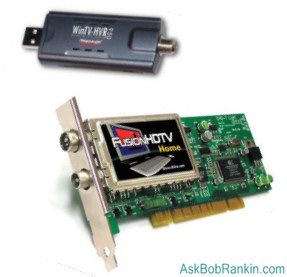
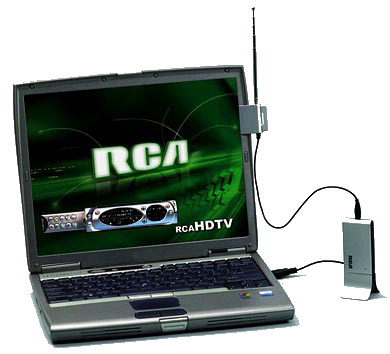
An HDTV tuner is a digital TV signal receiver that is connected to your personal computer. These tuners range in price from about $50 to several hundred dollars, and can be connected via an internal adapter card or an external USB port. External tuners are the easiest to connect to your computer, however, they tend to not offer as many features as the internal tuners do.
When selecting an HDTV tuner you will want to examine four things: (1) its costs, (2) processor utilization, (3) what types of signals it is capable of receiving and decoding and (4) how the tuner deals with multi-path and weak signals.
 Some of the top rated HDTV tuners include the Vbox Cat's Eye 150 ($80, Internal), the Fusion RT Gold ($160, Internal), OnAir HDTV GT ($180, USB) and the WinTV HVR-950 ($100, USB). This HDTV Tuner Chart is a good starting point to compare features and prices.
Before installing either an internal or an external HDTV tuner, you will want to make sure your computer is set up to handle the processing, picture, sound and memory requirements of running HDTV on your PC. Most HDTV tuners have relatively modest requirements, such as a Pentium (or compatible) processor running at 1.6 MHz or greater, at least 128 MB memory, and a 64 MB Graphics card. To ensure that your computer will be compatible with your tuner you should read the tuner's user guide and see what hardware is recommended.
Installing an External HDTV Tuner
If your computer is capable of handling an HDTV tuner, you're ready to install. For external HDTV tuners this will generally include installing the software provided, connecting your aerial antenna to the tuner and plugging your HDTV tuner into a USB 2.0 slot. If you want to record HDTV to a disc, then you will also need to install DVD recording and burning software, such as Roxio Easy Media Creator 9 or Nero 7 Ultra Edition. Oh, and a DVD-R drive is very helpful too. :-)
Installing an Internal HDTV Tuner
If you don't want to deal with external tuner clutter, you can install an internal tuner instead. Internal HDTV tuners are fairly easy to install. After cracking open the system unit, just plug it into an open PCI slot, connect a few cables and you're all set. Just be sure to read the instructions so you'll know the correct order of steps that you will need to take to install your HDTV tuner card, drivers and its supporting software.
Keep in mind that the tuner card is designed to only receive signals. If you want to record HDTV programs on your PC then you will also need DVD recording and burning software and a DVD-R drive.
Finding Free HDTV Signals
HDTV is becoming more prevalent (especially for sports), but it's still not what I'd call commonplace. Some stations have begun to broadcast in Hi-Def, at least for some of their programming. This is good news for you, because it means that you have a good chance of being able to receive free over-the-air HDTV signals from your local broadcasting stations. To learn which stations broadcast in HDTV, check your local television listings or go to websites that list HDTV stations like TitanTV.
To sum it up, if you want to watch free over-the-air HDTV programs on your PC then you will need to install an HDTV tuner. These tuners are fairly easy to install, however, it is important that you select a tuner that will work with your computer and your operating system. Finally, before trying to install your HDTV tuner, make sure you read the instructions that come along with the tuner and follow them closely. Do you have an HDTV tuner for your PC? Tell us about your experience by posting a comment below.


This article was posted by Bob Rankin on 27 Nov 2007
| For Fun: Buy Bob a Snickers. |
 |
Prev Article: Making Money In Second Life |

The Top Twenty |
Next Article: Gmail: Beyond the Basics |
 |
Post your Comments, Questions or Suggestions
|
Free Tech Support -- Ask Bob Rankin Subscribe to AskBobRankin Updates: Free Newsletter Copyright © 2005 - Bob Rankin - All Rights Reserved About Us Privacy Policy RSS/XML |
Article information: AskBobRankin -- Free HDTV on Your PC (Posted: 27 Nov 2007)
Source: https://askbobrankin.com/free_hdtv_on_your_pc.html
Copyright © 2005 - Bob Rankin - All Rights Reserved
Most recent comments on "Free HDTV on Your PC"
Posted by:

Jon Russell
05 Dec 2007
Bob, interesting article. What is really a shame is that your attention is most often directed at PC users. For us Mac fans - the numbers are increasing, they are of little value. Watching TV on a a Mac has been around for if I recall correctly at least a couple of years. How about broadening your audience by including Mac information.
EDITOR'S NOTE: I do try to include Mac-specific info when I can, but the reality is that 9 out of 10 computers still run Windows. When I was researching the article, I couldn't find an HDTV tuner for Macs. But here is one: http://www.cwol.com/pc-tv/tvmini-hd-miglia-mac.htm
Posted by:

fred fraser
06 Dec 2007
In your article on H.D.T.V. you should mention that the government is going to issue a $40 credit for one t.v. in your household. You can only use it to buy an adapter.
EDITOR'S NOTE: Yes, that's for the analog to digital converter. I mentioned that in the "Goodbye to Analog TV" article. See http://askbobrankin.com/goodbye_to_analog_tv.html
Posted by:

Ran
06 Dec 2007
Bob, My pc (winxp pro (sp2)) is connected via DVI=>HDMI to a 42" tv set, capable of showing HDTV. Can I transfer HDTV to my tv set through my pc?
EDITOR'S NOTE: Yes, if you have an HD tuner, and your TV is the monitor, it should work.
Posted by:

Jackson
06 Dec 2007
Are there any of these (USB particularly) which can take an input via an appropriate hard connection (HDMI, ASI, other); allowing the computer / monitor to double as an HD monitor?
EDITOR'S NOTE: I think you're on the wrong track. Why not just connect the video-out from the back of your TV to a computer monitor? You might need an HDMI to DVI converter, but I think it should work.
Posted by:

Dave in Indy
07 Dec 2007
1. A *slight* correction to your article not all analog signals will be going bye-bye the day after the Superbowl, in 2009. All "Full Power" US TV stations must switch to DTV but there are 2,100 lower power TV stations that are, for now, exempt. http://www.fcc.gov/cgb/consumerfacts/DTVandLPTV.html
2. In terms of the HDTV PC cards, keep in mind that antennas are critical. Many stations under DTV have had their actual (RF) frequency relocated to the UHF band. www.antennaweb.org can tell you what antenna that you need for your address. Simple whips and/or VHF rabbit ears may not produce good results, esp. if you are more than 20 miles from the transmitter.
Posted by:

Colin
09 Dec 2007
And in Canada........?
EDITOR'S NOTE: I would assume HDTV works the same in Canada as it does in the USA. Any HD tuner should work fine in Canada. Unless you're talking about the switch from analog to digital... If so, I haven't heard anything about Canada going all-digital for TV. Check with the Canadian CRTC for info on that:
http://www.crtc.gc.ca/eng/welcome.htm
Posted by:

Dee
25 Jan 2008
Hello Bob! A few months ago, I purchased a tv tuner, I installed it my cpu, and had cable tv. My house tv's are Directtv. I loved that pctv more than life itself, it was grand, and I could record shows on it as well. I had a modem problem, and the guy came out to replace the modem, and told me I was stealing cable, even though I pay for it on my computer. He then put something on the green box outside, and that was the end of my pctv, now it doesn't work anymore, I am heartbroken, and wondered what I can do to again see tv on my pc. What do you think? Thanks Bob, and you have the BEST newsletter out there.
EDITOR'S NOTE: The cable company should treat your PC+TV tuner as just another television set. Some do charge per TV, so that may be the problem. If not, complain to the cable company and tell them they are charging you for service you cannot receive.
Posted by:

Wes
26 May 2008
Bob have you found out if this is to good to be true? the 2008 elite edition which claim you get 3000 Stations for a small one-time fee!
EDITOR'S NOTE: YES... it's a nasty scam. Avoid it like the plague.
Posted by:

Mark Kraut
25 Oct 2008
My wife was told that we need to buy two converter boxes for our analog TV. One for the TV and the othrt for our DVD/VCR player conected to the same TV. Is this true?
EDITOR'S NOTE: I don't think so. The box converts the digital TV signal from the air to an analog signal that your TV can understand. You'll put the converter on the line that comes FROM the antenna, regardless of whether it plugs into the TV or the DVD/VCR. Your video player will continue to send an analog signal to the TV.
Posted by:

Susana Pineda
24 Nov 2008
I have no questions at this time. But I do want to say, I LOVE your website!
Posted by:

Joe
11 Jan 2009
Hi, How many channels can you get from a converter?
EDITOR'S NOTE: I don't see why the answer wouldn't be "all of them."
Posted by:

Kathy
27 Jan 2009
One more question for you...Do you have to have an Internet connection for this to work? Like at the airport, where they charge for service, can you watch TV for free?
EDITOR'S NOTE: No Internet connection required! It's just over-the-air broadcasting.
Posted by:

Rod
08 Feb 2009
How do I record a digital program on an analog VCR?
EDITOR'S NOTE: I dohn't think it's even something you need to think about. Just plug the output of your TV into your VCR and press record. The digital-to-analog conversion will be done by the VCR.
Posted by:

Darryl
08 Apr 2009
Maybe I'm missing something, but I assume you already have a working TV. Why not get the converter and antenna and use that to get the over-the-air signal on your already-paid-for big-screen TV instead of trying to watch something on a tiny computer monitor?
EDITOR'S NOTE: Well, yes... you are assuming that there is a big-screen TV in the room. HDTV on PC lets you watch TV anywhere you can take your laptop.
Posted by:

punktyras
08 Apr 2009
Is there any particular reason you offer to use these non free DVD recording programs? (Roxio Easy Media Creator 9 and Nero 7 Ultra Edition)
EDITOR'S NOTE: Is there any reason you didn't mention comparable free alternatives? :-)
Posted by:

PRAGERR
18 Jun 2009
If Mark has a separate converter for the DVD/VCR and the TV, he can watch one channel while recording another. If he has only one converter, he can only record the signal he's watching.
Posted by:

margaret lazarz
16 Jul 2009
Do we have to install a tuner for a samsung 375 in order to record? we have a digital flat screen tv, not being very electronically savvy I am at a loss as to what I need and why.
Posted by:

Tyler
30 Jul 2009
If you just purchased a computer with a built in HDTV Tuner, can you go right ahead and start getting HDTV or is there something else you need to purchase or download?
EDITOR'S NOTE: You'll need some sort of software that acts as a TV Tuner interface, to switch channels, etc. If you have a "Media PC" then Windows Media Player *might* do that, not sure. Something like SageTV will do the job.