


Is Webmail Better?
I'm thinking about switching from Outlook Express to a webmail service. What are the trade-offs? Are some better than others? Is webmail secure? |
Webmail vs. Desktop Email
If you've been using Outlook Express, Thunderbird, Lotus Notes or some other desktop email software to manage your email, you might want to consider a web-based email (webmail) solution. As the name implies, webmail is a way to send, receive and manage your email via the Web. Instead of using traditional email software that resides on your computer, you go to a website, login, and handle all your email tasks via your browser.
Webmail is secure and offers everything you'd expect in a desktop email client, such as an address book, customized folders, spell check and filtering (rules). But there are trade-offs between webmail and desktop-based mail, so let's look at the pro's and con's to help you decide which is best for you.
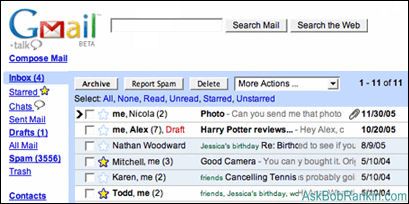
Webmail Advantages
With webmail, there's no software to install or maintain -- everything happens inside your web browser. So if there's no email software running on your computer, that eliminates one possible source of spyware and virus attacks. Webmail can also save space on your hard drive, since all your email folders are stored online, courtesy of your webmail provider. And there's nothing to backup, since your email is stored on a remote server.
But there are two other advantages of webmail, which I find very compelling. Webmail frees you from your Internet Service Provider. Many people would like to switch to another ISP, but they don't want to lose their email address. With webmail, your email is completely independent of your ISP... you can choose a new Internet provider and keep your webmail address. But my favorite reason for using webmail is that you can access it from any computer in the world with an Internet connection. You're no longer tied to a specific email program on your home computer. With webmail, you can check or send email at the library, the coffee shop, a hotel, or a friend's house.
Webmail Drawbacks
Of course, the most obvious disadvantage of using web-based email is that you must be online to use it. If you have a dialup connection, that limits you somewhat, since you can't download all your mail, disconnect, and then read messages or compose replies offline. Some webmail providers do allow you to connect to your account with a POP3 (regular desktop) email client, but then you have to find a way to keep the online and offline mail folders in sync.
 Also, webmail doesn't typically have niceties such as stationery, email templates, a dictionary and fancy formatting features. And this might sound strange, but one of the drawbacks of free web-based email is that it's free. And because it's free, you get what you pay for in terms of storage limits and availability. And if your webmail provider suddenly went out of business, you'd be stuck.
Here's a rundown on the offerings of the three most popular webmail providers. Hotmail, hosted by Microsoft, offers a maximum of 1GB of storage and a maximum attachment size of 10MB. For an additional fee of US$19.95 a year, you can raise your storage limits to 4GB with a 20MB attachment size. Yahoo Mail provides 1GB storage and 10MB attachments. You can upgrade to 2GB and 20MB for attachments for US$19.99 per year. Google's GMail service offers 2.8GB (and rising) of storage and 10MB attachments.
Hotmail, Yahoo and Gmail are all excellent webmail services. My favorite is Gmail because it offers the most free storage, has excellent built-in spam filters, does forwarding, and has an integrated chat feature. It also has a very powerful search facility, which allows you to search your emails by subject, sender, date or any keyword in the text of a message.
Webmail may not be ideal for dialup users, but it's easy to use, easily accessible, and has centralised maintenance and backup. It provides autonomy from your ISP and your desktop, giving you access to your email from anywhere. Do you use a webmail service that's not one of the "Big Three" mentioned above? If so, tell me why you like it better.


This article was posted by Bob Rankin on 10 Apr 2007
| For Fun: Buy Bob a Snickers. |
 |
Prev Article: Photo Editing Software |

The Top Twenty |
Next Article: Switching From Windows To Linux |
 |
There's more reader feedback... See all 26 comments for this article.
Post your Comments, Questions or Suggestions
|
Free Tech Support -- Ask Bob Rankin Subscribe to AskBobRankin Updates: Free Newsletter Copyright © 2005 - Bob Rankin - All Rights Reserved About Us Privacy Policy RSS/XML |
Article information: AskBobRankin -- Is Webmail Better? (Posted: 10 Apr 2007)
Source: https://askbobrankin.com/is_webmail_better.html
Copyright © 2005 - Bob Rankin - All Rights Reserved
Most recent comments on "Is Webmail Better?"
(See all 26 comments for this article.)Posted by:

David
26 Apr 2007
To Viv: Many free mail providers close an account if its unused for several months. Thats how I got rid of my spam-filled hotmail account. Theres no delete way. Its possible that if you had scripts or cookies blocked that it may not have recorded your login. Gmail may ask if you want to import Contacts etc from your local email client but its optional. And it doesn't delete your email as "spam" without you knowing about it which some do.
Bob: I can think of a couple of other issues with webmail accounts like the ones mentioned.
For one, you have no local backup of your email so if there is a hiccup like Viv mentioned, its gone. That could be fatal for a business. In that instance, I would use it as a remote copy for things like traveling but have it also forward to a standard POP account you can download.
Secondly, free email accounts have a bad reputation. Especially Hotmail and AOL. Some business sites won't accept them for contact. For a professional "look" its much better if you have a more professional domain.
Finally, its worth mentioning that most ISP's now provide web access to email so you can choose to use webmail or a client. The issue of being tied to an ISP is avoided by getting your own domain and using it with the ISP.
EDITOR'S NOTE: I do exactly what you mentioned for email backup. My bob@rankin.org is forwarded to Gmail and a regular POP inbox.
Posted by:

Anthony Balch
26 Apr 2007
I use Gmail as you can see, but I have recently been introduced to a new webmail called Squirrel, and although only one week of use it seems to offer most of the essentials one finds in Thunderbird.
Posted by:

Billy Ethridge
26 Apr 2007
An excellent web-based email -- one that allows you to pay a little more and substantially increase the storage -- is www.inbox.com. For $9.95 you can get rid of the one-line advertising "footer." Up to 30GB storage.
Posted by:

dincz
26 Apr 2007
Something else in Gmail's favour. They offer free POP access, so you get the best of both worlds - download your mail to your computer or, if you're travelling, use their webmail service.
Posted by:

Ron S
26 Apr 2007
In your article you state that "Webmail frees you from your Internet Service Provider." While I agree that not having your email tied to your ISP is a good thing, it is not really relevant to whether or not you use webmail. My ISP provides an email address that I can use with a POP3 client or via Webmail. Other email providers such as Gmail also allow you do likewise.
I definitely recommend getting an email address separate from your ISP. Whether you want to use webmail or not is a completely separate issue, based on all other valid issues you covered in the article. Your readers might be interested in checking out Inbox.com. It's a free email service that provides a lot of free extras such as photo posting and online storage. It seems to be a very good site.
EDITOR'S NOTE: It's true, some ISPs offer their own branded webmail service. If you're going to go to webmail, I do recommend that it be separate from your ISP.
Posted by:

Vernon B
26 Apr 2007
My two favorites is GMail and Yahoo (Beta) in that order. GMail gives you more options for free, like forwarding, Pop3, and the ability to collect email from other Pop3 mailboxes. Also like the ability to Pop3 email and have it Archive the downloaded messages instead of only two options of delete or leave in the Inbox. This creates a nice little Web mail access and still use your favorite desktop email client. Also if you set it up correctly sent items from you desktop email client will also be in GMails sent items as well.
Posted by:

Chet
26 Apr 2007
Bob: You should also mention the implications of having all your e-mail correspondence and address book on some freebie server. If they go down or out of business (or boot you), you are dead meat; and if its ever hacked, your least favorite enemy will have a ton of fun and may do insufferable damage with your little gift to them. And after you dump them (or they dump you) what reason do they have to keep any confidences? Food for significant additional thought, no?
EDITOR'S NOTE: The same thing could happen with a regular POP inbox at your ISP...
Posted by:

Sean Taggart
27 Apr 2007
Get the Best of Both (and some of the other). For the last month I have been using thunderbird installed on a pen drive (www.portableapps.com ). With this I collect all my Gmail, hotmail and RSS feeds in the morning at home then read them wherever I am during the day.
Thunderbird can read most webmail accounts if the webmail extension is installed however most webmial providers will not permit sending in this manner. To send you will need a POP3 account like Gmail (which is free and available anywhere you have an internet connection).
An additional note, somewhat off topic: Bob is the King. :-)
Posted by:

EddieC
28 Apr 2007
I have gmail, Hotmail, MSN and Yahoo webmail with my slow dialup and have never had a problem. I uninstalled Outlook Express and never learned how to use it or what to do with it. I guess what you don't know wont hurt you.
Posted by:

des
29 Apr 2007
Are you sure of your facts? I believe Yahoo mail now allows UNLIMITED email storage. I've been using it for many, many years and am very pleased. Once their server got infects with a virus and they had to find backups of all my mail. It all came in one folder, which I then had to re-sort into all my usual storage folders, but otherwise it's been great. I'm very impressed by the efficiency of Yahoo at identifying spam.
By the way, periodically my students find that the attachments they sent to themselves on their Hotmail account refuse to download. another teacher in another part of our school system and have never seen that on a Yahoo email account.
EDITOR'S NOTE: Yahoo currently offers 1GB, but they will begin rolling out unlimited storage in May.
Posted by:

Lissa
29 Apr 2007
Hi Bob, I like Gmail for several reasons. Hotmail filters out emails randomly, Yahoo bounces more often than not. Gmail is not only an almost-instantaneous delivery, it self-refreshes so that when new mail arrives, I don't have to hit "refresh", it does so automatically. I like the threading feature as well as the fact that when I am connected to Gtalk (its chat program), new mail notifications come in automatically as well. All 'round excellent program, and because it is still in beta stages, I'm betting it will get even better. Thanks for everything ya do!
Posted by:

Robert R Brandt
02 May 2007
I live in Brazil, and have webmail at work. Recently the server at work was hacked (could happen to anyone) and the administration opted for a re-install. Since then I have been unable to login to my company webmail. But I have set it up to forward my email to my gmail account, and now I can read it on any of the various computers I work with.
There is one computer I sometimes use which is a very old, slow PC. On this particular PC, once I log into gmail, I have to switch to "basic HTML" to read my emails. Otherwise the time it takes to refresh the page with all the fancy scripts is longer than the refresh rate, and it gets into a loop and I can't get it to do anything useful.
I've been a subscriber to the TOURBUS for some time. Keep up the good work, Bob.
Posted by:

Barb
04 May 2007
I rarely use web based email anymore since I can access all addresses from mail2web.com from any where. Their site allows me to delete email from my server, off of Postini.com and also use it the same as any email software. I don't have to sign up or register to use it either plus they also have a secure connection. I was told about mail2web.com by my server 8 or 9 years ago and have used it many times even at home when my OE isn't working.
Posted by:

Charles
24 May 2007
You state "Many people would like to switch to another ISP, but they don't want to lose their email address". If you don't already have a domain name, aren't you faced with changing your existing ISP email address to your new gMail, Hotmail or Yahoo address?? How do you keep your existing ISP provided address when you switch to the likes of gMail?
EDITOR'S NOTE: Many (not all) ISPs allow you to forward email to another address. If you forward your ISP mail to your webmail, you're good to go.
Posted by:

Val. Logue
10 Jul 2007
I have just recently got Gmail because of the facility for looking at pps on it since I do not have Microsoft Office installed on my computer. It does work fine except I do not hear the sound on any pps that has music on it. Is there aby way to get sound on Gmail pps ?
Posted by:

Andy M
06 Jul 2010
Hey Bob, Thanks for the excellent article!
I prefer webmail to desktop email clients. I'm a longtime fan of Gmail, and I use a relatively new webmail client called Taroby www.taroby.com for business purposes.
Posted by:

Hlobisile
22 Nov 2010
Webmail has given me alot of problems> It started by changing my password everytime I loggen on and now I can"t excess my mail. I'm so frustriated and hating it!!!!! What is going on??????
Posted by:

Martina
18 Dec 2010
Duh. Guess yo've never heard of IMAP. Also guess you've never heard of getting your own domain and never worrying again about an ISP or web mail service going under. (Wonder what's going to happen to all those Yahoo users when Yahoo goes the way of the dodo bird.)
Webmail is just too slow and limiting when you have work to do.
Posted by:

Bob Bowen
05 Jan 2011
Hi Bob, An old man I am (74) and I really enjoy receiving your newsletters "Ask Bob Rankin." I have gone over to Windows 7 Professional (at some price!) and border on the furious with Microsoft for not including a nice, easy email client like XP.s Outlook Express. I am now using a very complicated (to me) Windows Live Email but cannot find the Address Boob (read Book please). I don't like the idea of Webmail. What can I use to replace Outlook Express please? Thank you for your A1 newsletters!
EDITOR'S NOTE: You might like Thunderbird. See http://www.mozillamessaging.com/
Posted by:

Dave
24 Feb 2012
Someone's missing the point here. Having something like Windowsmail on the desktop does not preclude using an independent provider (I use Windows mail linked to googlemail) neither does it preclude using googlemail mail when moving around - syncing - what's the problem?
Stick to something on your desktop linked to an independent email provider!!!