


Review: PC Matic Gets a Zero!
After years of hearing from AskBob readers about PC Matic, I finally decided it was time to give the popular antivirus and PC optimizer software a test drive. So 18 months ago, I did just that, and published my PC Matic review. At the time, I was impressed enough to ditch my current security software, and entrust my home and office computers to PC Matic. A year and a half later, I'm giving PC Matic a ZERO. But wait... that's actually a GOOD thing! Read on for my updated review and recommendation... |
PC Matic Review - Part Deux
I've written about PC optimizers, computer security, and antivirus software many times over the years. And every time I've published an article on these topics, AskBob readers would write and ask "Why didn't you mention PC Matic?" I had seen the PC Matic TV commercials, and I thought they were a bit on the corny side. And I was happy with whatever I was using at the time, so I brushed them off. But eventually, the number of AskBob readers imploring me to check out PC Matic was too large to ignore.
I've been running PC Matic since September 2018, and as I mentioned in the opening lines of this article, I've given it a score of ZERO. That's ZERO for how many times my computers were infected by viruses, spyware, or ransomware. ZERO for the number of times the software nagged me to upgrade or buy some related service. And ZERO for how many times the company sold my personal information to third-party data brokers.
Ransomware is everywhere now. Every day we read stories about another user, school, business, or government office being impacted by ransomware. Just this week, ransomware forced the shutdown of a natural-gas pipeline for two days. It's obvious that in all of these attacks, the installed antivirus software FAILED to protect the computer that was infected.
But PC Matic assumes the opposite of what most mainstream anti-malware suites assume. The latter rely heavily on “black lists” of known threats and viruses, while the former assumes that any unknown software is unsafe until proven otherwise. If it's not on the white list, it's not allowed to run, period. So the "white list" approach stops ransomware cold. This video explains the difference between the whitelist and blacklist approaches.
I worried that PC Matic's white list feature might cause me many false positives and unnecessary interruptions, but PC Matic knew that LibreOffice and other programs I use were legitimate. There was only one instance where PC Matic questioned a 30-year-old DOS program that I occasionally need. But I was able to allow it to run with just one click.
Selling Your Digital Soul?
You might remember the recent stories about Avast, the popular antivirus company, caught selling "highly sensitive" data about their customers' web browsing activities. For years, Avast was tracking clicks and collecting data on Google searches, YouTube videos and other online activities. That data was then sold to advertisers. They actually promised their clients "Every search. Every click. Every buy. On every site." This is an internet security firm, whose software has full access to EVERYTHING that happens on your computer, and they're selling that data to the highest bidder. Outrageous, but it seems that is the price you pay for "free" software and online services.
In response, PC Matic published a Data Integrity Pledge which outlines how the company collects and protect your personal information. In summary, they promise not to sell or distribute your personal information, web browsing history, or data about the performance of your computer.
The PC Matic Story
PC Matic had its origins when PC Pitstop was founded in 1999 by Rob Cheng, a former Gateway 2000 Senior VP. At first, the company offered a free computer diagnostic and optimization service. The PC Matic software began life in 2009, aiming to be a “comprehensive tool to care for the maintenance and security of all your computers.” In the beginning they were licensing a third party antivirus engine, but after family members were infected with the "FBI Virus" they created their own antivirus software based on the whitelist approach, developed entirely in the United States. As far as I know, PC Matic is the only internet security product that's entirely US-based, including research, development and support. In the fall of 2019, the PC Pitstop brand was retired and the company now operates as PC Matic. And despite the PC-centric moniker, it's also available for Mac, and Android.
PC Matic has followed a road less traveled by its many competitors. First of all, PC Matic eschews the “freemium” shareware model. If you want to try it, you must first buy it for $50. It comes with a 30-day money-back guarantee but it offers no functional free version at all. The “free trial” version scans and reports problems that are found, but does not make any changes unless a license is purchased. The $50 annual charge lets you install it on up to 5 computers, but there's also a $150 "Evergreen" one-time payment option that never needs renewal.
Second, PC Matic is “as seen on TV.” Yep, Mr. Cheng takes to the airwaves to sell his software. Apparently, TV advertising and the "Made in America" pitch still work. You can see the PC Matic commercials here. If you lived in the greater NYC area in the 1980s, you might remember "Fudgie the Whale" and other commercials that Tom Carvel did for the Carvel ice cream company. And Crazy Eddie? They were terrible, but I loved them! So maybe Cheng is on to something with the personal approach, because the company is going strong.
AV-Test, the independent security testing lab, gave PC Matic a perfect score in Protection and Performance in their latest round of testing. They dinged PC Matic in the Usability category, due to a number of false positives for legitimate software. But that's the beauty of whitelisting. If a program is not on the list of "known good" programs, PC Matic puts up a warning and only lets it run if the user approves.
So yes, 18 months ago I gave my credit card number to PC Matic, paid the $50 and became the owner of a 5-seat license. I confess it felt weird to buy software I had not thoroughly checked out. But all those recommendations from my own readers and the money-back guarantee persuaded me to give it a try, and thus far I'm a very happy camper.
Last month I upgraded my last Windows 7 laptop to Windows 10, so I decided to install the PC Matic software on that computer. There were a few minor glitches in my 2018 install, but this time everything worked flawlessly. The software started up and prompted me to run an initial scan. To my surprise, it flagged three potentially malicious programs that Avast had allowed in. There was also an option to turn on the PC Matic Adblocker extension.
PC Matic seems to have little concern for aesthetics and other trappings of software “coolness.” IObit's Advanced SystemCare, a competing PC optimizer, always annoyed me with skins and themes and other things I could not care less about. Instead, PC Matic focuses on improving performance and security. PC Matic’s user interface ignores Google’s trendy Material Design minimalism. Most of the screen is filled with text and big, easily clicked icons.
In other words, PC Matic is software for us Elder Geeks. I like it!
Easy to Use and Understand
Super Shield is the real-time antivirus scanner for PC Matic that prevents malicious programs from running on your PC. Known threats will be blocked and known safe programs will be allowed to launch. Super Shield blocks polymorphic threats (malware that evolves as it spreads), and also catches emerging threats such as fileless malware and ransomware. If you are currently running another anti-virus program, you should disable or uninstall it before turning on SuperShield. Click the Super Shield icon on the main screen to enable or disable the Super Shield protection.
Clicking the “Scan” button launches multiple clean-up, optimize, and security scan routines that just run one after another while you do something else or stare enraptured at flying toasters and other signs of benchmark test activity. Very little effort is required of the user.
When PC Matic finishes a scan – which took less than five minutes the very first time, you can review the results. Any malicious files, outdated software and drivers, or unneeded junk files will be reported. Clicking "Next" displays a list of what it proposes to delete or tweak to improve your PC’s performance. The plan seemed quite feasible to I clicked just once to allow all of the “fixes” to be performed. That did not take long, either.
After about ten minutes, total, I had what seemed to be a brand-new PC: speedy, responsive, smoothly flowing. To my surprise, my Internet download speed was actually a bit higher than the 200 Mbps promised by Optimum. Usually it measures about 10% on the low side. On a second computer, an older laptop with a wifi connection, my speed measured in the mid-60s of Mbps, twice as fast as before when I let Advanced System Care Pro optimize my Internet configuration. Disk operations are swift and silent; PC Matic’s disk optimizer seems superior, too.
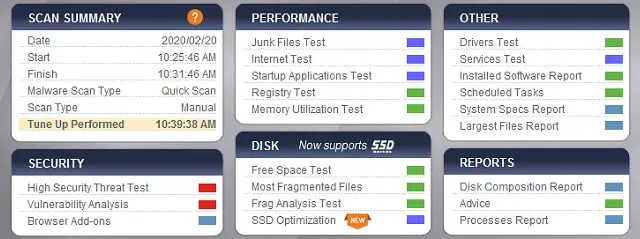
After completing its tweaks, cleanups, and security precautions, PC Matic displays a one-screen summary of what it has accomplished. It also recommends a restart and re-scan of the system to make sure all proposed tweaks were executed. I ran a second scan and found only a couple of new tweaks necessary. The second scantook only half the time of the first scan I ran on this machine.
While using the program, I got a few cryptic popup messages. But clicking "Ok" to continue seemed to clear things up with no noticeable repercussions. PC Matic also flagged a few items as malware that I felt were false positives, but they were old programs that I no longer used, so I allowed for their removal.
The Bottom Line
Is PC Matic worth $50 a year, to protect up to five computers? That compares favorably with most PC optimizer and security suites. They do offer an "Evergreen" option, which costs $150 and never expires. Mr. Cheng seems a bit old-fashioned in his pricing strategy, but that means he’s honest about what he thinks his product is worth. I have to agree with him.
I'm running PC Matic with Super Shield, and aside from the few cosmetic glitches, so far I'm very pleased and impressed. Over the past year and a half, it has done a great job of protecting several computers in my home and office from ransomware and other threats. The regularly scheduled scans and optimizations keep them running smoothly.
If you are looking for an all-in-one PC optimizer/cleaner/security tool, PC Matic is an excellent choice, and my current recommendation.
Have you tried PC Matic? Your thoughts on this topic are welcome. Post your comment or question below...
|
|
|


This article was posted by Bob Rankin on 20 Feb 2020
| For Fun: Buy Bob a Snickers. |
 |
Prev Article: Geekly Update - 19 February 2020 |

The Top Twenty |
Next Article: Beyond the Internet: Explore the Universe |
 |
There's more reader feedback... See all 90 comments for this article.
|
Free Tech Support -- Ask Bob Rankin Subscribe to AskBobRankin Updates: Free Newsletter Copyright © 2005 - Bob Rankin - All Rights Reserved About Us Privacy Policy RSS/XML |
Article information: AskBobRankin -- Review: PC Matic Gets a Zero! (Posted: 20 Feb 2020)
Source: https://askbobrankin.com/review_pc_matic_gets_a_zero.html
Copyright © 2005 - Bob Rankin - All Rights Reserved
Most recent comments on "Review: PC Matic Gets a Zero!"
(See all 90 comments for this article.)Posted by:

Jim Lowell
06 Sep 2021
I bought PCMatic after Bob's initial recommendation. Very satisfied, as no problems after using for several years. It even protects my wife's computer!
Posted by:

A.N.
13 Sep 2021
I use Kaspersky, it has NO backdoors to NSA or other snoopers.
Posted by:

Eric
16 Sep 2021
I was one of the early adopters of PCMatic and bought the Evergreen package back when it first came out. I recognized the whitelist model as the same model that we all use in our organizations. We don’t let anyone in to have free reign unless we know they are a good actor. Why should our computers be any different. My only concern with computer security since installing PCMatic is that I never have any problems. I sometimes wonder if I’m having trouble and PCMatic just isn’t catching it. But then I chalk that up to the paranoia inside me that is in my genetic makeup and drive on. I have not had a single computer issue since installing PCMatic in 2018. I could not say the same for all the predecessors that I tried.
Posted by:

Seth
05 Nov 2021
For 3 decades I've paid for and tried various digital prophylactics, including the biggest names, on my personal PC's running Win XP, 7 and 10. I've had major issues with all of them except ESET, which I've used for several years now, and like. I'm only considering a change to PC Matic because it's 100% USA-made. In today's world it just doesn't make sense for this American to trust my IT security to a Slovakian company.
Posted by:

DAVID M SMITH
01 Dec 2021
Been using PCMATIC from its beginning. Love it
Posted by:

Jons_On
16 Dec 2021
I have had PC Matic for a while now and it has been excellent. After a year I opted for the $150 lifetime package which cost me $100 as they included the first year in the price and have not been sorry since. Now if I can jam with their band it would be perfect.
Posted by:

David S
01 Jan 2022
Is my memory faulty, or do I remember that at one time Mr. Bob highly recommended AVG / Avast to everyone? He's now enthusiastic about PC Matic. Maybe I should wait??
Posted by:

Bruce Miller
02 Feb 2022
I attempted to help a friend who was applying for a job and he had only a phone to do it on. The job sent him an application to be filled an returned. He could not do it on his phone. I used my computer to download the application and now my phone is receiving his gmail. I managed to delete is info, however it remains embedded firmly on my phone with his login information. I attempted to remove it and Google says, it can't be done? I cannot fully utilize google due to his being the "main login". I don't know if this fully explain my predicament. I am a novice at all this IT stuff and at a loss for a solution.
Thank You for your consideration..
Bruce
Posted by:

Nora Poki Carr
28 Feb 2022
I was having trouble with my classroom computers. I had AVAST and Malwarebytes on them - BOO! TRASH! I swapped for PC Matic and have had NOT ONE problem since then. I also was gifted extra months of protection following listed comments of my experience with PC Matic. I have been anti-virus secure for almost a year and will be purchasing the lifetime coverage in Dec. 2022.
Posted by:

boyd
13 Apr 2022
thank you for this article, Bob, I too have been using PC Matic for about the same amount of time and have found it virtually iron-clad saft.
Posted by:

Joseph L Vega
24 Jun 2022
Bob, I have been using PC-Matic for the past 5 years and never had any problems, but this year it has been different, something is going on inside, service is terrible, I always had my computer scan automatically and all of a sudden, they stop doing it, and has been very difficult for me to get it back in auto scan. To this day they have not fix the problem. I would suggest a new review.
Posted by:

verena
02 Aug 2022
Bob, Ihave been using McAffee for years and it seems to be doing a good job. Is there anything that PC Matic does and that McAffee doesn't and vice versa?
Posted by:

Ray
24 Oct 2022
Bought pc matic,loaded it on my computer and it locked my operating system.cost me $250 to get it removed and repaired.
Do not recommend it,be careful. Also,customer service stinks.
Posted by:

DBA Steve
27 Oct 2022
It seems that the recent postings on this thread are MUCH LESS positive than the older posts.
Makes me wonder what was / is happening at PC MATIC headquarters. Has it been sold? Did someone quit?
I was about ready to buy it, until I read the last few posts. Now, I need to do more research.
Thanks to all for posting your experiences. And, of course, a big THANK YOU to Bob.
Posted by:

Mike
17 Mar 2023
I too upgraded a Windows 7 Laptop, to Windows 10. An Acer to be exact. I bought PC Matic and tried and tried to get it to run on that laptop with no success. I am on a newer laptop now an I am planning on trying it again. I am currently using Avast, but am getting so tiered of paying for all the different pieces of the puzzle, and still don't have all the pieces. I'm already over $200.00 a year now. This is going to change.
Thank you for the info.
P.S. I was considering Norton 360, but one of the main issue I did not like about Norton is they don't do drive updates.
Posted by:

Thomas
31 May 2023
I used PC Matic for a year or so. This month, I switched due to PC Matic's handling of software installations. Their White List must be really short as many common apps, that I believe should be white listed, are not on their list. This forces me to seek a second opinion and then make a decision. I have yet to encounter an app not on their White List that failed a scan by other anti-virus apps.
Posted by:

Jack
08 Sep 2023
We have four computers at our house, plus two Android phones and two Android tablets.
I wish PC Matic offered a package for up to 10 installations.
Posted by:

Bruce Grime
14 Dec 2023
i have been using PCMATIC since the days when it was PC Pitstop. I have not had one error/spam/phishing/etc get on my system since then. it is complete satisfaction as far as i am concerned, and it is on my wife's PC and my daughter's PCs as well now. they have also had a clear run. i am not based in the USA and that has not caused any problem either. there has been a response within the hour, no matter what the time of day or night for any queries i might have had. Full marks from me for a great system. Bob's writeup is so true. go for it folks!
Posted by:

Pete
26 Aug 2024
Thanks Bob! After you reviewed it, it got it and what was nice, they gave me credit for the $50 toward the Evergreen! Been very happy with it! Thanks again!!!
Posted by:

David Y.
02 Nov 2025
I just sent a question to PC Matic and they no longer offer the Evergreen purchase option. Pricing is vague at best. I see "$50 for first year". No indication of the price after that.