


Farewell, Blue Screen of Death?
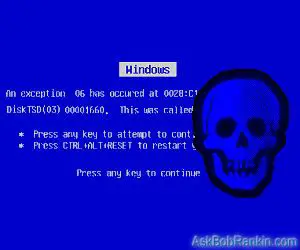
Hardcore fans of Windows XP may differ, but I believe Windows 10 and 11 are the most stable versions of the operating system to date. Still, it's not unheard of for the dreaded Blue Screen of Death (BSOD) to appear when Windows encounters an unexpected error. The good news is that you'll never see a Blue Screen of Death on Windows 11. The bad news is, they changed the color of the BSOD. On a Windows 11 system, it's the Black Screen of Death. But it's not all bad -- read on for the latest news on the BSOD and what to do if it happens to you... |
Fixing the Blue (or Black) Screen of Death on Windows
Even with the most up up-to-date system, it's not unheard of to see the dreaded Blue (or Black) Screen of Death suddenly pop up. It's usually a warning of a serious problem and should not be ignored. Here's what to do if you encounter this error on Windows 10 or 11...
Technically, the Black/Blue Screen of Death (we'll call it the BSOD going forward) is known as a "stop error." Windows brings everything to a complete, sudden stop "to prevent damage to your computer." The cause of a stop error may lie in hardware or software, and it can be very difficult to track down. Here are a few guidelines to debugging the BSOD on Windows 10 or 11.
An overheated CPU can cause a BSOD error. If your cooling fan is running constantly, you may need to take steps to cool things down inside of your computer case. Blow out dust. Replace heat sink thermal grease. If the cooling fan does not spin freely, install a new one or lubricate the bearing. Laptops may benefit from a lap pad designed to circulate cool air beneath the laptop. (See my article Do You Know Your Computer's Worst Enemy? for more tips on dealing with overheating.)
Bad RAM memory can cause the BSOD error. You can run the Windows 10 memory check diagnostic routine to check your system memory. Close any open files or programs, click the Start button, type mdsched.exe and press Enter. Next, click "Restart now and check for problems". Your computer will restart and run the memory diagnostic. The results of the test will be in the Windows Event Viewer.
Hard disk errors may cause a BSOD error. Run the error-checking tool on your boot drive's Properties page to find and fix errors. It's also a good idea to defragment magnetic hard drives regularly to minimize errors. Note that solid-state (SSD) drives don’t need to be defragged. See my related articles [CAUTION] Hard Drive Makes a Clicking Sound? and [FREE] Tools to Tune and Optimize Your Hard Drive for more help with this.
Software errors that cause a BSOD can occur when Windows does not shut down properly. Loss of power during shutdown is the most common cause of such errors. Using System Restore to restore your Windows settings to an earlier configuration may resolve a BSOD problem. See my article Try System Restore for Windows 10 to learn more about System Restore.

More BSOD Fix Options
Check the Security and Maintenance Center to see if there are any known problems or unresolved configuration errors. Click Start and type "Security and Maintenance" in the search box, then press Enter. Under the Maintenance heading, there's a link to "View reliability history". You'll be able to see if any software or system components have been malfunctioning.
Finally, Windows 10 and 11 have a Reset option that may help to resolve a Black/Blue Screen error. See my article [RESET BUTTON] Restore Your PC To Factory Defaults?. A Reset will install a fresh copy of the Windows operating system, while keeping all your personal files intact.
When all else fails to cure a recurring BSOD problem, you may have to take the machine to a service center or ship it to the manufacturer for diagnosis and repair. Hopefully, the machine is still under warranty as this can be expensive. Be sure to make backup copies of all essential data before sending the machine in for repairs, and delete any sensitive data from the hard drive before turning it over to strangers.
One final note: Windows may automatically restart after a BSOD. It can be hard to diagnose the error message on screen because the restart can happen before you get a chance to read it. I recommend disabling this setting. To do so, click the Windows button, type advanced system settings and press Enter. Click the Settings button in the Startup and Recovery section. Remove the check mark next to Automatically restart, and click OK. You’ll need to restart your computer for this to take effect.
By taking note of the Error Code and/or Stop Code displayed on the BSOD screen, you may be able to search online for a solution, or at least an explanation for the error that you can provide to a tech support person.
Have you experienced the BSOD on a Windows 10 or 11 computer? Post your comment or question below…


This article was posted by Bob Rankin on 5 Jul 2022
| For Fun: Buy Bob a Snickers. |
 |
Prev Article: Send a Free Fax From Your Computer |

The Top Twenty |
Next Article: Geekly Update - 07 July 2022 |
 |
Post your Comments, Questions or Suggestions
|
Free Tech Support -- Ask Bob Rankin Subscribe to AskBobRankin Updates: Free Newsletter Copyright © 2005 - Bob Rankin - All Rights Reserved About Us Privacy Policy RSS/XML |
Article information: AskBobRankin -- Farewell, Blue Screen of Death? (Posted: 5 Jul 2022)
Source: https://askbobrankin.com/farewell_blue_screen_of_death.html
Copyright © 2005 - Bob Rankin - All Rights Reserved

Most recent comments on "Farewell, Blue Screen of Death?"
Posted by:

Alan
05 Jul 2022
Maybe I was just lucky, but I've never had a BSOD with Windows 10. I only had one or two with Windows 7, but I had several with Windows XP. (I tried Windows 8 but hated it and quickly went back to 7)
Posted by:

Dave Cooley
05 Jul 2022
I had been having BSODs plus other random issues (both screens blank, mouse wouldn't work, programs would malfunction, etc.) so I've been trying various solutions and keeping a log of what was running, etc. Updated all drivers and some programs, ran "repair disc", added RAM, bought Advanced System Care and paid for the "pro" version. Then a friend suggested the power supply. Google said:
Signs of a Failing PSU (from Google)
PC Won't Boot at All.. ...
PC Randomly Restarts or Shuts Down. … check
Random Blue Screen of Death (BSoD) … check
Extra Noise Coming from the PC Case. … check
Smoke or a Burning Smell.
I had the middle 3 symptoms. I replaced the P/S and so far I'm six days sober. My PC is 10 years old. Keeping my fingers crossed.
Posted by:

Russ
06 Jul 2022
Just yesterday I fired up a Surface Pro 7 machine with windows 11 that the owner had placed a an application to "update" drivers on it ... Driver Bo..ter. I've seen this application before and it usually does a pretty good job updating ... but I've seen it cause nothing but problems on Surface Machines. And yes, when he tried to boot ... the dreaded Black Screen of Death appeared and eventually a screen indicating that the computer did not boot and offered to fix it. The fix did not work and he called me. Along with the offer to fix the problem, the "fix it' screen also offered other choices, one to "Reset" the computer, but I did not take that one. I choose, instead, to go to the command line and ran the command for System Restore "rstrui.exe". Unfortunately, on Surface machines, Microsoft has added a requirement to identify yourself as the owner of the machine. It required the user to go to a certain website, and type in the owners Microsoft Account email and password, and then go to the email and get a 7 digit temporary PIN. Thankfully the owner knew his account information and was able to get to his email using another computer. After all of this, a webpage appeared with the Surface computers ID and about a million and a half numbers that had to be entered into the Surface correctly. I did that and ran System Restore. It worked and the computer was running correctly again. Next, I used HiBitUninstaller and unistalled Driver Bo..ter completely, and returned the Surface to the owner.
Never, ever, install Driver Bo..ter on a Surface Machine and you probably should never use any Driver Updated on one unless you know what you are doing. I do have two Surface machines, myself, a Surface Pro 7 and a Surface Book 2 and they are fine machines, but be very careful updating drivers.
Posted by:

Bob K
06 Jul 2022
Hi Bob, I quit reading after this statement: "The good news is that you'll never see a Blue Screen of Death on Windows 11. The bad news is, they changed the color of the BSOD. On a Windows 11 system, it's the Black Screen of Death."
You must be joking, or this is the worst clickbait ever. -Bob K.
EDITOR'S NOTE: You'll never know, if you don't read the rest of the article.
Posted by:

Brian B
06 Jul 2022
I do not recall ever having a BSOD on Windows 10 Home, but I might be wrong. On earlier versions, XP and 7 I had only a few, and my reaction to them was an immediate reboot and carry on, since no error message, or clue, was given. Invariably, the computer resumed normal operation, with maybe a restart of the the program I was using. So maybe I've been lucky, but I've never had to delve into any hardware or software. The fact that it never reappeared again over a period of weeks, convinced me that it wasn't anything to worry about.
Posted by:

Mike C.
07 Jul 2022
A free diagnostic tool "WhoCrashed" offers more specific information about the cause of the BSOD. An Acronis driver caused a few on my PC. What one does about the causes can be challenging. Removing a file (or driver) causing the BSOD could make a program unstable or non-functioning.
Posted by:

Stukahna Sandbahr
08 Jul 2022
After an unsuccessful attempt from Microsoft support to deal with my BSOD, I dug deeper on the web and found out a third party app- my anti-virus program- was not installed correctly after a Windows version was changed. After I contacted them and reinstalled, everything was OK.