


Forgot Facebook Password
Did you forget your Facebook password? Having trouble logging in? Or did you forget the email address for your Facebook login? Maybe your email account is not working, so you can't change your password. Or maybe it's something with a simple fix. Here's the scoop on Facebook and password issues... |
I Forgot My Facebook Password
** NEWS FLASH! ** I do not have your Facebook password... I cannot get your Facebook password... But if you've lost access to your Facebook account, you can get it back if you read and follow the instructions in the article below...
If you're having trouble logging in to your Facebook account, you might assume that you forgot your password. But maybe the Caps Lock key is tripping you up. Facebook passwords are case-sensitive, so "QWERTY7" is not treated the same as "qwerty7". Turn off the Caps Lock, and try again.
Still no joy? It might be a cookies problem. If cookies are disabled in your browser, you may be returned to the login page even after entering the correct password. If you use Internet Explorer, click on Tools / Internet Options / Privacy and change the setting to Medium to allow cookies. Firefox users, click the Firefox button, go to Options / Privacy, select the "Use custom settings for history" option, and check the "Accept cookies from sites" box. In Google Chrome, click the wrench icon, click Settings, click Show advanced settings, then click the Content settings button under Privacy. Choose the "Allow local data to be set" option.
Restart your browser and try to log in again. It's also possible that cookies are being blocked by some over-zealous firewall, anti-virus or anti-spyware software, so check your settings there if problems persist. If you have heard stories that browser cookies are evil, read Eat Your Cookies for more information to set your mind at ease.
Facebook Account Recovery Options
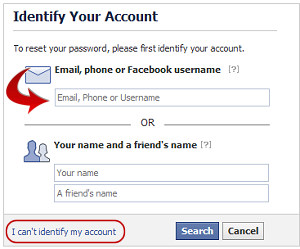
Okay, if none of that helped, you probably DID forget your password. No problem... just click the handy Forgot Your Password? link next to the Facebook Login button. You'll see the "Identify Your Account" screen that's pictured here. Enter your email address (the one you used to sign up for your Facebook account), your facebook username or the mobile phone number listed on your Facebook account, and Facebook will send an email or text message describing how to reset your password. You won't actually get your old password back, but you will get to pick a new one and regain access to your account.
Alternatively, you can identify your account by entering your name and a friend's name. But for some reason, this doesn't always work. When I tried entering my name and one of my friends, it failed. But when I switched the names around, it did identify my friend's account. As they say, your mileage may vary.
What If You No Longer Have Access to the Phone or Email Account?
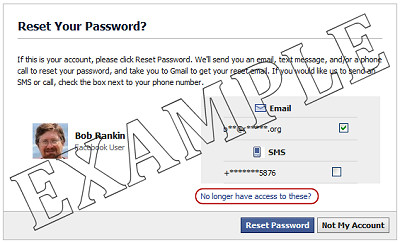
Most sites have a fairly simple way to regain access to your account by asking you to answer one or more security questions. Facebook does as well, but it's a bit more complicated. On the "Reset Your Password?" page, you'll need to click the "No longer have access to these?" link, then provide a new email address (one that's not associated with any Facebook account) where you can receive mail.
Facebook will then display your security question, if you've added one to your account. If you answer the security question correctly, you'll be prompted for a new Facebook account password. After entering the new password, Facebook will send an account recovery link to the email address you just entered. Click that link, and hopefully, you'll see this message: "You've successfully confirmed your identity."
But there's once more hurdle remaining... Facebook says "For your security, you must wait before you can access your account." How long? Twenty four hours! Yup, after jumping through all those hoops -- proving your identity, answering a security question, selecting a new password, and recovering access to your account, you must wait a whole day before you can log in using your new email and password. I suppose this gives an opportunity for people who get their accounts hijacked (through this very process) to alert Facebook that something is wrong. I learned about this unpleasant side effect while researching this article, and was locked out of my account for a day.
What About the "I can't identify my account" Link?
Back at the beginning of the "I forgot my password" process, the "Identify Your Account" page has a link that reads: "I can't identify my account". If you can't remember your Facebook username, email address, or phone number, and the "your name and a friend's name" thing doesn't work for you, this is the last resort for those who have lost access to their Facebook account.
Unfortunately, it's another disappointing dead end. Clicking that link brings you to a page that asks you about a dozen questions -- your name, birth date, email address, mobile phone number, and other Facebook account information. But don't even bother. At the bottom of the page, it says this: "Thanks for taking the time to submit this report. We don't provide personalized support for this issue right now, but we'll use this information to identify any bugs in our system." In other words, you're out of luck.
Change Your Faceboook Password or Email
It's a smart thing to change your passwords on a regular basis. If someone does gain access to your Facebook account by guessing your password, or watching over your shoulder, you limit the exposure by changing passwords. If you're logged in and want to change your Facebook password, click the little arrow on the top right (next to Home) on Account, then click Account Settings to get to this page. You can change your password, your contact email address, or add your security question. (If you've already added a security question, that option will not appear. And no, you can't ever change the security question, or even refresh your memory of the answer. So remember it!)
It's also a good idea to use a different password for each online account. If you use the same password for everything, and you forget it, then you're out of luck. To avoid this type of problem, I suggest you use a password manager to help you keep track of all your passwords in a secure manner. My article Is Your Password Hacker Proof? offers some tips for choosing a password manager, and help with selecting a good password that's hard for others to guess.
As I mentioned at the beginning of this article, I have no magic powers to retreive your Facebook password, or help you regain access if you're locked out of your Facebook account. I don't work for Facebook, and I'm not holding back any secrets. I originally wrote this article back in 2007, and have updated it as Facebook changes. This is all I know about the Facebook password recovery process. And yet, the most common question posted by those who visit this page is "Please send me my Facebook password!" Sigh... at least I can have a little fun with those people, as you'll see by reading the comments that follow.
Feel free to post your own comment or question below -- after reading the entire article of course!
|
|
|


This article was posted by Bob Rankin on 20 Jul 2012
| For Fun: Buy Bob a Snickers. |
 |
Prev Article: What's New in Microsoft Office 13? |

The Top Twenty |
Next Article: What's Hiding On Your Hard Drive? |
 |
There's more reader feedback... See all 243 comments for this article.
Post your Comments, Questions or Suggestions
|
Free Tech Support -- Ask Bob Rankin Subscribe to AskBobRankin Updates: Free Newsletter Copyright © 2005 - Bob Rankin - All Rights Reserved About Us Privacy Policy RSS/XML |
Article information: AskBobRankin -- Forgot Facebook Password (Posted: 20 Jul 2012)
Source: https://askbobrankin.com/forgot_facebook_password.html
Copyright © 2005 - Bob Rankin - All Rights Reserved
Most recent comments on "Forgot Facebook Password"
(See all 243 comments for this article.)Posted by:

sherry waters
08 Jul 2014
hello.i recently changed cell phones which is my main device used to play on my fb. for some reason it wasnt allowing me to log in so i tried to correct the problem by changing my pw. since i did this i seemed to have either accidently started a entirely new fb site or just lost or erased all my old data. pictures friends all my data is gone. how can i retrieve my original facebook page? and erase the new one, if that is the case?
EDITOR'S NOTE: More likely you accidentally created a new account. You'll need to figure out the original username and password to regain access to the old one.
Posted by:

isela
23 Jul 2014
can somebody please help me someone hacked into my facebook account and change my password and security question what can I do to help me please.
Posted by:

Dani
12 Aug 2014
I'm currently having the issue where I went through the password retrieval thing, identity was proved, and then they said they'd send me a text so I could further prove who I am. Problem is, once I got that text and clicked on it, it asked me to sign in (I did) and I received the same notice: An SMS was sent to your phone, click on the link when you get it. Resend if you didn't get it. I feel like I'm in this circle of death. Is that just part of it and after I've done this I need to wait 24 hours and then click on the link? Just wanted some clarification, as I can't post a question in the FB help forum without being able to sign in haha
Posted by:

dinesh koyyada
29 Sep 2014
I forgot my security question on my facebook account but i already change my password but i cant access it because the ask me to answer the security question...can i recover my account?
Posted by:

amy johnson
24 Dec 2014
I forgot my username and password ... also forgot my email address so I made another email address , but also do not remember security question and I no longer have same phone number to have any information sent to me . please help
Posted by:

Jan Hayes
28 Jan 2015
Help!!! I just want to delete my page, and also Janis Hayes page!! (...and start the heck OVER with my new email address!!)...Somehow everything is screwed up, including my passwords! LET ME START OVER, OK?? (Miss my friends!) I can't even get in anywhere! Janis Hayes....is all that comes up! That was just a mistake I started!... Did not know how to delete it! Don't remember passwords!!!!! I hate computers!!! Can never get things straightened out EVER! Driving me nuts! I have gone to this same page for 5-6 years with no problems!!! UGH!
Posted by:

Marco
09 Mar 2015
I do not remember the answer of the security question for my Facebook account, and I also do not remember the answer for the security question of my email account, even though I remember the passwords of each account, but cannot enter further due to the security question impasse. Please help me.
Posted by:

susana lartigue
05 Apr 2015
Good 4 am.
For the last week, I have been trying to recover or to change my password in FB because I forgot. It has been 10 days and I cant do it. Also, they are asking me to send and ID form. I dont know what else to do. I really need my FB BACK. I need it very badley. How can I change my password or changed it. Your cooperation will be hightly appreciaated. I really needed since my b day is coming up. thank you. susana
Posted by:

nungshiwaten
15 May 2015
I do not remember the answer of the security question for my Facebook account, and I also do not remember the answer for the security question of my email account, and also i dont remember my facebook password. please help me out.
Posted by:

John
09 Sep 2015
Hi I need your help, I'm automatically logged in on my Facebook thru my iPhone 6, I can post, check in and everything else, but I forgot my password since I don't use it cause of the automatic log in and the phone number I had it linked too was my previous one, which I changed my number earlier this year.
Now I'm trying to log into Facebook from my computer or from my iPad and I'm not able to since I have no way of retrieving or changing my password, please help what are my options.
EDITOR'S NOTE: Did you try the "Forgot your password?" link on the Facebook login page?
Posted by:

Michelle
15 Sep 2015
Facebook allowed me to create a new password using the reset tool through my email address. Then it told me that on Dec 26, that I created a new password at that time, and I must enter it to login. I don't remember the password I created then. Hence why I am created a new one. How can I access my facebook now?
Posted by:

marygrace faustino
16 Sep 2015
I can't log in on my facebook account, need the link code on my e-mail address but i forgot my password on my e-mail add.. what can i do?
Posted by:

Tanja Paligoric
12 Oct 2015
Someone hacked my facebook profile and changed my pass.
I don`t remebmer my e mail password couse i don`t use it for years.
Facebook asked me to choose 3 friends who will receive codes. I chose them but one of them does not remeber her e mail and password and facebook does not let me to choose other one.
Please for help
Posted by:

sarat cChandra sahu
14 May 2016
I forget my passward and also I can't attached my email address in my account.so I face a problem to log in the face book plz help me
Posted by:

sarat cChandra sahu
14 May 2016
I forget my passward and also I can't attached my email address in my account.so I face a problem to log in the face book plz help me
Posted by:

shubham rana
19 Jul 2016
Sir I forgotten my Facebook password and number which the Facebook send code is inactive. Email is also is not working
Posted by:

Zuciphe Zucie ntlabezi
11 Aug 2016
HTML
Posted by:

Chantelle
18 Feb 2018
Hey I've read the article and tried multiple ways on the help centre and yet when I go to the account recovery tool it doesn't give me an option to send a code to my phone or email. It goes to a page that says I need to get access to my email which I have access to so I'm confused. Any suggestions ? Yes I've put in a feedback form.
Posted by:

riditarowsan.ohi
28 Mar 2021
I need one time password
forgot_facebook_password.
Posted by:

Eric Cox
12 Sep 2024
DELETED