


Will This Gadget Replace Your Landline?
In its advertising, Magic Jack appears to be a device that you can plug into your computer and fire the phone company. It sounds too good to be true. So is MagicJack a scam, or does it actually work? Can it really replace your landline, and eliminate your monthly phone bill?” Read on for the surprising answer, and some news about Magic Jack for those who may have considered it in the past... |
What is MagicJack?
The short answer is YES – MagicJack is legit. In a nutshell, it's a device that enables very inexpensive VOIP calling (phone calls over the Internet). The MagicJack phone service competes with Vonage, Ooma, Skype, and other VOIP telephone service providers.
The MagicJack device has evolved considerably since its 2007 debut. It is currently the best-selling consumer VoIP product on Amazon, with over 5,700 customer reviews, an average 4.5-star rating, and hundreds of answered product questions. Let's take a look at the current MagicJack products and services.
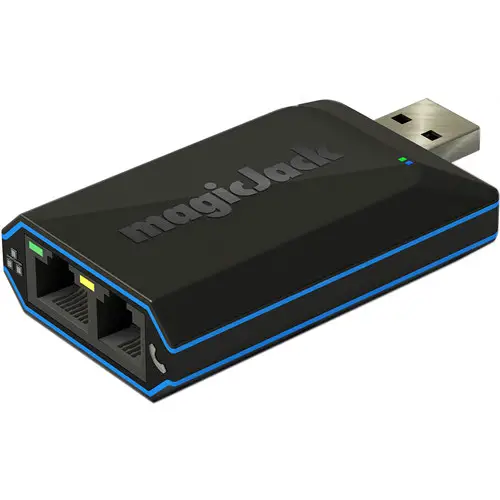
The hardware side of MagicJack is the magicJack HOME device. It's a minimalist device with a USB plug on one end and two jacks on the other, one for a phone line and the other for an Ethernet cable. Plug a standard phone into the phone jack, and connect to your computer via USB or directly to your router via Ethernet. Register your device once and that’s it; you’re up and VoIP-ing!
The magicJack Plus, magicJack Express, and magicJack GO, all discontinued, were essentially the same design. But the latest magicJack HOME device has a processor chip that’s 4 times faster than the previous model, with improved voice quality, even under congested network conditions.
Unlimited calls to landline and mobile numbers in the USA and Canada are standard, and international rates are competitive. Features include caller ID, voicemail, call waiting, call forwarding, call waiting, conference calling, and 411 service. The Automated Call Screening feature promises to block unwanted calls from automated calling systems, telemarketers and others.
Number porting is available for US and Canadian numbers, allowing you to keep your current landline number. The phone carrier service is provided by MagicJack’s sister company, YMAX.
What Does MagicJack Cost?
The price of the magicJack HOME device, which includes 12 months of inbound and outbound phone service is $49.99. Renewing costs $43/year. You can get 2 years of service for $79 or a 3-year pan for $109. (about $36/year, or $3/month!)
Something new with MagicJack is the option to choose only magicIN (inbound calling) or magicOUT (outbound calling) when you sign up. If you choose only one of those (one-way calling), you'll get 15 months of service instead of 12 months, and your renewal will by $38/year. I'm not sure why one might want to have just inbound calling or just outbound calling, but that's an option. It might make sense if you want to transfer your existing landline to MagicJack for inbound calls, and use your mobile phone for everything else.
The companion magicApp for Android or iOS enables free local and long-distance calls to any numbers in the U. S. and Canada on your smartphone using WiFi or 4G service. WiFi is widely available for free, but using the 4G service you'll have to keep in mind your data caps and charges. Worldwide calling is free with app-to-app or app-to-Jack device. If you have a companion MagicJack device, you can set up your MagicApp number to ring at your MagicJack home or business number and on your smartphone simultaneously.
Can I Really Fire the Phone Company?
MagicJack is so simple and so cheap that some people thought it was a scam when it first appeared. But MagicJack has proved to be quite real. A few years ago, after hearing a couple of my friends swear by the gadget, I did some research and found that MagicJack really does deliver what it promises. You pay a flat fee per year, and you never get a monthly phone bill.
Using MagicJack, you can make free calls to any phones in the United States, Canada, Puerto Rico and the U.S. Virgin Islands, or to any other MagicJack user anywhere on Earth. People who want to call you can reach you at your MagicJack phone number, no matter where you happen to be.
Another benefit is international calling. If you take the MagicJack with you when you travel, you can call any phone in the US for free. And people can reach YOU by calling a US number. Also, if you have a family member who lives outside the US, and they have a reliable Internet connection, this can be a significant savings on overseas long-distance fees. You can also call international numbers at very low per-minute rates. Call to the UK, France or Germany for 2.2 cents/minute, Mexico for 4.0 cents/minute, or China for 3.3 cents/minute.
So YES, you can cancel your landline service with the phone company and cut them out of the loop. I've heard from many people over years who have done just that. Like any VoIP service, MagicJack needs a reliable Internet connection; at least 128 Kbps in both directions. DSL, cable, fiber, and other land-based broadband works well with VoIP, but dialup and satellite connections are likely to be problematic.
Most MagicJack purchasers on Amazon give the service high ratings for call quality. Emergency 911 service is available with MJ, but with MagicJack Wireless. It's a completely separate option from the MagicJack home phone service, for people who want to break away from one of the "Big Three" wireless companies. Plans start with the "Talk & Text" option at $15/month for 500 minutes, 1000 text messages, and 250MB of mobile data. Then there are the 3GB Plan ($18/month), 6GB Plan ($21/month), 10GB Plan ($24/month), and the Unlimited Plan ($30/month). Each of those includes unlimited talk & text plus varying amounts of mobile hotspot capability. Keep in mind that ANY wireless service that's advertised as "unlimited" will have limits. Read the small print.
Those prices assume a purchase of 3 lines. The price per line goes down a little if you get more lines, and up a bit if you get fewer. MagicJack Wireless is a MVNO (Mobile Virtual Network Operator) that resells T-Mobile service. I've written about other MVNOs such as Tello (see Say Hello to Tello - Shrink Your Mobile Phone Bill, Ting (see
Ting-a-Ling! Save on Your Mobile Phone Bill and Consumer Cellular (see
Do You Love Your Phone Company?. So you might want to check those out as well.
MagicJack Customer Service
I've had quite a few people contacting me, thinking that my website is MagicJack Customer Service. It's not... I'm a tech journalist. I don't get any sort of commission from the company, and I don't have a red phone with a direct line to MJ Headquarters. But you CAN visit the MagicJack Customer Service page online, or call MJ Support at 844-866-2442 . That's all the info I have on MagicJack Customer Support. Really!
So there are both pros and cons to the device, but I can say that it's definitely not a scam, and works well for most people as a landline replacement. MagicJack is a very easy, highly portable, and affordable VoIP solution. It's been around a long time in "Internet years," and it will probably continue evolving. If you want to cut your phone bill, MagicJack can be a good way to do it.
Your thoughts on this topic are welcome. Post your comment or question below…


This article was posted by Bob Rankin on 5 Aug 2022
| For Fun: Buy Bob a Snickers. |
 |
Prev Article: Say Hello to Tello - Shrink Your Mobile Phone Bill |

The Top Twenty |
Next Article: How Secure (and Private) is Cloud Storage? |
 |
There's more reader feedback... See all 29 comments for this article.
Post your Comments, Questions or Suggestions
|
Free Tech Support -- Ask Bob Rankin Subscribe to AskBobRankin Updates: Free Newsletter Copyright © 2005 - Bob Rankin - All Rights Reserved About Us Privacy Policy RSS/XML |
Article information: AskBobRankin -- Will This Gadget Replace Your Landline? (Posted: 5 Aug 2022)
Source: https://askbobrankin.com/will_this_gadget_replace_your_landline.html
Copyright © 2005 - Bob Rankin - All Rights Reserved
Most recent comments on "Will This Gadget Replace Your Landline?"
(See all 29 comments for this article.)Posted by:

Greg C
05 Aug 2022
I have been using MagicJack for over five years. I recently renewed for another five years. I believe the special is available again for a short time.
THE GOOD: low price for good service. I need Call Forwarding and this is included. Also, I am not tied to an ISP, which can make switching difficult. There is a newer version of the device and I wonder if issues would improve with newer device?
THE BAD: Call quality is fair to good. There are some issues calling gov't & other very large phone systems. There can be both outbound and inbound busy signals without (apparent) cause. My friend has Ooma and connection between the two is ALWAYS unusable. About two years ago I upgraded the USB power supply and that reduced frequent disconnections and spurious strange sounds.
I pay about $3 a month not including a $10 a year charge for a Canadian phone number. This extra charge seems disproportionately excessive.
By contrast, Ooma offers two tiers of phone service. With Ooma Basic, phone service is completely free. Just pay a few dollars per month in taxes and applicable fees, and you get unlimited calling within the U.S. ( But NO Call Forwarding) To access all of Ooma’s advanced features, Premier costs just $9.99 per month.
Posted by:

Ernest N. Wilcox Jr.
05 Aug 2022
I'm a very satisfied MagicJack customer (I have absolutely no affiliation with MagicJack other than being a very satisfied customer), and I have been for nearly 3 years. I've had the same phone number since about 1974, so I ported it to MagicJack for a very nominal fee (a few bucks - I can't remember the amount), which took a few days, but I was able to keep my ATT phone service working until the porting process finished, so I didn't experience any interruption of service.
After switching, I asked people I talked with if they heard any difference in how I sounded and they didn't, so I told them about MagicJack. My service has been excellent with no interruptions, other than during power failures. I have ATT Fiber-500 Internet, which is very stable here and I'm sure that helps. The call quality on my end is at least as clear as what I had on copper (I can't tell the difference), and I couldn't be happier with what I have.
I recently learned about the free Robo-call blocking feature, so I enabled it. It's ingeniously simple. When someone calls me, they get a prompt to enter a random number to get put through. Since enabling that service, I hardly ever get bothered by robo-calls. The best thing about this feature is that I no longer get interrupted from whatever I'm doing (as often as a dozen times a day) by these nuisance calls. NICE!
I'm a retiree in my 70's, and I've had a home phone all my life. I have a mobile (cell) phone, but I only use it for emergencies. If anyone wants to contact me, they will have the best luck by calling me at home. If you're like me, and you want a home phone, MagicJack may be a great choice. Check it out,
Ernie
Posted by:

Mimi
05 Aug 2022
Was an avid MJ user in their early days and I absolutely loved it. Other than the choppy connection at that time, it lived up to its name. I got it since I had young children & needed to make sure they had access to a phone at all times. My cost at that time was $100 for 5 years!!!! Thinking about resubscribing. Thanks for the article.
Posted by:

Mimi
05 Aug 2022
Was an avid MJ user in their early days and I absolutely loved it. Other than the choppy connection at that time, it lived up to its name. I got it since I had young children & needed to make sure they had access to a phone at all times. My cost at that time was $100 for 5 years!!!! Thinking about resubscribing. Thanks for the article.
Posted by:

Mo
05 Aug 2022
We use it and the automated call screening feature is great. We get ZERO junk calls or political calls. Our phone only rings for a legitimate call.
Posted by:

Sarah L
05 Aug 2022
The low price does not help all the people with no internet service. That continues to be a problem in the US. The only solution so far is “Obama phones”, inexpensive smart phones given free to qualifying low income people, allowing e-mail and other internet activities. If the phone is stolen or lost, it can take a long time for a replacement. Qualifying means officially low or no income people disabled from all work, not allowed to have more than $2,000 cash in a bank account, living in food stamps and food pantries. Those are handed out by state rules, with help from a national program. I was reading closely to see if a relative now without phone or internet connection might be helped. Not by that technology, unless some program wires his building with fiber optic cable for mire reliable internet connections. He must keep waiting.
Posted by:

Bill K
05 Aug 2022
Might I suggest/recommend that anyone considering or using VoIP equipment also purchase an Uninterruptible Power Supply (UPS) and plug the MagicJack into the UPS (via the 'optional' USB cable) along with any equipment (cable modem/router or ONT/router) provided for connection to the internet. An essential difference between a POTS landline and a VoIP solution is that the POTS system uses its own power supply whereas your VoIP solution is dependent on the same power that powers your house. So if the lights are out, so is your VoIP and the e911 service it might provide, or any other calls as well. Sure, a mobile phone is there as long as the power outage does not affect the cell towers (think strong winds like hurricanes) and your phone has a charge. The UPS should be a standalone only for the internet and VoIP equipment. Pluging a computer/monitor into the same UPS would drain the power too quickly; however, any battery-powered, Wi-Fi-enabled devices (laptops, smartphones, tablets) will still be able to connect. Just a thought.
NOTE: I am not in the UPS business and I will not receive any commission for the above thoughts. I have just been there (IT operations) before. :-)
Posted by:

Charlie
06 Aug 2022
Something like Magic Jack will never replace a land line since it requires internet service to work. I live in a mountainous area where due to high winds, electrical storms, and other weather events we lose internet service frequently, often for several days. Cell phone service suffers the same problem, but less often than internet. Land lines are the most weather-stable of all. However, in California, for example, land lines often use relay towers, subjecting those land lines to the same interruption by weather or now fire.
Posted by:

sANDY jEWELL
06 Aug 2022
Sadly this article and a lot of others are not helpful to Australian members like me.
Posted by:

Janet Cook
06 Aug 2022
I have used it overseas for years in order to have a US line for forms and chatting. Invaluable. Using their app let:s me use it on my cell phone. I use it for talking and texting. great service!
Posted by:

Ron
06 Aug 2022
I’m in Australia and I used to use a VOIP phone but now I just use my mobile phone. It costs A$99/year for unlimited calls and texts. My home phone is included in my internet plan but it is no longer plugged in - the only calls I was getting on it were spammers or charities wanting money. In Australia we don’t pay to receive calls on our mobiles so it is used exclusively.
Posted by:

Ernest N. Wilcox Jr.
06 Aug 2022
@Sarah L,
Your relative may be able to get help from the federal lifeline website. There is now an Affordable Connectivity Program that helps low/no income Americans get a discount of up to $30.00/m0nth for Internet service. I am a retired and disabled senior citizen, and I get a $30.00/month discount on my Internet service here. If Internet service of any type is available where your relative lives,(s)he may be able to get help by going to https://www.fcc.gov/acp
I hope this helps,
Ernie
Posted by:

Dana Lynch
06 Aug 2022
I have been using Magic Jack for 8 years and love it and love saving money. No more paying for a landline I didn't use that much. And their customer service is a great. After 5 years Magic Jack quit working and they told me different things to try and when decide it was the device is was speedily replaced with newer model. They are very knowledgeable about their product.
Posted by:

Clive Holloway
06 Aug 2022
There is an alternative, NETTALK. A friend and I have had it for several years. I also sent one to family overseas complete with a local, to me, registered number. Same fees as mine, almost identical to Magic Jack. So I can call Europe (or wherever they are hooked up, and they can call me for the local fee (=$0.00). Another advantage is we can call with cell phone if out and for much less than a cell to cell would cost.
A few minor glitches over the years but otherwise a big saving.
Posted by:

markman
06 Aug 2022
This is not new information. VoIP gadgets have been around a very long time now.
EDITOR'S NOTE: Yes, that's why I said this at the beginning of the article: "The MagicJack device has evolved considerably since its 2007 debut." VoIP was starting to gain popularity a few years before that.
Posted by:

Frances
06 Aug 2022
To use this thing, you need power. A UPS will do for relatively short outages but we've had 2 lengthy outages in living memory. I wouldn't have wanted to be without a phone at those times. Before my husband died, we had quite a few 911 calls and I'm not sure I would have wanted to depend on the Magic Jack people to call 911 for me.
I have a Bell Canada landline and I think I'll stick with it.
Posted by:

Morty G
07 Aug 2022
I do not understand the popularity of MagicJack (or any voip). Don't 99% of the public (&world) have a "smart" phone with unlimited talk and text? Everybody, and I mean EveryBody I see everywhere is constantly pulling their smart phone out of their pocket to stare at it. Why would they need a MJ? Only old fogies like me who do not have a smart phone.
I have used MJ myself for years; I think it's great. I do have a flip phone for emergencies and to receive text messages so I can log on to my bank account. I would actually prefer just landlines and phone booths.
Posted by:

Roy
11 Apr 2023
I've been using MJ since 2007. I have been keeping it for faxing. For everything else, I use Google Voice on my cellphones (both Android and iOS devices) and Chromebooks via their app, and any other device with a web browser. Just way too many other features that Google Voice has over MJ, except the ability to hard wire a device to a phone line. Google Voice is free. MJ and other VOIP providers are not.
Posted by:

Shawn Rosvold
08 Dec 2023
Can a Canadian have a US number with MJ?
Posted by:

Gazza
05 Jan 2026
Reading about this article, I can't believe how lucky we are in Australia to have our great telecommunications systems. We have got rid of telephone exchanges and are using VOIP via our internet connections for those who want to use landlines. We don't have UPSes for our home gateways, but we do have a very reliable mobile phone system to use in case of power issues.