


Tricking Out Firefox
Firefox is an open source web browser that is rapidly gaining in popularity - approaching 100 million users worldwide and grabbing 15 percent of the browser market from Internet Explorer. A casual user might not even notice the difference between the two browsers, but under the covers, Firefox's focus on flexibility and usability has won it many converts from Internet Explorer. Let's focus on the flexibility factor and see how easy it is to customize your Firefox browser... |
Customize Your Firefox Browser
 What drives many to Firefox is the fact that it's NOT bloated with every feature imaginable. This keeps Firefox itself light and lean, so it downloads fast and starts quickly. But you can also do a lot to customize Firefox to fit your own needs and preferences, choosing from over 1000 extensions, add-ons, plugins and themes.
Add-ons and extension help you personalize your browsing experience with small tweaks, or entirely new features. Plugins provide support for popular third-party multimedia applications. And themes let you change colors, or ANY aspect of the way Firefox looks. Here are some suggestions for ways to personalize Firefox to your personal tastes:
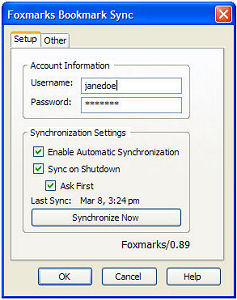 Foxmarks Bookmark Sync is essential if you you use Firefox on more than one computer, to keep your bookmarks synchronized.
- Greasemonkey allows you to customize web pages by adding small JavaScript files, to change their format.
- FireFTP provides easy access to FTP servers
- Firebug lets you behind the scenes of websites to deconstruct and debug.
- Performancing is a blog editor that operates within Firefox to make posting to a blog even easier.
- Pronto Shopping Messenger searches 50,000 US web merchants for a lower alternative price every time you buy online.
- Jeteye, collects links, images, text and video into a Jetpak which can then be shared with friends or accessed from any computer.
- Adblock Plus blocks pop-up ads
 FoxyTunes places the controls for your favorite mediaplayer within the Firefox page so you can choose music without leaving the browser.
- Add-ons like StumbleUpon and Clipmarks enhance storage and sharing capabilities.
Here are some popular themes you can employ to change the look and feel of Firefox. Try out some themes, you can always revert to the default if you like. You can find a huge directory of Firefox extensions and themes here.
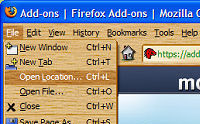 Walnut Theme |
 Blue Ice Theme |
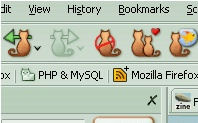 FireCats Theme |
One important caveat about Firefox addons and extensions is that some will be incompatible with future versions of Firefox. This problem has bitten many users as they upgrade from a previous version to Firefox 2 and their favorite extension no longer works. But because Firefox is open source, this makes it easy for programmers to quickly update their extensions and create new ones.
Got comments about Firefox addons, extensions or themes? Post your thoughts below...


This article was posted by Bob Rankin on 8 Mar 2007
| For Fun: Buy Bob a Snickers. |
 |
Prev Article: Rip & Burn Basics |

The Top Twenty |
Next Article: Switching From Windows to Mac |
 |
Post your Comments, Questions or Suggestions
|
Free Tech Support -- Ask Bob Rankin Subscribe to AskBobRankin Updates: Free Newsletter Copyright © 2005 - Bob Rankin - All Rights Reserved About Us Privacy Policy RSS/XML |
Article information: AskBobRankin -- Tricking Out Firefox (Posted: 8 Mar 2007)
Source: https://askbobrankin.com/tricking_out_firefox.html
Copyright © 2005 - Bob Rankin - All Rights Reserved
Most recent comments on "Tricking Out Firefox"
Posted by:

David
29 Mar 2007
One Add-in I really like is Mozilla Archive Format - this adds a format option under File,Save that lets you save the web page on your computer - useful when downloading programs to have requirements and install instructions, also for receipts, and more. Just saving the web page gives you a bunch of bits and pieces- scripts, images, etc. Whereas the MHT format compacts them into a single zipped file, openable by any browser. Printing to PDF is another option but it sometimes crops all the words on the right edge.
McAfee Site Advisor - it warns you if the site you've landed on spams or has virus laden downloads. Also displays in search results like Google. Not infallible but a very useful heads up.
Theres so many - Bookmark Links Checker, Amazing Media Browser, Quickzoom, Textlink. And if you do Web Development, the Web Developer toolbar, IE Tab, etc etc
Posted by:

JMJ
29 Mar 2007
Dear Bob, I've been using FF for a good while, and I'm now fully addicted... Here are two extensions I can't live without :
- IE view : calls IE from inside FF, to view the pages that where deeply microsofted and won't work at all without IE. You can even decide which pages will always open in IE, and it becomes fully transparent.
- Tab mix plus : A full-featured tool to do all what you always dreamed to do with your tabs : Reorder, reopen, duplicate, save, reload, protect, etc.
Posted by:

Kevin
29 Mar 2007
Hi Bob, I quite agree with your comments on Firefox - *far* superior to IE, especially because of the wonderful range of extensions. One little extension I wouldn't be without is New Tab Button on Tab Bar 2.0. Very simple, but it just makes opening an extra tab that little bit more quick and easy.
Posted by:

Grandpa
29 Mar 2007
My favorite is Flashblock. It stops flash apps from automatically playing on your screen. It substitutes a symbol that you can click if you reallly want to see the animation. You can also configure it to allow flash apps on pages you select (a form of white list). While it still has some glitches, I wouldn't want to surf without it.
Posted by:

Sandy
29 Mar 2007
I've been a FF user since it was released (and the Mozilla suite before that) because it ran so much faster on my dial-up connection. My recent FF find is Colorful Tabs. This little add-on randomly colors each tab (when you have two or more, of course!) to better toggle or close the one(s) you want. I never thought the simple addition of color would help so much!!
Posted by:

The Wombat
29 Mar 2007
G'day, I have Spoofstick with earlier versions of Firefox. However, Spoofstick doesn't have a version compatible with Firefox 2. I note that IE 7 has Spoofstick. Has MS purchased Spoofstick &/or CoreStreet?
EDITOR'S NOTE: Nothing so sinister... anti-phishing is built into FF now.
Posted by:

RAD
29 Mar 2007
Yes, Firefox extensions *may* not work with latest version of the browser. BUT, new install of Firefox tests them and reports which don't work. Also, Mozilla lets you know when a new version of an extension is available. So there's little danger of extensions really becoming obsolete. Certainly this is not a reason to avoid Firefox.
EDITOR'S NOTE: I don't follow your logic. What if the developer of the extension decides not to update it for the most recent Firefox? It's obsolete!
Posted by:

Gene
29 Mar 2007
At the company I work for, we use FF as our standard browser and place IE on a sub-menu for use when they find a rare website that just won't work with FF. The FF add-ons I personally use are: Aging Tabs, Copy Plain Text, Download Statusbar, IE Tab, Plain Text to Link, Print Preview, Searchbar Autosizer and Tab Mix Plus.
Posted by:

Janet
29 Mar 2007
A couple of add-ons I rely on are Download Manager Tweak and NoScript. The latter allows the user to choose to run Java, etc., or not.
Posted by:

hammond mike
29 Mar 2007
I agree about obsolete extensions. I was using KillGoogleAds,but it does not work on FF 2.0 It removed Google ads from web pages. I use Scroogle Scraper in my Search box, which works very nicely. I just wish another extension was available for the web sites. It is hard to find another extension with all that are available from Mozilla. Too much to read, and Search brings up everything I do not want.
Posted by:

Michelle
30 Mar 2007
I tried to locate the Performancing blog editor, and a quick search revealed that it is now called "Scribefire." Just thought I would post this in case anyone is having a problem locating it!
Posted by:

Giles
30 Mar 2007
A couple I like in addition to those mentioned: Session Saver - to restore all of your tabs after an unexpected crash. BugMeNot - an extension that automatically queries the site of the same name to bypass annoying registration pages.
EDITOR'S NOTE: Session Saver (or something like it) is built in to Firefox now.
Posted by:

DKong27
21 Aug 2009
Although the add-ons and plug-ins are helpful, remember not to load to many in or the speed is completely nullified.