


Watch Television on Your Computer
What's the best way to watch TV on my computer? I know some websites have selected shows, but I've also heard that you can buy a gadget that will pretty much turn your computer into a television set. What are my options for watching TV on the PC? |
How to Watch Television on Your Computer
The Internet has taken over the entertainment industry to such a degree that now in order to survive even television networks have to have an online presence. This is good news for anyone with a computer and an Internet connection, as now you can watch television on your computer. Whether you are interested in playing your favorite episodes from a specific series or watching live feeds from your favorite television channel, it is now all made possible by relatively simple to use technology.
Tuning in Over-the-Air Television Broadcasts
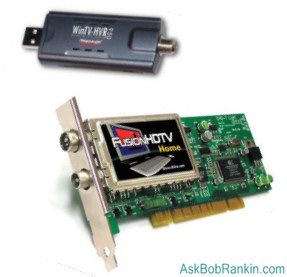
There are several different ways in which you can tune in to your favorite shows on your computer. The first method is to install a TV tuner adapter on your computer. This will effectively turn your computer into a television set and personal video recorder. This can be done using a TV tuner card that plugs into an internal PCI slot, or with an external USB based TV tuner adapter. To install the external TV tuner, generally all you have to do is plug it into an open USB port and install the software that came with it.
The installation of an internal TV tuner card is a little more complicated. First, you'll need to shutdown and disconnect your computer from its power source. Then you will need to open up the system unit case. This will give you access to your PCI slots on the motherboard. Find a PCI slot that is unused and slide the TV tuner card into the slot, then secure the card by screwing it into place. Now close up the case, reconnect the power and boot up your computer. Install the software that came with your internal TV tuner card.
The final step after installing your TV tuner adapter (either internal or external) is to connect your television antenna, cable, or satellite feed into the coaxial cable port on your TV tuner card. Now you can fire up the software, tune in live television broadcasts, and watch them on your computer screen. The TV tuner software will allow you to change the channel or record a show on your hard drive. Some even allow you to pause the show and come back to it later.
Watching "Canned" Shows on Free Online TV Sites
Another way you can watch television on your computer is to log onto one of the many free online TV sites and click on a show that you want to watch. Generally these sites will offer free memberships, however, you don't always have to sign up for an account to view the shows hosted by the site. In order to play the television shows on your computer you will need to have a current version of Adobe Flash Player, usually Adobe Flash Player 9 or newer. A couple of the sites that offer free television shows online are Joost and Hulu.
Network TV Websites
 In addition to websites that offer a collection of television episodes that you can watch online, most of the larger television networks also have websites that offer you viewing opportunities. These include live streaming feeds for news, network programming and "canned" shows from selected series that are shown on the network. For example, the TBS websites offers canned episodes from Seinfeld and My Boys that you can watch anytime you want.
In order to watch a canned episode or a live episode you will generally need to download the software for the video player used by the site. ABC's website, for example, uses a special video player that you will need to download, while TBS and NBC use a Flash Player that doesn't usually require you to download software. Once your computer has the right player installed all you have to do is click on the program you want to watch and it will load. Many players allow you to play, stop, pause, rewind and fast forward, just like a DVD player.
Beware the Free Satellite TV Scam
Oh, and I should also warn you about the "Satellite TV on PC" scam... Don't fall for those pitches that you see which promise thousands of satellite TV stations on your PC for $49. It's a scam and a lie. Read Satellite TV on PC for the whole story.
Do you watch TV on your computer? Tell us about it by posting a comment below...


This article was posted by Bob Rankin on 11 Dec 2008
| For Fun: Buy Bob a Snickers. |
 |
Prev Article: Is Blu-ray Doomed? |

The Top Twenty |
Next Article: Virtual Memory |
 |
There's more reader feedback... See all 29 comments for this article.
Post your Comments, Questions or Suggestions
|
Free Tech Support -- Ask Bob Rankin Subscribe to AskBobRankin Updates: Free Newsletter Copyright © 2005 - Bob Rankin - All Rights Reserved About Us Privacy Policy RSS/XML |
Article information: AskBobRankin -- Watch Television on Your Computer (Posted: 11 Dec 2008)
Source: https://askbobrankin.com/watch_television_on_your_computer.html
Copyright © 2005 - Bob Rankin - All Rights Reserved
Most recent comments on "Watch Television on Your Computer"
(See all 29 comments for this article.)Posted by:

tom lumsden
16 Dec 2008
Have watched tv now for over 10 years using ATI-All-In-Wonder card. Very difficult keeping up with AMD updates due to having to uninstall/re-install all components when required. Now use PCI Express ATI TV Wonder usb. Excellent set-up and operation for only $100.00. No fees and receive all my ISP/Cable company provides within the broadband regular monthly fee!
Posted by:

mickeymops
16 Dec 2008
I watch using www.livestation.com, and www.zattoo.com and www.wwitv.com
Posted by:

Colleen
17 Dec 2008
Hi Bob, Do you know of any URL that I can watch my favorite shows for free? I live outside the US. Thanks for the newsletter...very informative
EDITOR'S NOTE: I'm pretty sure several of the ones listed in the article will do it for you.
Posted by:

D.W.Whitlock
18 Dec 2008
Hi Bob; On ovguide.com you can check out a couple hundred sites that play TV shows and movies of all kinds for free. My fave is fancast.com. You can view 200+ TV shows from the 50's thru the 90's. All for free. They even have the original Star Trek (yes, I'm a ST Geek). Also, for those who are really into documentaries, check out moviesfoundonline.com. Many catagories. Lots of 9/11 conspiracy docs. All free. Happy(free)viewing.
Posted by:

WALLY
18 Dec 2008
Mac OS X version 10.4.11 24in screen
eyeTV hybrid, works Great, cable line in, usb into back
Posted by:

Walter
23 Dec 2008
My wife loves internet TV (watching shows on the network sites and sites like hulu) that we're going to be adding a second TV computer in the bedroom. We have a 3ghz Pentium in the living room and soon we'll have a retired 2ghz laptop in the bedroom.
We also watch various shows that are recorded with mpeg4 compression such as Japanese television. The unit in the living room also doubles as an mp3 jukebox giving days of uninterrupted music.
Posted by:

Katie
23 Dec 2008
I am currently teaching in Hangzhou China and I fulfill my US TV cravings with a product called Slingbox. It is hooked up to my cable & router at home in Georgia and I can watch Georgia stations during low bandwidth demand here in my China apartment on my old Mac laptop (G4- system 10). (doesn't work well when all the college kids are playing online games or watching their downloaded movies or Korean Soap operas). Only weird thing is that I watch the Today Show at 9 pm and the Evening News at 7am.
Posted by:

Roger
26 Dec 2008
I'm a little concerned, Bob, when I see in your piece about watching TV on your computer you indicate that we should know that claims to watch satellite TV on your PC for $49. is a scam yet one of your sponsored links is just such a purveyor. How does that work?!
EDITOR'S NOTE: As I've mentioned before, the Google ads are not under my control, and are *supposed* to be relevant to the content of the page. In an ironic way, even those scam ads are. My hope is that people will actually *READ* the article and understand why they should NOT believe the hype.
Posted by:

Debbie
06 Jan 2009
Hi Bob. I live in the UK, and simply can't watch US TV on the internet. It seems that most of these websites are IP controlled (e.g., Hulu, and cbs.com in particular), and so only accept US based IP addresses. I'd love to know if there is a way around this - especially now that there has been a big clampdown on P2P file sharing.
EDITOR'S NOTE: I wonder if a proxy site like anonymizer.com (or a free proxy recommended by peacefire.org) would get around that.
Posted by:

zaz
16 Jan 2009
Regarding Debbie from UK, If she has family or friends in the Us, she can hook up to Slingbox and view all chanels that are available on her friend/family TV.
Posted by:

Yanice
30 Mar 2009
Dear Mr Rankin, As you appear to be extremely knowledgeable and up to date on various subjects and the "ins" and "outs" of computer technology, please would you kindly assist in my struggle to convert my 42" plasma monitor into a TV screen to enable me to watch cable on it? I've trawled through the internet and emailed a number of "specialist" outlets looking for information on conversion kits and the likes but as of yet to no avail.
I would be most grateful if you would furnish me with your wisdom in order for me to use this monitor as a television set as my current TV has very little life left in it and alas my budget in todays climate is far stretched as it is.
EDITOR'S NOTE: I've never heard of a kit to convert a TV monitor into a full-blown TV set. What you lack is a tuner, the amplifier, and the speakers. I can't imagine it would be cheaper to buy all those components, when you can get a 32-inch LCD TV for under $300.
Posted by:

Keven
08 Apr 2009
Mr. Rankin, The U.S. Government delayed (no surprise) the mandatory cut over to digital TV until June 12, 2009. The "blue" information paragraph on your "How to Watch Television on your Computer" page should be updated.
EDITOR'S NOTE: Done. I had already updated that in two other articles, but missed this one. Thanks for the good detective work.
Posted by:

Shelly
10 Apr 2009
Another website where you can watch many TV shows and movies is www.free-tv-video-online.inf and most of its links work outside the US.
EDITOR'S NOTE: Stay away... I checked one link and found a virus.
Posted by:

Tv on your computer
29 Apr 2009
I just wanted to thank Bob Rankin for his informative articles. I've read several others that he has written and i must say he is quite knowledgeable in everything that he writes about. Much thanks, and Kudo's
Posted by:

CHET
18 Jun 2009
Sounds great but where do you get the external gadget that goes in the usb port?? Never heard of them nor seen them anywhere..(guess that would be redundant)
EDITOR'S NOTE: Do a Google search for "USB TV Tuner" and you'll find them.
Posted by:

Kevin
18 Jun 2009
Dear Bob,
A good article, but you ought also to mention that if you watch TV on a computer then you will need a TV licence (at least, this is true in the UK). Currently I don't have a TV and so of course I don't have a TV licence. If I was to follow the advice in your article, I would actually be breaking the law! So please include mention that if someone wants to watch TV - no matter whether it is on a TV set or a computer - then they must have a TV licence.
EDITOR'S NOTE: A "tv license"??? Never heard of that here in the USA. What if you watch TV at your neighbor's house -- is that illegal in the UK? Do you need a radio license to listen to the BBC? Can you read the Times without a newspaper license? Incredible! I just looked it up, and you are quite correct. You need a TV License in the United Kingdom and the Crown dependencies, even to watch TV content on the Internet. The annual cost (TAX) is about 142 British pounds, which is US$232. The money is used to subsidize the BBC.
Posted by:

Karen
15 Nov 2009
Help,
I moved to a location that does not get any local channels. I subscribed to DISH TV and they guaranteed local channels but they were wrong. Dish directed me to All American Direct, and guaranteed local channels. I received a Fox channel from CA through All American Direct. All American Direct is trying to sell me an antenna that I install to my dish and of course they are guarantee I will get ABC,NBC, and CBS. However they won't guarantee it to the point that if it doesn't work, they will waive the shipping and restocking fees. The only channels I want are ABC, NBC, CBS and FOX. I will get it if you think it will work or do you have any other ideas for me.
Posted by:

bebeliv
20 Feb 2010
There is a new software out there , just costs 49.5$,a one-time fee, 3500channels , no need to have statellite dish ,receiver or any other equipments ,all you need is a computer and an internet connection . .com/tv_on_pc/pctv.html">http://.com/tv_on_pc/pctv.html
EDITOR'S NOTE: SCAM ALERT! See http://askbobrankin.com/free_satellite_tv_on_pc.html
Posted by:

BP
28 Jul 2010
I WAS REALLY THANKFUL ABOUT THE WARNING "Satellite TV on PC" scam...
I DID FIND AN INTERESTING FREE SITE (FANCAST.COM) THAT HAS MANY LINKS TO OTHER TV/MOVIE SITES.
Posted by:

martin
21 Sep 2010
You can now also get hosted slingboxes:
http://mytv2me.com/hosted_slingbox.html
They will provide you with a TV subscription and a slingbox that you can access from anywhere - This has the advantage of being able to watch when overseas.