


Convert Internal to External Hard Drive
So, you finally replaced your computer's old 80 GB hard drive with a faster, more spacious one. Great! Now, what do you do with the old drive? One option is to convert it into a handy, portable external hard drive. It's easy, here's how... |
Make Your Own External Hard Drive
It is easy and inexpensive to convert an internal hard drive to an external one. All you need is a hard drive enclosure that fits your existing internal hard drive. Hard drive enclosures are widely available at computer stores and online. Prices range from as little as five dollars for a basic one-drive USB 2.0 enclosure to over a hundred dollars for enclosures that hold multiple internal drives in RAID arrays with eSATA interfaces. You probably don't need to spend more than $20 for a basic one-drive enclosure.
Removing a hard drive from a laptop or desktop is easy. Power down and unplug the computer. On most laptops, you'll remove a plastic panel from the underside of the laptop with one or two small screws. Remove the drive by gently tugging it free from the connectors, and you're done. On a desktop, open the system case, and locate the hard drive in its metal bay. Disconnect the power and data cables, remove the screws holding the drive in the bay, and slide it out. Just remember, you're removing the hard drive, but NOT opening it up. Doing so will damage the sensitive internal components.
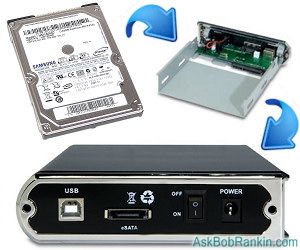
You do need to make sure you buy the right kind of drive enclosure kit, so it will be compatible with the drive you've removed from the desktop or laptop.
The first consideration is the size of your hard drive. Laptop drives are all 2.5 inches, while desktop drives are usually 3.5 inches. Determine the size of your internal hard drive and shop for a hard drive enclosure into which it fits. Note that 3.5 inch drives generally require an external power supply, while 2.5 inch drives can pull their power from the computer to which they connect.
The drive interface is another critical factor. Old hard drives may use an IDE interface. Many new drives use the speedier SATA interface. Make sure the enclosure you select supports your internal hard drive's interface. If you have any confusion about the size or interface for your drive, just Google the name. For example, I have an old hard drive that I pulled from a defunct desktop computer. The markings on the drive say "WD Caviar 36400" so a quick search for that phrase tells me it's a 6.4GB Western Digital, 3.5 inch, IDE drive.
Connecting the External Drive to Your Computer
The connector on a hard drive enclosure is the means by which it is connected to your computer. USB 2.0 is a common connector because most computers support it. Firewire is another option if your computer has an available Firewire port. An eSATA connector is faster than USB 2.0 or Firewire, but relatively few computers and enclosures support eSATA at this time.
The enclosure box may be made of aluminum, plastic, or some other material. A box sporting LED indicators helps you observe drive activity. Other bells and whistles are optional.
Installing an internal drive is into an enclosure is easy. You may need a screwdriver, but no special tools are required. Just avoid static electricity and don't force any connectors. If you are enclosing an IDE drive, make sure to set its master/slave jumpers to the positions recommended in the enclosure's instructions. SATA drives do not require jumper settings.
Connect the enclosure's interface cable to the internal hard drive's interface connector. Plug the enclosure's power cable into the drive. Fasten the drive into the enclosure with the fasteners provided. Close up the enclosure.
If necessary, plug in the external drive's power cord. If you don't need external power, just plug the connector cable into the appropriate USB, Firewire, or eSATA port on your computer. Mac and Windows computers should recognize the new drive automatically. It should appear in your drives list with its own drive letter. Copy a few files to and from the new drive to make sure everything is working. Then enjoy your new external hard drive!
Have you done a conversion from an internal to external hard drive? Post your comment or question below...


This article was posted by Bob Rankin on 29 Jul 2011
| For Fun: Buy Bob a Snickers. |
 |
Prev Article: Five Free Blogging Tools |

The Top Twenty |
Next Article: Seven Great Laptops for Business Travelers |
 |
There's more reader feedback... See all 22 comments for this article.
Post your Comments, Questions or Suggestions
|
Free Tech Support -- Ask Bob Rankin Subscribe to AskBobRankin Updates: Free Newsletter Copyright © 2005 - Bob Rankin - All Rights Reserved About Us Privacy Policy RSS/XML |
Article information: AskBobRankin -- Convert Internal to External Hard Drive (Posted: 29 Jul 2011)
Source: https://askbobrankin.com/convert_internal_to_external_hard_drive.html
Copyright © 2005 - Bob Rankin - All Rights Reserved
Most recent comments on "Convert Internal to External Hard Drive"
(See all 22 comments for this article.)Posted by:

Paul
29 Jul 2011
Your article was great for as far as it went. I think you should have also addressed erasing and reformatting the HD if someone wanted to start with a fresh storage unit.
Posted by:

Paul Dellechiaie
29 Jul 2011
It should be mentioned that while 2.5" drive enclosures are usually powered through the USB connection itself and don't have separate transformers, they usually work more reliably either plugged into a USB port directly on the computer or into a powered USB hub (which has a separate transformer), than into an unpowered hub. Unpowered hubs, especially if other USB devices are plugged in to them, are frequently unable to provide enough power to operate a hard drive stably.
Posted by:

Ariel
29 Jul 2011
Dang.3 days too late.I would of bought an internal drive and swapped it out with my 140gb drive. Instead I just bought an external 500 gb seagate from newegg. Bad timing shame on you. :-)
Posted by:

Doug
29 Jul 2011
I am suddenly seeing "Error Code 43" when I attempt to use my external hard drive (removed from an older computer). Searching the internet--and Microsoft's support site--indicates that it is a wide-spread Windows 7 (and maybe broader) problem, which visitors testify to having fought for >one year. Any ideas Bob? Anybody?
Posted by:

Bob Pegram
30 Jul 2011
Bob -
You forgot to mention that the laptop should be unplugged AND the laptop battery should be removed before removing the internal hard drive. The battery can give it a shock if it wiggled while removing.
A good program to reformat the new drive is Easeus Partition Manager. First, hook up the new drive externally, then format it using Easeus Partition Manager Home. Download that and install it on the old internal drive.
After the new drive is formatted, but before installing it in the laptop, Easeus ToDo Backup can be used to clone the data on the old internal drive to the temporarily external new one. Then, when the new bigger one is installed, all of the data will be on that one in the laptop.
Easeus Partition Manager can then be used expand the partition size back to the full hard drive size (for the new internal drive). That is needed because the cloning process will temporarily make the new drive look the same size as the old one that is being cloned. The extra space is there on the new one, but invisible because the drive size info is also copied during the cloning process. That makes the size data on the new drive the same as on the old one until you use Easeus Partition Manager to expand it back to the full size of the drive (or whatever other size you want. (You can make the bigger drive look like two drives if you want by formatting the empty space as a separate partition.)
Both Easeus programs are free and available as a download many places on the internet.
Posted by:

Bob Pegram
30 Jul 2011
I forgot - there are kits that can hookup any drive externally without a case. They have various adapters. That would make the process I described easier since the new drive would be hooked up externally first, but only temporarily.
Posted by:

Ernie L S
30 Jul 2011
I've been doing this for years, but without the encloser. A few years ago I bought a CO0LMAX unti that will plug into A 525" SAAT,or old IDE drive, AS WELL AS A 2.5"IDE. It came with an external power supply and usees a 2.0 USB port.I use the frame of a stripped dribe to keep it cool and off the work aria. Have a few old drives that I use to stor seldom needed, or financial records. Works great for me.
Posted by:

Nicolo
30 Jul 2011
It's funny. This article came out just a couple hours after I started using my desktop hard drive as an external drive for my laptop. I didn't know that I can purchase enclosures though which got me excited when I saw it in this article. Right now I'm just using a SATA to USB cable to connect to my laptop. Works great. I can't wait to shop around for enclosures. Although I am worried about the heat building up inside it. Without the enclosure,the hard drive doesn't heat up that much.
Posted by:

Denis Trainor
30 Jul 2011
Bob ;
How do I erase everything of the drive and how do I for matte the hard drive?
Thank you
Denis
Posted by:

Steve
30 Jul 2011
I have upgraded my hard drives several times, but instead of reusing the old hard drive, I put them away in the event of a hard drive crash/virus/corrupted section. It is easier to copy back the old hard drive to the new one than reinstalling windows. It has saved me an enormous amount of work on a couple of occasions.
Posted by:

David
30 Jul 2011
I agree about wanting to know about erasing and re-formatting - I have an old computer I could strip and am unclear about how to set it up with Acronis backup software.
Posted by:

Tim
01 Aug 2011
This is something that I've done several times, but there's an issue that I don't quite understand: unlike drives specifically designed to be portable and USB-pluggable, internal hard drives installed in third-party enclosures can sometimes get grabbed by Windows in such a way that they won't remove without a shutdown. (I'd recommend, by the way, a utility called USBSafelyRemove that extends and enhances the Windows native device removal program, particularly because it tells you more about why a drive can't be removed right now than Windows does.)
It's important to ensure that Windows doesn't index the drive or that you know how to suspend indexing for it, but even that's not always enough to get round the occasional need to shut down before removing the drive.
I'd echo the comments about using powered/internal USB slots with drives without their own power source. Bear in mind also that a USB-2.0-connected drive will NOT be as fast as it was when it was internal: if you have the option to go to USB 3 or an external SATA port, that should increase the performance significantly. Also, 2.5" enclosures don't always work too well if they're attached to -- and powered only by -- a laptop or netbook that's running off battery power alone. (Your mileage may vary!)
Posted by:

Hugh
10 Aug 2011
I've been doing this for years using new and old drives.
In my experience, it's very important to pick a well-designed metal case, as plastic cases will fail much faster.
I've bought about 12 of these and they have never failed. There are similar cases somewhat cheaper, but reliability is critical.
http://www.tigerdirect.com/applications/SearchTools/item-details.asp?EdpNo=1337267&CatId=2779
As for formatting, simply connect the drive and open disk management. Find the drive and rt-click to format, partition, initialize or whatever is required.
Hard drives are great for additional storage and backup, but they are not reliable for critical data. Always have at least two copies of such data, and consider supplementing your backup with optical or cloud backup.
All hard drives will fail, it's just a matter of when.
Posted by:

Snert
10 Aug 2011
Years ago I bought a dingshoolie that lets me use an old IDE HD drive as an external HD.
Power transformer plugged into the 4 pin power plug, a USB adapter plugged into to where the ribbon cable goes and reboot. There's another 180 Gb's to play with, Drive W:. BUT you have to put the jumper in Cable Select or things go gaft agly.
(I use the last letter available naming drives so I don't have to juggle drive letters).
My milage varies.
Posted by:

John
10 Aug 2011
Hi Bob
My last computer had 2 SATA2 hard drives and I bought a relatively inexpensive Sharkoon plug in base unit and can now access them with it.
Since then I have added a new 500 gb hard drive which is almost full with my photos. If I want to add another - which I will soon - all I need to do is by an internal hard drive and plug it in. Sharkoon now make a SATA 3 unit with SATA3 card which will be my new choice.
Posted by:

Rob Huttinga
03 Oct 2011
Hello, I have here in my hand a Maxtor DiamondMax 21, 250 GB SATA.and I have a usb to SATA/eSATA. if I connect the internal hard drive to my laptop as an external one. but the laptop doesn't react to it. Do i need to supply the hard drive with power, if yes, how?
EDITOR'S NOTE: I don't know if a USB/Sata adapter can supply power to the SATA drive. I would suggest a kit that includes an enclosure and AC power.
Posted by:

bobz
02 Feb 2012
Guys, i have an old hdd that I pulled from a defunct desktop computer. The markings on the drive say "maxtor 3.5 series n256 40Gb". which interface should i use?
EDITOR'S NOTE: The one that fits! That drive happens to be an IDE drive, but you couldn't connect it to a SATA interface if you wanted to. Well there are IDE/SATA adapters, but that would be adding an extra layer of complexity.
Posted by:

kuldeep
13 Jun 2012
How do you know i replaced my old 80 Gb hard disk , seriously i had 80 gb hdd. Replaced with 500GB and now i am gonna convert it to external then use it for backups.
Today is bad day for me lost very important data from hard disk , that's why i finally decided to convert my old HD to external and make it useful for backups ;)
Posted by:

Manie
05 Jun 2014
I converted my PC's 250Gig internal HDD to an external HDD, but I need to acces the data that is on the disk. I have tried data recovery software without succes. Is there any way that I can recover the data on the disk?
Posted by:

Sylvester
02 Sep 2019
Hi Bob
Got an old internal desktop hard drive (Win XP OS) and I'm deciding to convert to a portable ext drive. How will I go about?
Your help