


Defrag Your Hard Drive
If you have noticed your computer running a little sluggish and slow lately, it might be time to defragment your hard drive. Your hard drive does need to be cleaned out regularly and defragmented in order to keep everything working better. Here's the why and how of defragging... |
Defragment Your Hard Drive For Improved Performance
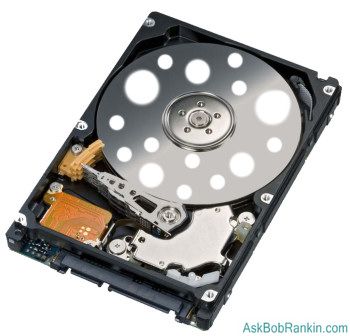
So what does it mean to defrag your hard drive? As you work with your computer, you will create and delete thousands of files on your hard drive. Over time, this churn leaves areas of empty space on your hard drive. Eventually you have a hard drive that looks like swiss cheese, and when you want to install a new program, or create a new file, your computer has to put chunks of your file all over the disk, instead of storing it in one contiguous block. This will result in extra time required to open files and launch applications, because everything is scattered (or fragmented) around your hard drive.
In order to fix this, there are programs available called defragmenters. When you defragment your hard drive, the program will move those scattered chunks of data so that files are stored contiguously, and create larger areas of free space to store files in the future. After drefagging, your computer has less work to do in order to open files and load programs. This is why defragmenting your hard drive is important.
How To Defragment Your Hard Drive
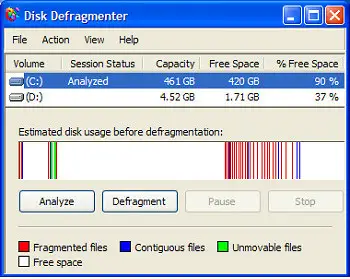 If you run Windows, your computer already has a free defragmenting program on it. Windows Defragmenter is provided with your Windows operating system. To begin, start by closing all your Windows programs. You might want to run your Defragmenting program in the evening, when you are finished with other work.
Click on the Start button, which is over on the bottom left part of your screen. Select Programs. Then select Accessories. Select System Tools. In System Tools, you'll find something called Disk Defragmenter.
From this program, you can select the hard drive that you want to defrag. Typically that's the C: drive, but if you have multiple drives, you can do them all. Press the Analyze button after selecting the drive, and Defrag will tell you if the drive needs to be defragmented. Lots of colored bars scattered all over the graph usually means you need to defrag. When most of the colored bars are over on the left side of the graph, that's good. Click the Defragment button to begin the defrag process.
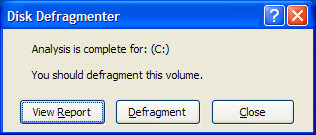 If it has been a long time since you've last used it, or if you have a large hard drive with lots of files, it could take several minutes (or even hours) to complete. Defrag will show you the before and after snapshots of the defrag process.
Mac users, keep reading -- there's some defrag love in the next section for you...
I recommend that you defragment your computer regularly. Once a month should be enough, though do it more if you're a very active user, or you regularly deal with large (multi-megabyte) files such as music, video or graphics. If you have Windows Vista, the Disk Defragmenter offers you the option to run the program on a regular schedule.
Other Defragmenting Software
There are other defrag software programs available besides the one built into Windows. Some of these programs do a more thorough job of defragmenting your drive, and offer advanced features you might like.
Diskeeper is a popular commercial defragmenter. The newest version scans and fixes your computer in real time. So when you delete a program or file, it readjusts your hard drive right then. This eliminates the need to actually go in and run the program, taking minutes or hours out of your day to run the program.
DiskMagik is another good choice. It runs its disk defragmenter throughout the day, plus it'll learn when your slow times are, so it can adjust. It'll use fewer resources throughout the times when you use the computer more.
And Mac OS X users, I haven't forgotten you... Apple recommends a program called Drive Genius which will defrag, repair, repartition and do other maintenance tasks on your Mac. Other Mac savvy folks recommend iDefrag.
These programs are optional, but if you're the type of person who wants to squeeze every bit of performance out of your system, an advanced defragger is highly recommended. These programs eliminate the need to actually remember to run your disk defragmenter, and they'll optimize your disk. A fast and clean hard drive will really make a difference and improve your computer's performance.
Do you have comments about disk defragmentation, or a favorite defrag tool that's not mentioned here? Post a comment below...


This article was posted by Bob Rankin on 10 Jun 2008
| For Fun: Buy Bob a Snickers. |
 |
Prev Article: My Favorite Software |

The Top Twenty |
Next Article: Five Geeky Gadgets |
 |
Post your Comments, Questions or Suggestions
|
Free Tech Support -- Ask Bob Rankin Subscribe to AskBobRankin Updates: Free Newsletter Copyright © 2005 - Bob Rankin - All Rights Reserved About Us Privacy Policy RSS/XML |
Article information: AskBobRankin -- Defrag Your Hard Drive (Posted: 10 Jun 2008)
Source: https://askbobrankin.com/defrag_your_hard_drive.html
Copyright © 2005 - Bob Rankin - All Rights Reserved
Most recent comments on "Defrag Your Hard Drive"
Posted by:

Erin
10 Jun 2008
I just wanted to add that if you have Vista you don't get the visual indication of how the defrag is going which can be initially be confusing and frustrating. The first few times I tried to defrag using a new computer with Vista I nearly tore my hair out with frustration, assuming it wasn't working. Eventually I Googled an article which not only explained why defrag is different in Vista but how to do a "manual defrag" using command lines to gain a bit more control and get some feedback. http://www.howtohaven.com/system/vistadefragmentation.shtml
Posted by:

Yasser
11 Jun 2008
My favourite defragmenting application is Raxco's PerfectDisk 2008 -- http://www.raxco.com
Posted by:

anonymus
11 Jun 2008
I tried the latest version of Diskeeper 08 and its great on drives that are running out of free space. The other features also seem to work cool. Definitely recommend it.
Posted by:

Windsor
11 Jun 2008
With the advent of automatic defragmenters, manual or scheduled defragging has become pretty much obsolete. The automatic defragmenters defrag the drive(s) in the background in real-time intelligently utilizing only free system resources. This means that the drives are always in great shape without any effort on the users' part.
I see this as a welcome change from the past: PC 'maintenance' should be as automatic as possible so Windows users' time on the computer is spent more productively ie. for work/gaming/entertainment etc., rather than on fixing or optimizing it.
EDITOR'S NOTE: I agree. Too bad no such feature is built into Windows, Mac or Linux operating systems. That's why I mentioned the commercial alternatives.
Posted by:

kingfish
20 Jun 2008
When I turn my computer on it starts up fine, but after a short period of time it just turns off with no warning. It started doing this after I scaned with ad aware and avg. Avg found some stuff and said it took care of the items. I then started clean disk and defraged the computer. i dont think it ever finished the defrage or clean disk. The last couple of time I tryed to defrag is when it is shutting down.
EDITOR'S NOTE: You'll find a lot of help here: http://askbobrankin.com/computer_shuts_down_by_itself.html
Posted by:

Mervyn Doobov
16 Jul 2008
I suggest you have a look at JkDefrag.exe at http://www.kessels.com/JkDefrag/. It's free, simple, and works well.
Posted by:

Duncan
17 Jul 2008
I confess I find the displays produced by defraggers somehow restful and hynoptic. I regret that the XP Defraggers doesn't show the blocks moving like older versions did.
Back to the point:
Does anyone know of a defragger which can handle the swap file and/or other "immovable" files? On my disk I suspect that these are spread around in away which is stopping optimisation of my rather large mail database.
Posted by:

rocketmouse
19 Jul 2008
I vaguely remember that there's something you can do with the Auslogics defragger (http://www.auslogics.com/disk-defrag)
to handle such files, but I can't verify it for you. Which brings me to my question: Does anyone know of a free defragger for OS X, or perhaps some way of optimizing the disk from Disk Utility or Terminal? (The Drive Genius trial did let me know how badly fragmented the drive was, but then wanted money -- AFTER I restarted from backup..., and Onyx doesn't do it any more.)
Posted by:

Mikey
18 Aug 2008
There is a defragmenter available, free of charge, called Auslogics Disk Defragmenter. It is good to look at, is very fast, and works perfectly with Vista Home Premium. In short, it is all you would need from a defragmenter
Posted by:

Rae
03 Sep 2008
I note that the instructions you gave for Defrag are for XP Bob? Unfortunately, as you are no doubt aware, there is no way with Vista we can get the 'analyze' button or defrag screen, Microsoft has seen fit to hide it from us. So, trusting the program, I scheduled the defragmenter to run every month at a certain time, and assumed, even though the computer didn't slow down at all during the time
the computer was supposedly defragging, that it was doing the job. WRONG!! I downloaded Auslogics defragger after having talked to another Vista user, and discovered on running the Auslogics program, that my computer had never defragged. Just a warning for other Vista users out there.
Posted by:

Gerold Manders
04 Nov 2008
Maybe a strange one, but since I know about the defragmentation software from DiskTrix (UltimateDefrag), I never looked back to any of the other big name defragmenters.
The interface (from the freeware version) is...well something to get used to, I'll guess. But it functions very well. Not only does it defrag, it also moves files to the inner/outer tracks of your harddisk and/or partitions according to your specification.
Because of this your system is a lot(!) snappier. There is also a manual (PDF format) that explains every function in plain English, so you're not getting lost in all it's options.
I'm just a very happy user from the software and not in any way affiliated with DiskTrix. The free version (v1.72) I got was given out by them to promote/lure (new) users in buying their v2.x version, but it should not be so hard to Google for the freeware version.
Posted by:

Hart
04 Nov 2008
I, too, am very pleased with JkDefrag. It can be found at http://www.kessels.com/Jkdefrag/ and is FREE. It is very fast, if you keep your system fairly clean, and it appears to do a much better job than XP's built-in defrag. I have put an icon for it on my desktop so that I'm sure to use it regularly.
Posted by:

flo
04 Nov 2008
Before my computer went dead on me I was able to defrag completely (100%). I got it fixed and now it only defrags 17% and then it is done.
Posted by:

Robert
04 Nov 2008
Another free option for Windows is Defraggler (http://www.defraggler.com), from Piriform, the same people who wrote CCleaner.exe.
Posted by:

Sara
11 Nov 2008
I also have Windows Vista and it took all long time to hunt down the defrag option. When I do defrag (which I have scheduled daily) it takes hours every time. Is it doing anything? I noticed the other comment complaining about the Vista defragger.
Posted by:

Ben Williams
19 Mar 2009
I have a Windows NT 4.0 system that really has a bad case of fragmentation. But from looking at the different defragmenters out there (as well as other software) you would think that Windows NT never even existed (and yet Windows XP was built on NT and when I use an XP everything seems very familiar to me). What is wrong with these people? Why is everyone so ANTI-NT? Now I know what it feels like to be a minority and have everyone ignore you. Does anyone make a really good defragmenter that works under Windows NT? I don't understand what these new OSs have that should cause the software makers to only be able to make software that runs on them.
EDITOR'S NOTE: Keep in mind that the most recent version of Windows NT was released in 1996. So your "New Technology" is now at least 13 years old. This may help: http://www.geocities.com/andreigaceff/DefragNT.html
Posted by:

Dave
03 Aug 2009
Diskeeper can defrag the paging file, but only when booting the machine and it can be set to defrag every time it's booted or just a one time event. The drawbacks: takes a long time to boot up, if using one time event setting you have to remember to tell it to do the job every now and then.
Posted by:

jorge
06 Jan 2011
hey thanks for this advice man i didnt know about defragmentation until know this was very helpful thanks a lot
Posted by:

Jyoti
09 May 2013
Defragmentation is the process of rearranging scattered Mac files in contiguous memory locations to enhance Mac performance. However, Windows has an inbuilt tool to defrag it but, Mac doesn't have because Mac OS X can minimize the chances of defragmentation but that too upto 20 MB file size only. What about heavy files? Yes....in that case Stellar Drive Defrag is the best tool to defrag your Mac.