


Five Super-Secure External Hard Drives
External hard drives and USB flash drives are convenient, portable ways to back up and transport data. But because they're portable, they're obviously vulnerable to loss or theft, so it's important to protect your data with encryption, passwords, and other security measures. Here are some external drives that help keep your data secure... |
Encryption and Physical Security for Portable Drives
When you're travelling with an external hard drive or USB flash drive, there's always the possibility you could lose it. You bag could be stolen or mis-directed. You might accidentally leave your keys (with flash drive attached) at the diner or the coffee shop. So it's important, especially if you're carrying sensitive or confidential data, that you protect your external drive. Bulit-in hardware encryption is nice, but here are five external drives that use physical security options that go above and beyond.
The LaCie Rugged Safe includes both password and biometric finger-scan security features. Up to ten users can store their passwords and fingerprint scans directly in the drive. Each user can be assigned a customized level of access to the drive, from full administrator privileges to read-only access. There is no need to remember a password; once a fingerprint is registered, a simple swipe of that fingertip authenticates the user. (Hopefully, this cuts down a LOT on the "I forgot my password" calls to the help desk.)
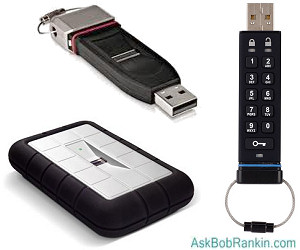
The Rugged Safe is protected against damage by a sturdy aluminum case rimmed with rubber, and internal rubber shock absorbers. Equipped with FireWire 400 and USB 2.0 connectors, the Rugged Safe is compatible with Mac or PC computers. A 250 GB SSD (solid state) version is available ($529), while magnetic versions range from 500 GB ($149) to 1 TB ($249).
The Imation Defender F200 Biometric Flash Drive is a more portable (and more expensive) USB drive offering fingerprint security. The F200, which comes in sizes from 2GB ($109) to 64 GB ($562), protects you with a tamper-resistant metal case, hardware-based, military-grade 256-bit AES encryption and malware protection. One unique feature is the optional “Stealth Zone” which provides mobile workers with a copy of Microsoft Windows Embedded Standard (MWES) Edition pre-installed on the drive.
The Apricorn Padlock USB 3.0 offers data transfer speeds up to ten times faster than USB 2.0. It has a built-in keypad for entering a PIN that unlocks the drive. Data is encrypted with your choice of real-time 128-bit or 256-bit Military Grade AES-XTS Hardware Encryption. This drive is compatible with any OS including Windows, Mac OS, or Linux. Capacities range from 250 GB ($179) to 1 TB ($249).
Smaller but just as secure as the Padlock, the Aegis Secure Key is a PIN-protected USB 2.0 flash drive. Its capacity ranges from 4 GB ($65) to 16 GB ($125). Military grade Full-disk AES 256-bit CBC Hardware Encryption keeps your data safe. No software or drivers are required; it's dust and water resistant; and works with any USB-capable computer.
The Xapear Solid State Disc drive lets you split it into two partitions, one freely accessible to any user. The other partition is hidden so that no unauthorized user knows it's there. The hidden partition is revealed by swiping a physical RFID key across the device's sensor. A second swipe of the key hides the partition again. The Xapear also contains a GSM SIM card which can be linked to only one mobile phone. If the device goes missing, a simple text message from that phone deletes everything on the drive.
It sounds like something from a spy movie, and I wonder who (besides spies and criminals) might need such a gadget. I suppose if you live, work or travel in certain countries, it could be handy. The downside of this cool drive is that you can't buy one, at least yet. The Xapear is so new, that as of this writing, both the price and capacity are unknown. Also, its remote-deletion feature won't work with non-GSM phones.
You can protect data on external drives without buying new hardware. The free encryption software from TrueCrypt.org will encrypt any drive. However, TrueCrypt accesses encrypted drives through a computer (Windows, Mac, or Linux). If the computer is infected by keylogging malware, the TrueCrypt password could be compromised.
Do you use encryption or physical security measures for your external hard drive or USB flash drive? Post your comment or question below...


This article was posted by Bob Rankin on 12 Jul 2012
| For Fun: Buy Bob a Snickers. |
 |
Prev Article: Seven Steps to Create Your Own Website |

The Top Twenty |
Next Article: Backup Your Text Messages |
 |
Post your Comments, Questions or Suggestions
|
Free Tech Support -- Ask Bob Rankin Subscribe to AskBobRankin Updates: Free Newsletter Copyright © 2005 - Bob Rankin - All Rights Reserved About Us Privacy Policy RSS/XML |
Article information: AskBobRankin -- Five Super-Secure External Hard Drives (Posted: 12 Jul 2012)
Source: https://askbobrankin.com/five_supersecure_external_hard_drives.html
Copyright © 2005 - Bob Rankin - All Rights Reserved
Most recent comments on "Five Super-Secure External Hard Drives"
Posted by:

Bob Evans
12 Jul 2012
Before I do out and buy a secure external hard drive, I'm experiencing a "blue screen" crash; windows shuts down; restart in safe mode with network support runs OK but very limited. Retry Normal Mode and crash reoccurs. What do I do? I'm running Windows 7 Starter on a Toshiba Netbook.
EDITOR'S NOTE: First thing I would try is System Restore.
Posted by:

Alex
10 Sep 2013
The simplest way to password protect portable drive is by Lockngo (http://www.keynesis.com). It locks entire drive with a password. When disk is locked it contains only lockngo application file. To unlock it just click on the application icon and enter the password. Not free. The simplest version costs around $20. Requires administrators rights.