


A Harbinger of Hard Drive Hardship?
A concerned reader asks: 'My 4-year-old hard drive is making a persistent clicking sound. It started recently and seems to be getting more frequent. Sometimes I hear a repeated click-whir sound when starting or using my computer. Does this mean my hard drive is going bad?' Yikes! Hard drive clicking sounds are clearly cause for consternation. Read on to learn exactly what that clicking means, what Concerned Reader (and you) should do, if it happens to you... |
Impending Hard Drive Failure?
Generally a clicking sound coming from your hard drive is a Very Bad Thing. It could be a hint of horrific hardware happenings, or the drumbeat of developing data disaster. So my immediate advice is "BACKUP YOUR HARD DRIVE!" as soon as possible. If the drive fails, you're out of luck. No amount of anguished alliteration will save you.
In fact, even if you don't suspect a problem with your hard drive, it's wise to make regular backups so you can survive a hard drive failure with only minimal inconvenience.
On Windows, you can check your hard drive for errors (and sometimes fix them) by running the CHKDSK utility. To do so, click the Start button, then type CMD, but don't press Enter. Right-click on the CMD.EXE icon at the top of the search results, then click "Run as administrator." If you get a User Account Control popup, click YES to continue. When the Command Prompt window appears, type CHKDSK C: /F /R then press Enter. The /R option tells CHKDSK to scan for bad disk sectors, and the /F option means to fix any errors found.
You'll see a message informing you that "CHKDSK cannot run because the volume is in the use by another process. Would you like to schedule this volume to be checked the next time the system restarts?" This happens because CHKDSK cannot operate on the drive from which you have started Windows. Reply Y, then restart your computer. CHKDSK will run before loading Windows, and you may see a bunch of geeky stuff on the screen while it's scanning your disk. On Windows 8, 10, or 11 you'll just see a black screen with the Windows logo and a progress indicator.
If CHKDSK offers to "convert lost chains to files", recover lost data, or fix something else, you should accept. (If CHKDSK tries to sell you a cheap Rolex watch, politely decline the offer.) After CHKDSK finishes, and you've restarted normally, you may want to see the CHKDSK results.
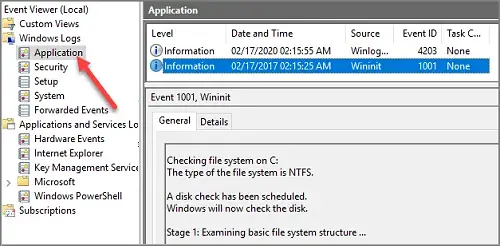
To do so, click the Start button, type EVENTVWR, then press Enter. This will open the Windows Event Viewer. Click on Windows Logs, then Application. Scroll down until you see the Wininit item in the source column. Click on that line, and you'll see the CHKDSK log file. Hopefully, you'll find the phrase "Windows has scanned the file system and found no problems" there. If not, the drive may be damaged.
If you decide to purchase a new hard drive (or a new computer), see [HOWTO] Copy Old Hard Drive to New PC for help with transferring your files.
Are You On The Level?
But before you trash your troublesome drive, you should try one more thing... Some hard drives are very sensitive to non-level surfaces, and will not function properly if they're sitting on a slant. Shut down your computer, make sure your system unit is on a flat surface (use a level to make sure), and then restart. I was all set to give up on an older computer that was doing the click/whir routine, but I noticed it wasn't sitting on a level surface. As soon as I fixed that, the problem was gone!
If your computer won't start, don't assume that hard drive is a goner. A few years ago, my hard drive got totally mucked up, and nothing I tried could restore the drive to working order. But I found a wonderful program called TESTDISK that was able to analyze the disk and recreate the damaged partition table and boot record. I was certain that all the data was lost, but TESTDISK did the job for me, and the computer was able to start just fine.
Sometimes odd noises may come from a cooling fan inside your desktop computer. If you are brave enough, pop open the hood on the system unit, turn on the computer, and see if the noise is coming from a fan. It's much cheaper to replace a bad fan than a failed hard drive.
Your thoughts on this topic are welcome. Post your comment or question below...


This article was posted by Bob Rankin on 6 Dec 2022
| For Fun: Buy Bob a Snickers. |
 |
Prev Article: Have You Backed Up THIS Important Thing? |

The Top Twenty |
Next Article: Should I Buy a Used Computer? |
 |
Post your Comments, Questions or Suggestions
|
Free Tech Support -- Ask Bob Rankin Subscribe to AskBobRankin Updates: Free Newsletter Copyright © 2005 - Bob Rankin - All Rights Reserved About Us Privacy Policy RSS/XML |
Article information: AskBobRankin -- A Harbinger of Hard Drive Hardship? (Posted: 6 Dec 2022)
Source: https://askbobrankin.com/a_harbinger_of_hard_drive_hardship.html
Copyright © 2005 - Bob Rankin - All Rights Reserved
Most recent comments on "A Harbinger of Hard Drive Hardship?"
Posted by:

Dan
06 Dec 2022
But if it's clicking RIGHT NOW ... I told the last client who called me about this "DON'T TURN IT OFF! DON'T USE IT! LEAVE IT ALONE UNTIL I GET THERE!"
When I arrived I ran what quick checks I could, and started salvaging his crucial data. Then - holding my breath - I was able to clone the old, small, ailing mechanical drive to a new blank one from my stock. A shutdown and drive swap brought the machine back up after only a few hours with no loss of data.
I spent a few minutes helping my client imagine the damage and headaches a fully-crashed hard drive would have caused. Persuaded him to have me check / upgrade all his other computers (10-15) and create a regular data backup routine.
Still not sure he realized how large and close the bullet was that he dodged, but he at least had the presence of mind to call me when it started making unusual noises.
Posted by:

Bob Jaskolka
06 Dec 2022
My now retired H-P desktop was a real dust magnet, even though I regularly vacuumed the case's air intake ports. Here's my periodic maintenance method, using the air compressor with a long hose and an adjustable pressure nozzle.
1. Close all programs then remove all cables.
2. Carry desktop to the garage and place it on a rigid worktop just outside of the main door entrance, to keep dust outside.
3. Remove 4 screws from 3 sided metal housing then lift the housing off the framework.
4. Using wood pencils or same diameter plastic rods, insert 1 into each fan blade housing to keep the blades from spinning. DO NOT USE METAL!
5. Starting at the top, slowly move the nozzle, allowing just enough air pressure from the nozzle to blow the dust off and into the neighbor's yard. DO NOT TOUCH ANY COMPONENTS WITH THE NOZZLE!
6. When the dust stops, remove all fan stoppers then re-attach the outer casing with 4 screws.
7. Return the unit to work area, then properly return cables to correct slots.
8. Not an obligation, but I use this time to run all anti-virus and clean-up software. When they're done, I re-boot the system and it runs as smooth as a spanked baby's butt!
Posted by:

Mike in Colorado
09 Dec 2022
A little more info on TESTDISK would be helpful. I'm not quite sure how I can use it to recover a hard drive that won't start up anymore.
Fortunately, the person I'm helping has a backup running and also uses OneDrive, so his files are not lost.